
Hosted by site sponsor WebMate.
Aluminum Unibody Mac mini Q&A @ EveryMac.com
Update Published December 14, 2020
Also see: Mac mini Specs | All Mac Q&As
EveryMac.com's Aluminum "Unibody" Mac mini Q&A answers questions about the 2010, 2011, 2012, 2014, and 2018 Aluminum Mac mini models. The systems from 2010-2014 can be collectively identified by the A1347 model number and the 2018 systems can be uniquely identified by the A1993 model number.
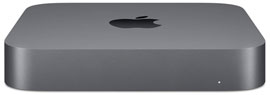 Questions range from "What are all the differences between the 'Late 2018' Aluminum Mac mini and the models replaced?" to "How do you upgrade the storage in the Aluminum Unibody Mac mini models? What type of hard drive(s) or SSD(s) do they support?" and everything in between.
Please note that some "Late 2018" Aluminum Mac mini models are currently shipping and all previous Aluminum models have been discontinued.
 Earlier Mac mini models use polycarbonate cases. EveryMac.com covers these PC and Intel-based models separately. PowerPC Mac mini models can be identified by the A1103 model number. Intel Mac mini models can be identified by the A1176 and A1283 model number.
 Later Mac mini models also use aluminum cases, and look practically identical to the Intel-based Aluminum Mac mini models, but use a completely different internal architecture. They can be identified by the A2348 model number.
For answers to questions about earlier PowerPC Mac mini models, see the Mac mini G4 Q&A. For earlier Intel Mac mini models in polycarbonate cases, see the Polycarbonate Intel Mac mini Q&A. For later Mac mini models, see the Apple Silicon Mac mini Q&A.
To be notified of new Q&As, sign up for EveryMac.com's bimonthly email list.
Most Frequently Asked Aluminum "Unibody" Mac mini Q&As:
How do you upgrade the storage in the Aluminum "Unibody" Mac mini models? What type of hard drive(s) or SSD(s) do they each support?
What are all the differences between the "Late 2018" Aluminum Mac mini models and the "Late 2014" models replaced?
How do you upgrade the RAM in the Aluminum "Unibody" Mac mini models? What type of RAM do they use? How much RAM do they actually support? Is it even possible to upgrade the RAM?
What are all the differences between the "Late 2018" Space Gray Aluminum Mac mini models? Which is best for me?
How do I connect an Aluminum "Unibody" Mac mini to a television? Do they support both HDTV (1080p) and 4K televisions?
What are the "pros and cons" of the Aluminum "Unibody" Mac mini? Is one right for my needs?
How fast are the "Late 2018" Space Gray Aluminum "Unibody" Mac mini models compared to each other and to the "Late 2014" models replaced?
Is it possible to upgrade the processor in the Aluminum "Unibody" Mac mini models?
Do all Aluminum "Unibody" Mac mini models have an IR receiver? Do they support a remote? Is it possible to add remote support?
What type of video system is provided by the Aluminum "Unibody" Mac mini models? Which are integrated and which are dedicated? Can the video be upgraded?
Software Compatibility Q&As:
What version of Mac OS X is pre-installed on the Aluminum "Unibody" Mac mini models?
Can the Aluminum "Unibody" Mac mini run Mac OS 9/Classic applications?
Can the Aluminum "Unibody" Mac mini run Windows?
Can the Aluminum "Unibody" Mac mini run Linux? Is it true that Apple has blocked Linux on these Macs?
Comparison & Performance Q&As: Late 2018 - Current:
What are all the differences between the "Late 2018" Space Gray Aluminum Mac mini models? Which is best for me?
What are all the differences between the "Late 2018" Aluminum Mac mini models and the "Late 2014" models replaced?
How fast are the "Late 2018" Space Gray Aluminum "Unibody" Mac mini models compared to each other and to the "Late 2014" models replaced?
Comparison & Performance Q&As: Late 2014 - Discontinued:
What are all the differences between the "Late 2014" Aluminum Mac mini models?
What are all the differences between the "Late 2014" Aluminum Mac mini models and the "Late 2012" models replaced?
How fast are the "Late 2014" Aluminum "Unibody" Mac mini models compared to each other and to the "Late 2012" models replaced?
Comparison & Performance Q&As: Late 2012 - Discontinued:
What are all the differences between the "Late 2012" Aluminum "Unibody" Mac mini models?
What are all the differences between the "Late 2012" Aluminum "Unibody" Mac mini models and the "Mid-2011" models replaced?
How fast are the "Late 2012" Aluminum "Unibody" Mac mini models compared to one another and to the "Mid-2011" models replaced?
Comparison & Performance Q&As: Mid-2011 - Discontinued:
What are all the differences between the "Mid-2011" Aluminum "Unibody" Mac mini models?
What are all the differences between the "Mid-2011" Aluminum "Unibody" Mac mini models and the "Mid-2010" models replaced?
How fast are the "Mid-2011" Aluminum "Unibody" Mac mini models compared to the "Mid-2010" models replaced?
Comparison & Performance Q&As: Mid-2010 - Discontinued:
What are all the differences between the "Mid-2010" Aluminum "Unibody" Mac mini "Core 2 Duo" models?
What are all the differences between the "Mid-2010" Aluminum "Unibody" Mac mini and the "Polycarbonate" Mac mini models replaced?
How fast are the "Mid-2010" Aluminum "Unibody" Mac mini "Core 2 Duo" models compared to the Mac mini models replaced?
Graphics, Video, & Television Q&As:
What type of video system is provided by the Aluminum "Unibody" Mac mini models? Which are integrated and which are dedicated? Can the video be upgraded?
What is the largest display the Aluminum "Unibody" Mac mini models will support? What type of displays do they support? Do they support dual displays? Do they support a 4K/Ultra HD display?
Do all Aluminum "Unibody" Mac mini models have an IR receiver? Do they support a remote? Is it possible to add remote support?
Is the Aluminum "Unibody" Mac mini capable of 1080p H.264 HD playback? What about 4K playback?
How do I connect an Aluminum "Unibody" Mac mini to a television? Do they support both HDTV (1080p) and 4K televisions?
What is a good wireless keyboard with a trackpad to use with a Mac mini while sitting on the couch?
What is HDMI?
What is "Thunderbolt"? Is it an industry standard? What advantages does it offer? Are there any disadvantages?
Upgrades & Expansion Q&As:
How do you upgrade the RAM in the Aluminum "Unibody" Mac mini models? What type of RAM do they use? How much RAM do they actually support? Is it even possible to upgrade the RAM?
How do you upgrade the storage in the Aluminum "Unibody" Mac mini models? What type of hard drive(s) or SSD(s) do they support?
Is it possible to upgrade the processor in the Aluminum "Unibody" Mac mini models?
Does the Aluminum "Unibody" Mac mini have a PCI slot?
How is the SD Card slot different on the Aluminum "Unibody" Mac mini compared to SD Card slots on earlier Macs?
What is "Thunderbolt"? Is it an industry standard? What advantages does it offer? Are there any disadvantages?
What is 802.11n? How is it different from 802.11b, 802.11g, and 802.11a?
Design, Configuration, & Purchasing Q&As:
Who designed the Aluminum "Unibody" Mac mini?
Where can I buy an Aluminum "Unibody" Mac mini?
What are the custom configuration options for the Aluminum "Unibody" Mac mini models?
What are the "pros and cons" of the Aluminum "Unibody" Mac mini? Is one right for my needs?
Established in 1996, EveryMac.com has been created by experts with decades of experience with Apple hardware. EveryMac.com includes, and always has included, original research incorporating detailed, hands-on inspection of packaging, computers, and devices as well as extensive real-world use. All information is provided in good faith, but no website or person is perfect. Accordingly, EveryMac.com is provided "as is" without warranty of any kind whatsoever. EveryMac.com, and the authors thereof, shall not be held responsible or liable, under any circumstances, for any damages resulting from the use or inability to use the information within. For complete disclaimer and copyright information please read and understand the Terms of Use and the Privacy Policy before using EveryMac.com. Copying, scraping, or use of any content without expressed permission is not allowed, although links to any page are welcomed and appreciated.