
Hosted by site sponsor WebMate.
iPad Q&A
Update Published April 27, 2025
All Apple Q&As >> iPad Q&A (Home) | Also see: All iPad Specs
To be notified of new Q&As, sign up for EveryMac.com's bimonthly email list.
What are the main differences between the iPad and the MacBook Air? Which makes the most sense for my needs?
There are many different iPad and MacBook Air models. In fact, as carefully documented by EveryMac.com, there actually are dozens of distinct models released over the course of many years.
Based on e-mail received, readers who want to know the difference between the iPad and the MacBook Air are most interested in usability and functional differences rather than technical differences, per se.
This Q&A does cover a number of general technical differences -- and some of these differences are critical -- but the primary focus is of general comparison to help one determine whether an iPad or a MacBook Air is best for their needs rather than an exhaustive technical evaluation.
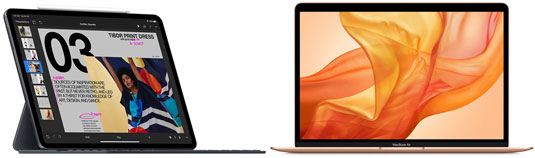
Photo Credit: Apple, Inc. (iPad with Apple Keyboard; MacBook Air)
Target Market Differences
Apple initially positioned the iPad between the Mac and the iPod touch/iPhone and intended for it to essentially compete with netbooks, tablet computers, and e-readers, rather than with more full featured notebook computers.
However, practically immediately, users viewed the iPad as a potential notebook competitor, as well. Additionally, since the first iPad was released in 2010, the device has become more capable, a great deal of unique software has been released that takes full advantage of the touch screen interface, a variety of external keyboards have become available (including "official" offerings from Apple), and it no longer is required to be "tethered" to a Mac or PC for software updates, either.
Consequently, for many users, the iPad is quite viable as a standalone computer, particularly when compared to the also light and portable MacBook Air models. For some users, these days, the iPad might even be a better computer than the MacBook Air.
For others, though, the iPad is best suited as a complementary purchase to a more powerful notebook or desktop Mac for "heavy lifting" work with the iPad relegated to less performance hungry tasks, or perhaps "less serious" tasks, depending on perspective.
Naturally, Apple would be quite happy for you to purchase an iPad as well as a MacBook Air, but budget constraints may require you to choose one or the other.
Usage Differences
In general, if you primarily use a computer to browse the web, type a modest amount of text, play music, present photos, and watch online video, the iPad could be ideal for your needs.
If you spend much of your time creating visual content that does not require a great deal of typing or a substantial amount of computing power -- like relatively simple photo manipulation, video editing, and music creation -- the iPad, particularly the iPad Pro; could be as good or even better than the MacBook Air for you. Recent iPad Pro models can hold their own with even pretty "serious" creative content production but remain somewhat hobbled by software and OS limitations.
On the other hand, if you type extensive documents, use spreadsheets, and prepare complicated presentations that are text heavy, in addition to performing photo, video, and music-related tasks, the MacBook Air probably is the better choice for you.
Of course, you can add an external keyboard to the iPad, and but based on hands-on use, EveryMac.com finds these keyboard solutions to be an improvement for text entry on the iPad, but nowhere close to as fast or as pleasant as typing on a MacBook Air. iOS 13 (iPadOS) (and later versions of the iPadOS) have made massive improvements, though, with vastly improved selection options and a huge number of new key commands borrowed from the macOS that make life much easier.
Nevertheless, some apps may cooperate with a keyboard and support rudimentary controls from the keyboard itself whereas others may require a combination of keyboard use and touching the screen. The end result can be a decidedly awkward experience.
Although the MacBook Air is not an extremely high performance computer, it has typically been more powerful than the iPad models. The exact performance difference varies between devices and years, but for many years, MacBook Air models tended to be in the neighborhood of 50%-150% faster than iPad models from the same year of release.
From 2019 to 2020, the performance of the MacBook Air began to stagnate and iPad Pro models far exceeded its speed, but with the switch to Apple's own processors for the MacBook Air in 2021, it has been about the same speed as high-end iPad Pro models and substantially faster than entry-level ones.
User History
Another important aspect to consider is your own computing history. If you are an "old school" Mac user who has invested time and money on Mac software over the years and who has a great deal of work saved in macOS file formats (or even Mac OS 9 file formats) or a "switcher" from Windows to the Mac, it is unlikely to make sense to go to the trouble to migrate exclusively to an iPad for mobile use.
No doubt, you still can find an iPad helpful as a secondary device, but it is highly likely that you would feel most comfortable doing the majority of your "real work" on a MacBook Air.
On the other hand, if you are a Freshman university student and your past work consists of a few school papers and science fair reports and the like, which you may never even look at again, the iPad very well could meet all of your computing needs and even be more than sufficient for research and writing courses as well when paired with an external keyboard.
Although some entire books have been written only with the onscreen iPad keyboard (albeit imported onto a Mac for the final editing process), it is unlikely that you would really want to type even a five-page paper entirely using a glass screen.
Furthermore, even as a student unburdened by much "legacy" work, if you plan to store a lot of music, photos, and movies on the device itself (rather than within Apple's own iCloud or on another cloud storage service like site sponsor WebMate), the higher capacity iPad and iPad Pro configurations can cost as much as or even much more than current or recent MacBook Air models (and the also expensive iPad keyboards add even more to the price tag).
Consequently, depending on your exact desired usage, the extra power and functionality of the MacBook Air may be preferable to you and make more sense when budgetary constraints require only a single purchase.
Battery Life Differences
Older iPad models have much better battery life than older MacBook Air models released at the same time or otherwise. For example, the original iPad provides up to ten hours of battery life, whereas the 11-Inch MacBook Air from the same year (2010), only provides half the battery life.
However, recent MacBook Air models -- such as those lines powered by Intel's recent efficient architectures and Apple's own -- compare quite favorably with recent iPad models -- such as the iPad Air, iPad mini, and iPad Pro lines. Unlike earlier MacBook Air systems, these models provide ten or more hours of battery life, which is about the same as recent iPad models. With as much as 18 hours of battery life, the current MacBook Air even surpasses recent iPad models.
Major Design & Hardware Differences
With even a casual glance at the iPad and the MacBook Air, it is obvious there are many differences.
The iPad models have a touchscreen, dual cameras (with the exception of the original iPad line, which does not have cameras at all) and high-end models from each year include cellular networking support as well as GPS capabilities.
The iPad models do not have an attached keyboard and are essentially "sealed" devices. Although external storage is available for the iPad, is not possible to upgrade internal storage after purchase, substantially augment their capabilities with third-party peripherals, or easily replace the batteries, which are unfortunately glued in place. This has changed somewhat with recent iPad models, all of which have an industry-standard USB-C port and support much more "computer-like" external connectivity.
The MacBook Air models, on the other hand, have generally larger displays that do not support touch, a single webcam optimized for videocalls, and an attached keyboard and touch-sensitive trackpad. Ports vary between models, but all include industry-standard USB ports as well as other connectivity options. They do not have cellular networking support or GPS, though.
Recent, and current, MacBook Air models also are a largely "sealed" and disposable design, eliminating the advantage of now vintage models that did offer storage that can be upgraded after purchase (and support extensive and inexpensive external storage) and batteries that are easy to replace, also.
Both lines are lightweight, but many iPad models are roughly half the weight of the MacBook Air. The lightest iPad models are around two thirds of a pound whereas heaviest iPad models are around a pound and a half. By contrast, the lightest MacBook Air models are less than two and a half pounds whereas the heaviest are over three pounds.
Naturally, for travel in particular, lighter is better, but keep in mind that if you add an external keyboard to the iPad, many models are similar in weight to smaller MacBook Air models.
Furthermore, in the United States, adding an external keyboard to the iPad also typically will require you to take it out of your bag in airport security lines, as well, just as if it were a notebook computer. On the other hand, if the iPad is not paired with a keyboard (or at least the iPad and keyboard are stored separately from one another), you generally do not have the added hassle of removing it from your bag.
Major Software Differences
The iPad models all run a version of the iOS/iPadOS, whereas the MacBook Air models run a version of the macOS. For years, apps written for the iOS/iPadOS and macOS were not compatible with one another, but this has become blurrier and blurrier in recent years starting with the "Project Catalyst" technology introduced with macOS Catalina (10.15). Recent and current MacBook Air models will run iOS apps by default, even.
iPad apps are getting more-and-more sophisticated, but in basic terms, macOS has more high-end applications for professional use whereas the iPad has many more games. macOS also can run Windows in a virtualized environment (or by booting into Windows directly on Intel-based MacBook Air models courtesy of BootCamp), whereas the iPad cannot run Windows directly on the device.
In addition to simple software compatibility, there also is a great deal of difference in the philosophy behind these two different operating systems. The iPadOS is quite "closed" (without hacks or jailbreaks) and all software has to be installed through Apple's own App Store, which means some applications that might be quite valuable to you never are released to the public.
macOS, on the other hand, historically has been a much more "open" operating system that supports a variety of third-party software, including software that interacts directly with the hardware, more thoroughly integrated cloud services (although integration has improved dramatically with recent versions of the iPadOS), and software that Apple may not particularly approve of. For recent versions of macOS, Apple offers an App Store, but its usage is optional rather than required, but this likely will change going forward unless legal rulings force it to stay open.
Depending on your perspective, the iPadOS may be advantageous because it is safer and easier or disadvantageous because it is stifled and limiting. Alternately, macOS may be advantageous because it is more powerful and flexible or disadvantageous because it is more complicated and dangerous. Either of these perspectives very well may be valid and are subject to debate. Ultimately, though, only your opinion matters. It is your purchase, after all.
Comparison Chart
The major differences between the iPad and MacBook Air models are summarized below:
 iPad |
 MacBook Air |
|
|---|---|---|
| Key Advantages: | Ease-of-Use Cellular Networking Tiny Size & Weight |
Powerful OS & Software Often Better Performance Integrated Keyboard |
| Key Disadvantages: | Limited Expansion Limited Pro Software No Integrated Keyboard |
Relative Complexity No Cellular Support No GPS Capability |
| Approx. Weight: | ~0.7-1.5 Pounds | ~2.3-3 Pounds |
| Design: | Sealed | Limited Upgrades |
| Display Sizes: | 7.9"-12.9" | 11.6"-15.3" |
| Curr. Storage Type: | Integrated | Integrated |
| Curr. Battery Life: | 9-10 Hours | 15-18 Hours |
| Curr. Battery Type: | Glued In | Glued In |
| Processor Type: | Apple (ARM) | Intel/Apple (ARM) |
| Optical Drive: | None | Optional (External) |
| Keyboard: | Onscreen/External | Integrated |
| Trackpad: | Optional | Yes |
| Camera: | Front/Rear* | Webcam |
| Wireless: | Wi-Fi & Cellular | Wi-Fi Only |
| GPS: | High-End Models | No |
| Digital Compass: | Yes | No |
| USB Ports: | Yes** | Yes |
| Ethernet: | Yes (With Adapter) | Yes (With Adapter) |
| Ext. Disp. Support: | Dual Display† | Dual Display |
| Operating System: | iOS/iPadOS | macOS |
| Windows Support: | No | Yes |
| Current Price (US): | US$349-US$2499 | US$999-US$1599 |
| Current Price (UK): | £329-£2499 | £999-£1599 |
| Current Price (CA): | C$499-C$3459 | C$1399-C$2299 |
| Current Price (AU): | A$599-A$4299 | A$1699-A$2699 |
* The original iPad does not have cameras.
** Recent iPad models have a single USB-C port.
† External display support has been improving for years; recent iPad models support an external display in mirroring or even dual display mode.
For pricing details in dozens of other countries, please refer to the iPad or MacBook Air specs page for the model of interest as well as EveryMac.com's extensive Global Original Prices section.
So, which makes the most sense for me?
Ultimately, the iPad and MacBook Air both are capable portable computers.
EveryMac.com's preferred setup is to have one of each. Specifically, a iPad mini -- mostly for reading, movie watching, casual games and the occasional two thumb typed e-mail -- and a MacBook Air for proper writing and code crunching along with modest graphic and video production work paired with a large external display much of the time. If you have a sufficient budget for both and you do not mind carrying two devices, you also may like to have one of each.
Instead, if you only want one -- either an iPad or a MacBook Air -- whether due to budget or logistical convenience, an iPad is the best choice if you put a great deal of importance on (1) simplicity, (2) the option of cellular networking capability, and (3) the ultimate in portability. Likewise, the iPad is best for you if are not bothered by (1) often more limited professional software and a general lack of compatibility with many "legacy" applications, and (2) the lack of a truly integrated physical keyboard.
Alternately, a MacBook Air is a better choice if you place more importance on (1) powerful software and a flexible operating system (not to mention more options to use Windows), (2) performance (although the gap has been narrowing for years), and (3) a quality integrated keyboard. Likewise, the MacBook Air is your best option if you are not bothered by (1) the relative complexity of the operating system and professional software, (2) the lack of integrated cellular networking capability, and (3) the lack of integrated GPS.
It also would be wise to carefully review all of the points enumerated in the comparison above, as your decision very well could come down to a single feature. You also might choose an iPad for a specific app that simply cannot be replicated by a non-touch interface or a MacBook Air for a specific older Mac-only app, for example.
In the US, site sponsor OWC sells used and refurbished MacBook Air and iPad models with free shipping.
In the UK, site sponsor Hoxton Macs has a large number of used and refurbished iPad and MacBook Air models with a one-year warranty and free next day delivery throughout the UK.
Permalink | Report an Error/Typo | Sign Up for Site Update Notices
<< iPad Q&A (Main) | All Apple Q&As
Established in 1996, EveryMac.com has been created by experts with decades of experience with Apple hardware. EveryMac.com includes, and always has included, original research incorporating detailed, hands-on inspection of packaging, computers, and devices as well as extensive real-world use. All information is provided in good faith, but no website or person is perfect. Accordingly, EveryMac.com is provided "as is" without warranty of any kind whatsoever. EveryMac.com, and the authors thereof, shall not be held responsible or liable, under any circumstances, for any damages resulting from the use or inability to use the information within. For complete disclaimer and copyright information please read and understand the Terms of Use and the Privacy Policy before using EveryMac.com. Copying, scraping, or use of any content without expressed permission is not allowed, although links to any page are welcomed and appreciated.