
Hosted by site sponsor WebMate.
Retina Display MacBook Pro Q&A
Update Published August 8, 2012
All Mac Q&As >> Retina Display MacBook Pro Q&A (Home)
To be notified of new Q&As, sign up for EveryMac.com's bimonthly email list.
What are the differences between the 15-Inch Retina Display "Mid-2012" MacBook Pro models?
Please note that the "Mid-2012" Retina Display MacBook Pro models have been discontinued. However, this Q&A is up-to-date and is quite useful for anyone buying or selling one of these notebooks on the used market.
The 15-Inch "Mid-2012" Retina Display MacBook Pro models -- the MacBook Pro "Core i7" 2.3 15" (Retina) and "Core i7" 2.6 15" (Retina), as well as the custom configured MacBook Pro "Core i7" 2.7 15" (Retina) -- are quite similar to one another -- differentiated only by processor speed and default storage.
However, these differences still are worth evaluating as are the shared attributes of these models to determine which -- if any -- are best for your needs.
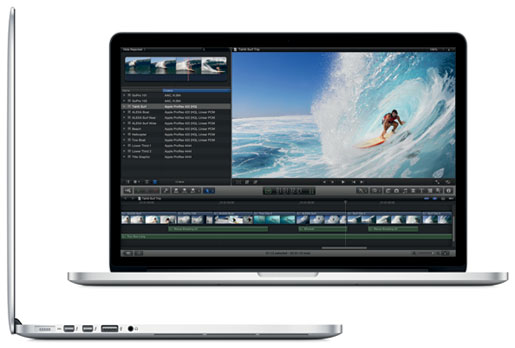
Photo Credit: Apple, Inc.
External Similarities
All "Mid-2012" Retina Display MacBook Pro models share the same essentially "sealed" wafer thin aluminum and glass design. Unlike the MacBook Air models, which have are tapered from back to front, the Retina Display line are uniformly 0.71 of an inch thick, 14.13 inches wide, and 9.73 inches deep when closed and weigh a little less than 4.5 pounds.
Each has a high-resolution LED-backlit 15.4" widescreen 2880x1800 (220 ppi) "Retina" display. Somewhat curiously, the display bezel is not branded "MacBook Pro" as previous models in the line have been, which immediately caused some to ponder as to whether or not it was originally intended as a "less pro" MacBook Air model (it is only externally branded as a MacBook Pro on the bottom). Each has a full-size "chiclet-style" backlit keyboard, a glass "no button" trackpad with "inertial scrolling" support, integrated stereo speakers and an integrated 720p FaceTime HD webcam. None have a built-in optical drive, although an external one can be purchased at additional cost.
Connectivity Similarities
Connectivity is the same for all models and includes 3-stream 802.11a/b/g/n, Bluetooth 4.0, two USB 3.0 ports, two "Thunderbolt" ports, an HDMI port, an audio out port, an SDXC card slot, and a thinner "MagSafe 2" power connector port.
It does not have Gigabit Ethernet or Firewire "800," although Apple offers Thunderbolt-to-Gigabit Ethernet and Thunderbolt-to-Firewire 800 adapters at extra cost.
Identification Differences
At the time of introduction, the "Mid-2012" Retina Display MacBook Pro models shared a unique model number -- specifically A1398. They also could be pinpointed by a shared model identifier in software -- MacBookPro10,1.
However, as future models share the same model number and model identifier, the EMC number -- 2512, is better for long-term identification. As always, EveryMac.com has painstakingly hand documented these details for your convenience.
Finally, EveryMac.com's Ultimate Mac Lookup feature additionally can uniquely identify each one of the "Mid-2012" Retina Display MacBook Pro models by their serial numbers.
Internal Similarities & Differences
Internally, these systems are quite similar and use the same "Ivy Bridge" architecture with quad core Intel "Core i7" processors, onboard 1600 MHz DDR3L SDRAM that is soldered in place and cannot be upgraded after purchase, and dual graphics processors -- a NVIDIA GeForce GT 650M with 1 GB of dedicated GDDR5 memory and an "integrated" Intel HD Graphics 4000 graphics processor that shares system memory.
Although the internal flash storage is not intended to be upgraded after purchase -- as first discovered by site sponsor OWC -- it is mounted on a removable module, so upgrades to larger storage capacities than those provided by default is possible.
The built-in 95 watt-hour lithium-polymer battery provides up to 7 hours of runtime in Apple tests, although actual runtime can vary. Unfortunately, the internal battery is glued in place, which makes it effectively impossible to replace without also replacing the entire upper case even for the highly skilled.
Comparison Chart
The differences between the standard 15-Inch "Mid-2012" Retina Display MacBook Pro models -- processor, default storage, identifiers, and price -- are summarized below:
 Core i7 2.3 Retina |
Core i7 2.6 Retina |
|
|---|---|---|
| Processor Speed: | 2.3 GHz* | 2.6 GHz* |
| Processor Type: | Core i7 (I7-3615QM)* | Core i7 (I7-3720QM)* |
| Shared L3 Cache: | 6 MB* | 6 MB* |
| Direct Media Interface: | 5 GT/s | 5 GT/s |
| Standard RAM: | 8 GB | 8 GB |
| Maximum RAM: | 16 GB† | 16 GB† |
| Internal Storage: | 256 GB†† | 512 GB |
| Dedicated Graphics: | NVIDIA GeForce GT 650M | NVIDIA GeForce GT 650M |
| GDDR5 VRAM: | 1 GB | 1 GB |
| Display Size: | 15.4" Widescreen | 15.4" Widescreen |
| Display Resolution: | 2880x1800 (220 ppi) | 2880x1800 (220 ppi) |
| Battery Life: | 7 Hours | 7 Hours |
| SDXC Card Slot: | Yes | Yes |
| Dimensions: | 0.71 x 14.13 x 9.73 | 0.71 x 14.13 x 9.73 |
| Weight: | 4.46 lbs (2.02 kg) | 4.46 lbs (2.02 kg) |
| Order Number (US): | MC975LL/A | MC976LL/A |
| EMC Number: | 2512 | 2512 |
| Model Identifier: | MacBookPro10,1 | MacBookPro10,1 |
| Intro Price (US): | US$2199 | US$2799 |
* As originally shipped, only the 2.6 GHz model additionally could be custom configured with a 2.7 GHz Core i7 (I7-3820QM) for an extra US$250. As first spotted by C|Net, the entry-level 2.3 GHz model also could be custom configured with the same starting on or around August 2, 2012. This custom processor has an 8 MB level 3 cache. EveryMac.com also has documented this BTO/CTO configuration as its own model.
† Both models could be upgraded to 16 GB of RAM as a US$200 option, but only at the time of purchase. RAM is soldered in place and cannot be upgraded after purchase.
†† Starting on or around August 2, 2012, Apple added the option of 512 GB or 768 GB of storage for an additional US$500 or US$1000, respectively, to the entry-level model.
Which is best for me?
The "Mid-2012" Retina Display MacBook Pro models are similar enough that the most important consideration is to first determine whether the system meets your needs overall. If you place a great deal of emphasis on a large, beautiful display in a relatively small form factor as well as performance, but not on price or internal upgrades, either system likely would be ideal.
Choosing which specific "Mid-2012" Retina Display MacBook Pro is best for you likely will depend simply on whether you place more importance on price or performance.
If price is most important, but you really want a "Mid-2012" Retina Display MacBook Pro (rather than a cheaper traditional "Mid-2012" MacBook Pro or an older used model), the entry-level MacBook Pro "Core i7" 2.3 15" (Retina) is your best choice.
If performance is most important, the high-end MacBook Pro "Core i7" 2.6 15" (Retina) or even its custom configured MacBook Pro "Core i7" 2.7 15" (Retina) brethren offer higher performance and will be ideal for you. However, the stock high-end model provides only roughly 8% more speed than the entry-level model, but that performance boost -- as well as twice the storage -- costs around 27% more.
Alternately, if price and physical size are more important than display size/resolution, performance, or additional connectivity, a "Mid-2012" MacBook Air likely would be a better choice. If performance, upgrades, and "legacy" connectivity -- like Gigabit Ethernet and Firewire -- as well as an internal optical drive are important, a traditional "Mid-2012" MacBook Pro would be better for you.
Of course, subsequently released models also are well worth considering, although they cost more, naturally.
MacBook Pro Purchase & Sale Options
There are any number of places to purchase a new or used MacBook Pro. However, purchasing from a quality merchant with years of service in the Mac market -- and after sales support -- will provide the best experience and save you money and time, too.
In the US, site sponsor Adorama sells new MacBook Pro models with free shipping. Other World Computing sells used and refurb MacBook Pro models at bargain prices with free shipping, as well. On the other hand, if you need to sell a MacBook Pro, A+ BBB-rated Cash for Your Mac and GoRoostr will buy your older notebook with an instant quote and prompt payment.
In the UK, site sponsor Hoxton Macs sells used MacBook Pro models with a one-year warranty and free next day delivery throughout the UK. Delivery across Europe also is available starting at just £9.99 for two-day delivery to France and Germany.
Please refer to EveryMac.com's Ultimate Mac Comparison feature to dynamically compare any MacBook Pro model to any other Mac.
Permalink | Report an Error/Typo | Sign Up for Site Update Notices
Suggest a New Q&A | Sign Up for Bimonthly Site Update Notices
<< Retina Display MacBook Pro Q&A (Main) | All Mac Q&As
Established in 1996, EveryMac.com has been created by experts with decades of experience with Apple hardware. EveryMac.com includes, and always has included, original research incorporating detailed, hands-on inspection of packaging, computers, and devices as well as extensive real-world use. All information is provided in good faith, but no website or person is perfect. Accordingly, EveryMac.com is provided "as is" without warranty of any kind whatsoever. EveryMac.com, and the authors thereof, shall not be held responsible or liable, under any circumstances, for any damages resulting from the use or inability to use the information within. For complete disclaimer and copyright information please read and understand the Terms of Use and the Privacy Policy before using EveryMac.com. Copying, scraping, or use of any content without expressed permission is not allowed, although links to any page are welcomed and appreciated.