Apple Power Macintosh G5 Dual Core (2.0) Specs
Identifiers: Late 2005 - M9590LL/A - PowerMac11,2 - A1117/A1177* - 2023
All Power Macintosh G5 Models | All 2005 Models | Dynamically Compare This Mac to Others
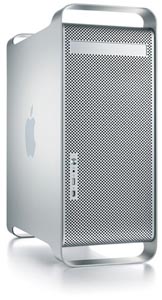 The Power Macintosh G5 Dual Core (2.0), along with the Power Macintosh G5 Dual Core (2.3) and Power Macintosh G5 "Quad Core" (2.5), are the first and last Power Macintosh G5 models to use dual core PowerPC 970MP (G5) processors, which have two independent processor "cores" on a single silicon chip.
The Power Macintosh G5 Dual Core (2.0) is powered by a single "dual core" 2.0 GHz PowerPC 970MP (G5) processor with dual optimized AltiVec "Velocity Engine" vector processing units (one per core), four double-precision FPUs (two per core), 1 MB of on-chip level 2 cache on each core, and a 1.0 GHz frontside system bus. It shipped configured with 512 MB or 1 GB of 533 MHz PC2-4200 DDR2 SDRAM, a 160 GB (7200 RPM) Serial ATA hard drive, a reported "16X" dual-layer "SuperDrive", and a NVIDIA GeForce 6600 LE video card with 128 MB of GDDR SDRAM.
Connectivity includes USB 2.0, FireWire "400" and "800", a single-link DVI and a dual-link DVI port, optical digital audio in/out, two independent Gigabit Ethernet ports, and support for AirPort Extreme (802.11g) and Bluetooth 2.0+EDR.
All of the "multiple core" equipped Power Macintosh G5 models have three open PCI-Express (PCIe) expansion slots. The Power Macintosh G5 Dual Core (2.0) uses the same easy-to-upgrade "anodized aluminum alloy" case as all other Power Macintosh G5 models with the same removable side panel for easy access to internal components. Likewise, it is divided into four different thermal zones with nine computer-controlled fans for optimum cooling.
Also see: What are the primary differences between the "Late 2005" or "Dual Core" Power Mac G5 models?
Despite the age of this system, site sponsor Other World Computing has RAM, hard drives, SSDs, and other upgrades available for this specific Mac while supplies last.
- Tech Specs
- Ports
- Popular Q&As
Click on the category for related details. The most commonly needed info is "open" by default, but all info is important.
| Introduction Date: |
October 19, 2005 |
Discontinued Date: |
August 7, 2006 |
| Details: |
The "Introduction Date" refers to the date a model was introduced via press release. The "Discontinued Date" refers to the date a model either was replaced by a subsequent system or production otherwise ended.
Also see: All Macs introduced in 2005. |
| Processors: |
1 (2 Cores) |
Geekbench 2: |
1814 |
| Details: |
Geekbench 2 benchmarks are in 32-bit and 64-bit modes, respectively. These numbers reflect an average of user provided 32-bit and 64-bit results as submitted to the Geekbench website. Higher numbers are better.
You also might be interested in reviewing all 32-bit Geekbench 2 user submissions for Macs with the PowerMac11,2 Model Identifier, which may include multiple models.
To dynamically compare Geekbench results from different Macs side-by-side, see EveryMac.com's Ultimate Mac Comparison. |
| Processor Speed: |
2.0 GHz |
Processor Type: |
PowerPC 970MP (G5) |
| Details: |
The PowerPC 970MP "G5" has two independent 2.0 GHz processor "cores" on a single silicon chip. It also includes dual optimized AltiVec "Velocity Engine" vector processing units (one per core), four double-precision FPUs (two per core), and on chip level 2 cache on each core.
Like all PowerPC "G5" processors, the PowerPC 970MP "G5" has 64-bit data paths and registers with native support for 32-bit application code. Apple also reports that each core of the 970MP has a "parallel data structure supporting up to 215 simultaneous in-flight instructions, [and] simultaneous issue of up to 10 out-of-order operations." Each core likewise has a "dual-pipeline Velocity Engine for 128-bit single-instruction, multiple-data (SIMD) processing [and] advanced three-stage branch-prediction logic."
Also see: How fast are the "Dual" and "Quad" Core Power Mac G5 models compared to earlier ones? |
| Processor Upgrade: |
G5 Daughtercard |
FPU: |
Integrated |
| Details: |
The Power Macintosh G5 models have the processor(s) mounted on a custom 300-pin daughtercard, but it is not feasible to upgrade the processor.
Also see: Is the CPU on the Power Mac G5 upgradable? How is it mounted? |
| System Bus Speed: |
1.0 GHz (2:1) |
Cache Bus Speed: |
2.0 GHz (Built-in) |
| Details: |
Apple notes that the system has a "single 1 GHz 64-bit DDR bidirectional frontside bus". |
| ROM/Firmware Type: |
Open Firmware |
ROM/Firmware Size: |
1 MB |
| Details: |
Boot ROM and around 1 MB, other instructions are loaded into RAM (NewWorld). |
| L1 Cache: |
32k/64k |
L2/L3 Cache: |
1 MB |
| Details: |
32k level 1 data cache, 64k level 1 instructional cache. The 1 MB on-chip level 2 cache runs at processor speed. |
| RAM Type: |
PC2-4200 DDR2 |
Min. RAM Speed: |
533 MHz |
| Details: |
Supports 533 MHz PC2-4200 DDR2 SDRAM.
Also see: How do you upgrade the RAM in the Power Mac G5 models? |
| Standard RAM: |
512 MB, 1 GB |
Maximum RAM: |
16 GB |
| Motherboard RAM: |
None |
RAM Slots: |
8 |
| Details: |
Apple notes that the system features a "128-bit memory controller and data path".
Also see: How much RAM of what type does the Power Mac G5 support? Which models have four RAM slots and which models have eight RAM slots? |
| Video Card: |
GeForce 6600 LE |
VRAM Type: |
GDDR SDRAM |
| Details: |
The NVIDIA GeForce 6600 LE with 128 MB of GDDR SDRAM occupies a 16-lane PCI Express slot.
Also see: What graphics cards are provided by the Power Mac G5? Which have ADC ports and which have DVI ports? |
| Standard VRAM: |
128 MB |
Maximum VRAM: |
128 MB |
| Details: |
NVIDIA GeForce 6600 with 256 MB of GDDR SDRAM, NVIDIA GeForce 7800 GT with 256 MB of GDDR3 SDRAM, and NVIDIA Quadro FX 4500 with 512 MB of GDDR3 SDRAM were available at the time of purchase via build-to-order. Other graphics cards could be pre-installed at the time of purchase or installed later. |
| Display Support: |
Dual Displays* |
Resolution Support: |
2560x1600 |
| Details: |
Apple advertised that this system can support "two Apple flat-panel displays for each graphics card installed". The default graphics card can support "up to 2560 by 1600 pixels" with the dual-link DVI port and "up to 1920 by 1200 pixels" with the single-link DVI port. It also can support analog resolutions "up to 2048 by 1536 pixels". |
| 2nd Display Support: |
Dual/Mirroring |
2nd Max. Resolution: |
1920x1200 |
| Details: |
The default graphics card can support a second display with a maximum resolution of 1920x1200 using the single-link DVI port (assuming the dual-link DVI port is being used for the primary display). The build-to-order NVIDIA Quadro FX 4500 graphics card with 512 MB of GDDR3 SDRAM has two dual-link DVI ports and is capable of powering two 2560x1600 displays, like the 30-inch Apple Cinema Display models. |
| Standard Storage: |
160 GB HDD |
Std. Storage Speed: |
7200 RPM |
| Storage Dimensions: |
3.5" (26.10 mm) |
Storage Interface: |
Serial ATA (1.5 Gb/s) |
| Details: |
Officially holds two 3.5" hard drives -- drives larger than 128 GB are supported. Not compatible with Ultra ATA drives without an adapter. |
| Standard Optical: |
6X DL "SuperDrive" |
Standard Disk: |
None |
| Details: |
Apple reports that this "16X" DVD+R DL/DVD±RW/CD-RW SuperDrive "writes DVD-R discs at 16x speed, writes DVD+R DL discs at up to 6x speed, reads DVDs at up to 16x speed, writes CD-R and CD-RW discs at up to 24x speed, [and] reads CDs at up to 32x speed." It uses an Ultra ATA/100 bus.
Also see: What are the capabilities of the "SuperDrive" provided by the Power Mac G5? How do you upgrade or replace the optical drive? |
| Standard Modem: |
None |
Standard Ethernet: |
Gigabit (x2) |
| Details: |
External USB modem optional. The system has "two independent 10/100/1000BASE-T [Gigabit] Ethernet (RJ-45) interfaces with support for jumbo frames." |
| Standard AirPort: |
802.11b/g (Optional) |
Standard Bluetooth: |
2.0+EDR (Optional) |
| Details: |
Expansion slots for AirPort Extreme (802.11g) card and Bluetooth 2.0+EDR module. Both optional at the time of purchase. |
| USB Ports: |
4 (2.0) |
Firewire Ports: |
2 (400), 1 (800) |
| Details: |
The "Multiple Core" Power Mac G5 models have four USB 2.0 ports on the system (one on the front panel and three on the back), two Firewire "400" ports (one on the front and one on the back), and one Firewire "800" port on the back. Apple also advertised "two USB 1.1 ports on included keyboard". |
| Expansion Slots: |
3 PCIe, AP/BL |
Expansion Bays: |
2 3.5", 1 5.25" |
| Details: |
This model has "two open full-length four-lane PCI Express slots", "one open full-length eight-lane PCI Express slot", a 16-lane PCI Express slot that is occupied by the graphics card, as well as expansion slots for AirPort Extreme (802.11g) -- antenna internal -- and Bluetooth 2.0+EDR.
In the default configuration, one internal 3.5" bay is occupied by a hard drive and one is free, and the single external 5.25" bay is occupied by a "SuperDrive" optical drive.
Also see: Which Power Mac G5 models have PCI, PCI-X, and PCI Express slots? How many PCI slots of what speed does each Power Mac G5 have? How do you install a PCI card? |
| Incl. Keyboard: |
Apple Keyboard |
Incl. Input: |
Apple Mighty Mouse |
| Details: |
Also included a USB keyboard extension cable. |
| Case Type: |
Tower |
Form Factor: |
Power Mac G5 |
| Apple Order No: |
M9590LL/A |
Apple Subfamily: |
Late 2005 |
| Details: |
The Apple order number should be unique to this system. Also see: What are the primary differences between the "Late 2005" or "Dual Core" Power Mac G5 models? |
| Apple Model No: |
A1117/A1177* (EMC 2023) |
Model ID: |
PowerMac11,2 |
| Details: |
*Earlier systems are labeled model number A1117 whereas some, but not all, later systems are labeled model number A1177. Apart from minor configuration changes, systems with either model number seem to be identical, so the change may be a factory error. Please also note that these identifiers are shared by multiple systems.
Also see: All Macs with the A1117/A1177* Model Number, the 2023 EMC Number, and the PowerMac11,2 Model Identifier.
For more about these identifiers and how to locate them on each Mac, please refer to EveryMac.com's Mac Identification section. |
| Battery Type: |
N/A |
Battery Life: |
N/A |
| Pre-Installed MacOS: |
X 10.4.2 (8E90) |
Maximum MacOS: |
X 10.5.8 |
| Details: |
This system cannot run versions of MacOS X more recent than 10.5.8. |
| MacOS 9 Support: |
Classic Mode Only* |
Windows Support: |
Emulation Only |
| Details: |
*This model is capable of using Mac OS 9 applications within the Mac OS X "Classic" environment provided with Mac OS X 10.4.11 "Tiger" and lower ("Classic" is not supported starting with Mac OS X 10.5 "Leopard"). It cannot boot into Mac OS 9. |
| Dimensions: |
20.1 x 8.1 x 18.7 |
Avg. Weight: |
44.5-48.8 lbs. |
| Details: |
In inches - height by width by depth, (51.1 cm, 20.6 cm, 47.5 cm). Weight in kilograms is 20.2-22.1 kg. |
| Original Price (US): |
US$1999 |
Est. Current Retail: |
US$200-US$350 |
| Details: |
Photo Credit: Apple Computer. |
Ten of the most popular Q&As about the Power Macintosh G5 models follow.
Permalink | Report an Error/Typo | Sign Up for Site Update Notices
<< Power Macintosh G5 (Home) | Also see: Power Macintosh G5 FAQ
Established in 1996, EveryMac.com has been created by experts with decades of experience with Apple hardware. EveryMac.com includes, and always has included, original research incorporating detailed, hands-on inspection of packaging, computers, and devices as well as extensive real-world use. All information is provided in good faith, but no website or person is perfect.
Accordingly, EveryMac.com is provided "as is" without warranty of any kind whatsoever.
EveryMac.com, and the authors thereof, shall not be held responsible or liable, under any circumstances, for any
damages resulting from the use or inability to use the information within. For complete disclaimer and copyright
information please read and understand the Terms
of Use and the Privacy Policy before
using EveryMac.com. Copying, scraping, or use of any content without expressed permission is not allowed, although links to any page are welcomed and appreciated.

 2 (DVI)
  None
None  None
None  None
None  None
None None
None 4 (2.0)
 2 (400), 1 (800)
 2 (RJ-45)
 None
None None
None None
None 2
2 2
2 1
1 1
1 N/A
N/A 1
1 N/A
N/A