
Hosted by site sponsor WebMate.
Mac Identification Q&As (Identify Different Macs)
Also see: Mac Identification (Main) | iPod, iPhone & iPad Identification
To be notified of site updates, sign up for EveryMac.com's email list.
Where can I locate the Serial Number on my Mac? Are Serial Numbers unique? What are the limitations identifying a specific Mac using the Serial Number?
Mac Serial Numbers can be located under the "About This Mac" section of Mac OS X and on the hardware itself as well as on some packaging and receipts, making the identifier quite versatile for identification and differentiation.
The easiest way to locate the Serial Number for a particular Mac is to select "About This Mac" under the Apple Menu on your computer and click the "More Info..." button.
You should see a window similar to this one:
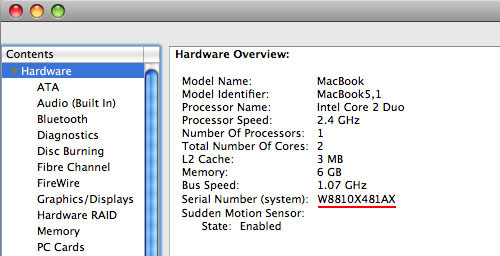
Image Credit: EveryMac.com
In this example, from EveryMac.com's own collection, the underlined W8810X481AX Serial Number is enough to identify a single Mac and it is believed to be unique to this one particular model -- the MacBook "Core 2 Duo" 2.4 13-Inch (Unibody).
Please note, however, that not all Macs of a particular model have the same Serial Number characteristics. Another reader also could have a MacBook "Core 2 Duo" 2.4 13-Inch (Unibody), but it could have quite different identifying characteristics.
Additionally, and unfortunately, Serial Number identifiers are not always unique to one Mac either, and this is a limitation overall. Based on hands-on inspection and thousands of reader-submitted Serial Numbers there appear to be some different models in the PowerBook G4, Power Mac G4, Power Mac G5, Mac Pro, iMac and eMac lines that share identifying information. There very well may be models in other lines that share identifying information, too.
When Serial Number identifying information is shared they usually, but not always, are from the same subfamily. One still should verify that an exact match for a Serial Number is correct and comprehensive using secondary identifiers whenever possible. Should you encounter a potential error or an omission in EveryMac.com's Ultimate Mac Lookup, please report it. Thank you.
Another weakness of using Serial Numbers for identification is that repairs can alter or remove the serial number in software or hardware and/or provide conflicting Serial Number information. Occasionally, there are different Serial Numbers listed on the hardware and in software due to manufacturing error as well. In these situations, one will need to use alternate information to identify a particular Mac.
If a Mac will not boot, and/or locating a Serial Number is easier externally (perhaps the power cable is missing, damaged or in another location, for instance), this can help pinpoint where Serial Numbers are located on different Macs:
| Mac Series | Serial Location |
| Power Mac G3 | Back |
| Power Mac G4 | Back |
| Power Mac G5 | Inside Access Panel |
| Mac Pro | Back |
| iMac | Bottom or Under "Foot" |
| eMac | Inside Optical Drive "Flap" |
| Mac mini | Bottom |
| PowerBook G3 | Bottom |
| PowerBook G4 | Inside Battery Bay |
| iBook | Under Keyboard and Inside Battery Bay |
| MacBook | Inside Battery Bay or Bottom* |
| MacBook Pro | Inside Battery Bay or Bottom* |
| MacBook Air | Bottom* |
* MacBook and MacBook Pro models with batteries that are not designed to be removed by the end user and MacBook Air models have Serial Numbers etched on the bottom. MacBook and MacBook Pro models with removable batteries have the Serial Number inside the battery bay (either on the bottom of the bay or on the side walls).
Also see:
- Where can I locate the Order Number for my Mac? Are Order Numbers unique? What are the limitations identifying a specific Mac using Order Numbers?
- Where can I locate the Model Number or Family Number on my Mac? Are they unique? What are the limitations identifying a specific Mac using this identifier?
- Where can I locate the EMC Number on my Mac? Are EMC Numbers unique? What are the limitations identifying a specific Mac using EMC Numbers?
- Where can I locate the Model Identifier (Model ID) or Machine Model for my Mac? Are Model Identifiers unique? What are the limitations identifying a specific Mac using the Model Identifier?
If EveryMac.com does not identify your Mac -- or it identifies a different Mac or Macs -- when you type in its Serial Number, but you are able to track down your Mac using another identifier, please share any missing information. The Ultimate Mac Lookup feature is quite comprehensive, but it will be even more so with your additions. Thank you.
Established in 1996, EveryMac.com has been created by experts with decades of experience with Apple hardware. EveryMac.com includes, and always has included, original research incorporating detailed, hands-on inspection of packaging, computers, and devices as well as extensive real-world use. All information is provided in good faith, but no website or person is perfect. Accordingly, EveryMac.com is provided "as is" without warranty of any kind whatsoever. EveryMac.com, and the authors thereof, shall not be held responsible or liable, under any circumstances, for any damages resulting from the use or inability to use the information within. For complete disclaimer and copyright information please read and understand the Terms of Use and the Privacy Policy before using EveryMac.com. Copying, scraping, or use of any content without expressed permission is not allowed, although links to any page are welcomed and appreciated.