
Hosted by site sponsor WebMate.
MacOS 9/Classic Support Q&A - Published August 30, 2006
To be notified of new Q&As, sign up for EveryMac.com's bimonthly email list.
Is there a wireless adapter that works with MacOS 9?
Scouring the Internet revealed that the vast majority, if not all, currently available wireless USB adapters lack the needed drivers for MacOS 9 compatibility. However, it is still possible to connect a non AirPort-equipped Mac running MacOS 9 to a wireless network with an older wireless USB adapter like the discontinued Belkin F5D6050.
Belkin did not ship this particular wireless USB adapter with MacOS 9 drivers, but these can be downloaded from the company website. The primary advantage of USB adapters is the low cost, but even a cursory glance at customer reviews shows that many found it to be unreliable, particularly with MacOS 9. It also uses the slower 802.11b (AirPort) standard rather than 802.11g (AirPort Extreme).
Consequently, a better option likely would be a wireless ethernet bridge, like the Motorola WE800G (on the right).
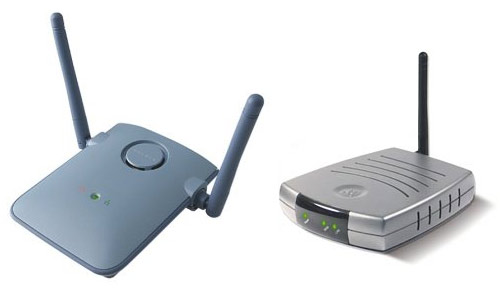
Photo Credit: Belkin (Left) & Motorola (Right)
Motorola explains that with the WE800G "any Ethernet-equipped hardware can join a wireless home or small office network. That's desktops, printers, peripherals, game consoles... anything with an Ethernet port". Drivers are not needed and it operates using the faster 802.11g (AirPort Extreme) standard.
The WE800G has been tested with systems as old as the Power Macintosh 7500 running MacOS 7.6.1 and it works. It requires a system running at least MacOS 9 and Netscape 7 for configuration.
Permalink | Report an Error/Typo | Sign Up for Site Update Notices
<< MacOS 9/Classic Support Q&A (Main)
Established in 1996, EveryMac.com has been created by experts with decades of experience with Apple hardware. EveryMac.com includes, and always has included, original research incorporating detailed, hands-on inspection of packaging, computers, and devices as well as extensive real-world use. All information is provided in good faith, but no website or person is perfect. Accordingly, EveryMac.com is provided "as is" without warranty of any kind whatsoever. EveryMac.com, and the authors thereof, shall not be held responsible or liable, under any circumstances, for any damages resulting from the use or inability to use the information within. For complete disclaimer and copyright information please read and understand the Terms of Use and the Privacy Policy before using EveryMac.com. Copying, scraping, or use of any content without expressed permission is not allowed, although links to any page are welcomed and appreciated.