
Hosted by site sponsor WebMate.
Apple TV Q&A
Update Published May 26, 2021
Also see: All Apple Q&As >> Apple TV Q&A (Home)
To be notified of new Q&As, sign up for EveryMac.com's bimonthly email list.
Do the Apple TV models support 1080p? Do they support 4K?
The original Apple TV and black Apple TV 2nd Gen only support 720p video playback. The Apple TV 3rd Gen and Apple TV 4th Gen, also black, support 1080p. The Apple TV 4K and Apple TV 4K (2nd Gen) support 4K (2160p).
Interestingly, as first discovered by Engadget, the second generation model actually is hardware-capable of playing 1080p video content streamed from iTunes, but it downscales it to 720p when displayed. Although some have expressed displeasure with this decision, it seems highly likely that Apple imposed this restriction to increase the likelihood of smooth video playback even over the often limited bandwidth in homes at the time it was released.
Also see: What is the difference between 480i, 480p, 720p, 1080i, and 1080p?
What ports are provided by the black Apple TV models?
As EveryMac.com does for all Apple systems, the site offers specs for Apple TV line including details on ports and connectivity. Details on ports and connectors also are provided below.
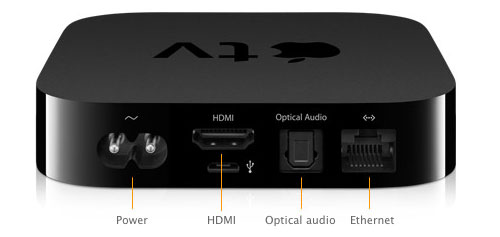
Photo Credit: Apple, Inc. (Apple TV 2nd & 3rd Gen - Ports)
As the above picture shows, the black 2nd Gen and 3rd Gen Apple TV models have a power connector, an HDMI port, an optical audio out port, and a 10/100Base-T Ethernet port. Both also have a Micro-USB port that formally is for diagnostic use only as well as support for 802.11a/b/g/n wireless. The front of each has a status light and an IR receiver for the remote.
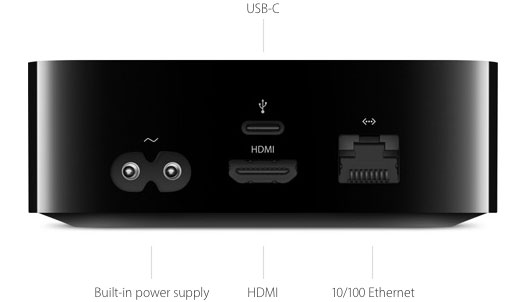
Photo Credit: Apple, Inc. (Apple TV 4th Gen - Ports)
Hardware connectivity for the also black Apple TV 4th Gen is a bit more limited. It has a power connector, an HDMI 1.4 port, a 10/100Base-T Ethernet port, and a USB-C port formally "for service and support" only. It also has 802.11ac Wi-Fi with MIMO capability and Bluetooth 4.0 as well as an IR receiver for the remote, but it does not have an optical audio out port.
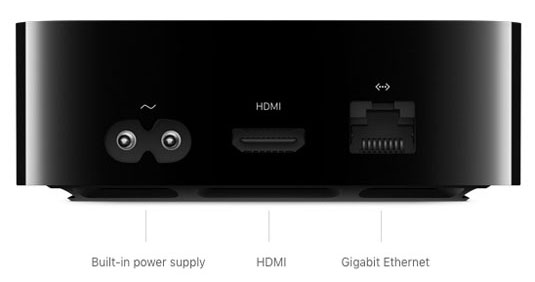
Photo Credit: Apple, Inc. (Apple TV 4K Ports)
Ports for the Apple TV 4K and Apple TV 4K (2nd Gen) have been reduced even further. Both models have Gigabit Ethernet and Bluetooth 5.0 as well as an IR receiver for the remote.
The original Apple TV 4K has an HDMI 2.0a port and 802.11ac Wi-Fi with MIMO (simultaneous dual-band 2.4 GHz and 5 GHz) whereas the Apple TV 4K (2nd Gen) has an HDMI 2.1 port and even faster 802.11ax Wi-Fi 6 with MIMO.
Also see: What is HDMI?
What audio and video formats do the black Apple TV models support? Do they support video streaming directly from the Internet?
The black Apple TV models do support video streaming and rental of movies and television shows directly from the Internet in addition to audio and video streamed from a Mac, PC, iPod touch, iPhone or iPad via AirPlay. Different models have different capabilities, though.
Apple TV 2nd Gen
Apple reports that the black Apple TV 2nd Gen supports the following video, audio and photo formats.
Video
- H.264 video up to 720p, 30 frames per second, Main Profile level 3.1 with AAC-LC audio up to 160 Kbps per channel, 48kHz, stereo audio in .m4v, .mp4, and .mov file formats
- MPEG-4 video, up to 2.5 Mbps, 640 by 480 pixels, 30 frames per second, Simple Profile with AAC-LC audio up to 160 Kbps, 48kHz, stereo audio in .m4v, .mp4, and .mov file formats
- Motion JPEG (M-JPEG) up to 35 Mbps, 1280 by 720 pixels, 30 frames per second, audio in ulaw, PCM stereo audio in .avi file format
Audio
- HE-AAC (V1), AAC (16 to 320 Kbps), protected AAC (from iTunes Store), MP3 (16 to 320 Kbps), MP3 VBR, Audible (formats 2, 3, and 4), Apple Lossless, AIFF, and WAV; Dolby Digital 5.1 surround sound pass-through
Photo
- JPEG, GIF, TIFF
Apple TV 3rd Gen
The Apple TV 3rd Gen offers the same audio and photo support as the Apple TV 2nd, but improves video support (differences in italics):
- H.264 video up to 1080p, 30 frames per second, High or Main Profile level 4.0 or lower, Baseline profile level 3.0 or lower with AAC-LC audio up to 160 Kbps per channel, 48kHz, stereo audio in .m4v, .mp4, and .mov file formats
All other video support between the Apple TV 2nd Gen and Apple TV 3rd Gen is identical.
Apple TV 4th Gen
The also black Apple TV 4th Gen model supports the same photo formats -- JPEG, GIFF, and TIFF -- as earlier black Apple TV models, but adds support for "Dolby Digital Plus 7.1" audio and improves video support a bit, too (differences in italics):
- H.264 video up to 1080p, 60 frames per second, High or Main Profile level 4.2 or lower
All other video support for the Apple TV 4th Gen is the same as it is for earlier models, although it is worth noting that it no longer supports iTunes music or radio, but instead only iTunes movies and TV shows and Apple Music. In addition to audio and video streaming, the Apple TV 4th Gen supports more advanced app functionality.
Apple TV 4K (Original)
The still black Apple TV 4K model adds significant additional support for photos and audio:
- For images, the Apple TV 4K adds support for the HEIF image format alongside the previously supported JPEG, GIF, and TIFF.
- For audio, the Apple TV 4K drops support for Audible (formats 2, 3, and 4), but adds support for FLAC and E-AC-3 (Dolby Digital Plus 7.1 surround sound). It does not support the newer Atmos format, though.
For video, it adds the massive improvement of support for 4K (2160p):
- H.264/HEVC SDR video up to 2160p, 60 fps, Main/Main 10 profile
- HEVC Dolby Vision (Profile 5)/HDR10 (Main 10 profile) up to 2160p
- H.264 Baseline Profile level 3.0 or lower with AAC-LC audio up to 160 Kbps per channel, 48kHz, stereo audio in .m4v, .mp4, and .mov file formats
- MPEG-4 video up to 2.5 Mbps, 640 by 480 pixels, 30 fps, Simple profile with AAC-LC audio up to 160 Kbps, 48kHz, stereo audio in .m4v, .mp4, and .mov file formats
Like its predecessor, the Apple TV 4K runs the "tvOS" and provides more advanced app functionality, too.
Apple TV 4K (2nd Gen)
The yet still black Apple TV 4K (2nd Gen) supports all of the same photo formats as its predecessor, but adds Dolby Atmos as a supported audio format and for video, adds high-frame rate HDR with Dolby Vision (HLG up to 2160p, 60 fps).
Permalink | Report an Error/Typo | Sign Up for Site Update Notices
Established in 1996, EveryMac.com has been created by experts with decades of experience with Apple hardware. EveryMac.com includes, and always has included, original research incorporating detailed, hands-on inspection of packaging, computers, and devices as well as extensive real-world use. All information is provided in good faith, but no website or person is perfect. Accordingly, EveryMac.com is provided "as is" without warranty of any kind whatsoever. EveryMac.com, and the authors thereof, shall not be held responsible or liable, under any circumstances, for any damages resulting from the use or inability to use the information within. For complete disclaimer and copyright information please read and understand the Terms of Use and the Privacy Policy before using EveryMac.com. Copying, scraping, or use of any content without expressed permission is not allowed, although links to any page are welcomed and appreciated.