
Hosted by site sponsor WebMate.
Apple TV Q&A
Update Published June 6, 2007
Also see: All Apple Q&As >> Apple TV Q&A (Home)
To be notified of new Q&As, sign up for EveryMac.com's bimonthly email list.
What type of hard drive does the original Apple TV use? How do you upgrade it?
Officially, Apple reports simply that the original Apple TV has a hard drive "for storing content locally" and no internal components are to be serviced by end users. Consequently, EveryMac.com does not recommend that one attempt to upgrade the hard drive in the Apple TV.
As originally shipped on March 21, 2007, the Apple TV was available with a 40 GB hard drive (MA711LL/A). On May 30, 2007, Apple began offering the product with a 160 GB hard drive (MB189LL/A) as well the original 40 GB configuration. Apple does not provide any information about the type of hard drive that the Apple TV uses.
However, as can clearly be seen in "disassembly" photos courtesy of TechRestore, the Apple TV uses a standard 2.5" IDE/PATA hard drive (not SATA).
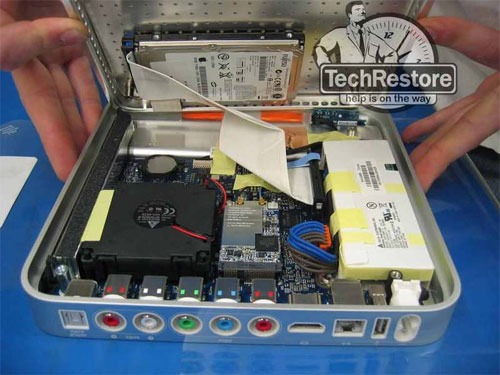
Photo Credit: TechRestore, Inc.
Obviously, upgrading the hard drive would violate the warranty, but curious hackers have found that it is quite a bit easier to upgrade the hard drive in the Apple TV than it is in the Mac mini.
The always excellent AnandTech posted a detailed "unboxing and dissection" that includes photos and information that could be used to upgrade the hard drive. The complete article should be read in its entirety, but in brief, the relevant steps simply are:
1. Carefully remove the "rubber bottom" from the Apple TV.
2. Unscrew the four T10 screws on the corners of the underside of the case.
3. Unscrew the four "inner" T8 screws on the underside of the case. These hold the hard drive in place -- which also is attached with adhesive.
4. Carefully open the case, being cautious not to damage the hard drive cable.
5. Carefully peel the hard drive off the case and disconnect the hard drive cable.
As Apple did not place any restrictions on the Apple TV software to make it more challenging to copy the contents of the hard drive -- in fact, it shows up as a standard HFS volume when installed in a Mac -- creative hackers quickly learned how to duplicate the files on the original hard drive, create compatible partitioning on the new drive, and re-install the new drive with the original software in the Apple TV.
Complete instructions on this process are available from Engadget and MacWorld.
Site sponsor Other World Computing sells notebook hard drives that can be installed in the original Apple TV as well as (newer) used Apple TV models that are more up-to-date.
Permalink | Report an Error/Typo | Sign Up for Site Update Notices
Established in 1996, EveryMac.com has been created by experts with decades of experience with Apple hardware. EveryMac.com includes, and always has included, original research incorporating detailed, hands-on inspection of packaging, computers, and devices as well as extensive real-world use. All information is provided in good faith, but no website or person is perfect. Accordingly, EveryMac.com is provided "as is" without warranty of any kind whatsoever. EveryMac.com, and the authors thereof, shall not be held responsible or liable, under any circumstances, for any damages resulting from the use or inability to use the information within. For complete disclaimer and copyright information please read and understand the Terms of Use and the Privacy Policy before using EveryMac.com. Copying, scraping, or use of any content without expressed permission is not allowed, although links to any page are welcomed and appreciated.