
Hosted by site sponsor WebMate.
Apple TV Q&A
Revised April 12, 2012
Also see: All Apple Q&As >> Apple TV Q&A (Home)
To be notified of new Q&As, sign up for EveryMac.com's bimonthly email list.
What is is 802.11n? How is it different from 802.11b, 802.11g, and 802.11a?
802.11n, which once Apple confusingly dubbed "AirPort Extreme" -- the same name the company gave to the earlier 802.11g specification -- is a wireless networking standard first supported by the original Apple TV. Starting on July 20, 2011, Apple quietly started refering to this standard just as 802.11n "Wi-Fi" for simplicity.
Apple also supports 802.11n on Macs starting with the Core 2 Duo-based models (some first require enabler software to be installed) -- with the exception of the iMac "Core 2 Duo" 1.83 17-Inch (IG). For a complete list of G3 and Later Macs that support the different standards of AirPort, please refer to the "By Capability" section of EveryMac.com.
Performance Overview
In basic terms, 802.11n is faster than 802.11g, which itself is faster than the earlier 802.11b. On the company website, Apple explains that 802.11n offers "greater performance, more range, and improved reliability". Apple also notes:
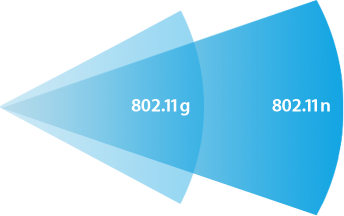 Among its key innovations, 802.11n adds technology called multiple-input multiple-output (MIMO), a signal processing and smart antenna technique for transmitting multiple data streams through multiple antennas. The result? Up to five times the performance and up to twice the range compared to the earlier 802.11g standard.
Diagram Credit: Apple, Inc.
The always excellent BareFeats evaluated the Apple AirPort Extreme 802.11n base station and found it to be "3.8 times faster than the 802.11g setup" in real-world tests. The always superb MacInTouch [no longer online] also reviewed the same product and found it to be substantially faster as well but also discovered a number of caveats and limitations that may effect some users.
802.11a & 802.11n Details
As noted elsewhere on EveryMac.com, 802.11a formally is not supported by Apple, but all Intel-based Macs work with an 802.11a network. 802.11a offers the same theoretical speed (54 Mbps) as 802.11g, but it operates in a different frequency (5 GHz) and is not backwards compatible with 802.11b.
802.11n can operate on either the 5 GHz frequency at a theoretical maximum speed of 300 Mbps or on the 2.4 GHz frequency in "mixed mode" which will support systems only capable of using 802.11b or 802.11g, but it will slow the entire network down to the maximum speed of the earliest standard connected.
Some Macs introduced starting in 2011 also are capable of supporting 802.11n at a theroretical maximum speed of 450 Mbps on the 5 GHz frequency thanks to three send and receive antennas.
Major 802.11a/b/g/n Differences
For your convenience, the main differences between 802.11b, 802.11g, 802.11a, and 802.11n are summarized below.
Apple Product |
Standard |
Speed† |
Range† |
Frequency |
AirPort |
802.11b |
11 Mbps |
150 Feet |
2.4 GHz |
AirPort Extreme |
802.11g |
54 Mbps |
50 Feet |
2.4 GHz |
AirPort Extreme |
802.11a* |
54 Mbps |
50 Feet |
5 GHz |
AirPort Extreme |
802.11n |
300 Mbps |
175 Feet |
2.4/5 GHz |
† Real-world speeds are more modest. Likewise, range varies depending on configuration and placement.
* Apple provides no official support for the 802.11a standard, but it works with all Intel-based Macs.
§ Apple Macs with three antennas can support 802.11n at 450 Mbps. A complete list may be of interest.
Permalink | Report an Error/Typo | Sign Up for Site Update Notices
Established in 1996, EveryMac.com has been created by experts with decades of experience with Apple hardware. EveryMac.com includes, and always has included, original research incorporating detailed, hands-on inspection of packaging, computers, and devices as well as extensive real-world use. All information is provided in good faith, but no website or person is perfect. Accordingly, EveryMac.com is provided "as is" without warranty of any kind whatsoever. EveryMac.com, and the authors thereof, shall not be held responsible or liable, under any circumstances, for any damages resulting from the use or inability to use the information within. For complete disclaimer and copyright information please read and understand the Terms of Use and the Privacy Policy before using EveryMac.com. Copying, scraping, or use of any content without expressed permission is not allowed, although links to any page are welcomed and appreciated.