
Hosted by site sponsor WebMate.
iPad Q&A
Update Published April 28, 2025
All Apple Q&As >> iPad Q&A (Home) | Also see: All iPad Specs
To be notified of new Q&As, sign up for EveryMac.com's bimonthly email list.
How do you connect a camera to the iPad to transfer photos? Does it have an SD card slot?
For the original iPad, iPad 2, and iPad 3rd Gen models, Apple offered an iPad Camera Connection Kit, which includes a pair of adapters that make it possible to connect a camera to any iPad via USB cable or transfer photos directly from an SD card, respectively.
Later iPad models either have a "Lightning" port or a USB-C port rather than the older 30-pin Dock Connector port, and need different adapters.
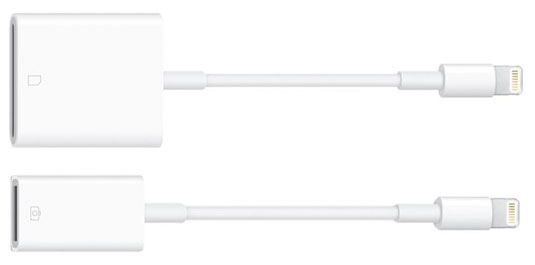
Photo Credit: Apple, Inc. (Lightning to SD Card; Lightning to Camera)
For the Lightning-equipped iPads, you will need to purchase either the "Lightning to SD Card Camera Reader" to transfer photos directly from an SD card to the iPad or the "Lightning to USB Camera Adapter" to connect the camera itself to the iPad.
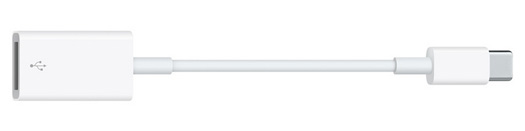
Photo Credit: Apple, Inc. (USB-C to USB Adapter)
For iPad 10th Gen and iPad A16 (11th Gen) models -- which have a USB-C port -- you can connect a USB-C equipped camera or SD card reader directly. If you have a camera or SD card reader with an old school USB 2.0 or USB 3.0 port (USB-A), you might want the Apple USB-C to USB Adapter (MJ1M2AM/A) as the simple way to connect a traditional USB port to a USB-C port.
No iPad has an internal SD card slot. Also, if you are looking on the used market, note that the earlier iPod Camera Connector is not compatible with any of the iPad models, even those with a 30-pin Dock Connector port.
If you are not sure which iPad you have, see EveryiPad.com's iPad Identification section.
Connection & Photo Transfer Instructions
Regardless of the specific iPad or the adapter used, connecting a camera to the iPad and transferring photos is simple and straightforward. It is covered on page 49 of the original iPad User's Guide, but instructions are quoted from the manual below as well for your convenience:
- Insert the SD Card Reader, USB Camera Connector, or [adapter] into the iPad dock connector port, [Lightning port, or USB-C port].
• To connect a camera or iPhone, use the USB cable that came with the camera or iPhone, and connect it to the USB port on the Camera Connector. If you're using iPhone, make sure it's turned on. To connect a camera, make the sure the camera is turned on and in transfer mode. For help, see the documentation that came with the camera.
• To use an SD memory card, insert it in the slot on the SD Card Reader. Don't force the card into the slot; it fits only one way.
- Unlock iPad.
- The Photos application opens automatically and displays the photos that are available for importing.
- Select the photos that you want to import.
• To import all of the photos, tap Import All.
• To import just some of the photos, tap the ones you want to include (a checkmark should appear on each), then tap Import, and select Import or Import All.
- After the photos are imported, you can choose to keep or delete the photos on the card, camera, or [iPad].
• To view the photos, look in the Last Import album. A new Event is also created, containing all the photos that were selected for import.
• To transfer the photos from iPad to your computer, connect iPad to your computer and import the images with a photo program such as iPhoto or Adobe Elements.
- Disconnect the card reader or camera connector.
That should do it!
Permalink | Report an Error/Typo | Sign Up for Site Update Notices
<< iPad Q&A (Main) | All Apple Q&As
Established in 1996, EveryMac.com has been created by experts with decades of experience with Apple hardware. EveryMac.com includes, and always has included, original research incorporating detailed, hands-on inspection of packaging, computers, and devices as well as extensive real-world use. All information is provided in good faith, but no website or person is perfect. Accordingly, EveryMac.com is provided "as is" without warranty of any kind whatsoever. EveryMac.com, and the authors thereof, shall not be held responsible or liable, under any circumstances, for any damages resulting from the use or inability to use the information within. For complete disclaimer and copyright information please read and understand the Terms of Use and the Privacy Policy before using EveryMac.com. Copying, scraping, or use of any content without expressed permission is not allowed, although links to any page are welcomed and appreciated.