
Hosted by site sponsor WebMate.
iPod Q&A - Updated July 29, 2017
To be notified of new Q&As, sign up for EveryMac.com's bimonthly email list.
What are the differences between the iPod shuffle 4th Generation and the earlier iPod shuffle 3rd Generation? How does the 4th Generation model compare to the 2nd Generation one?
Please note that all iPod shuffle models have been discontinued. However, this Q&A is up-to-date and can be quite helpful for anyone buying or selling one of these devices on the used market.
In a quiet admission from Apple that the "no buttons" iPod shuffle 3rd Generation model was received poorly by the marketplace, the iPod shuffle 4th Generation model brought the iPod shuffle back to much where it was with the 2nd Generation.
External Differences
The iPod shuffle 2nd Generation -- which was sold from 2006 until 2009 -- and 4th Generation -- the original, 2012, and 2015 models alike -- have "clickable ring buttons" (previous track, next track, volume up, volume down, play/pause) on the body of the players themselves whereas the iPod shuffle 3rd Generation has an awkward three button controller -- volume up, volume down, and "action" (which varies depending on the number and duration of clicks) -- integrated with the headphone cable.
However, the 4th Generation model adds another button on the top that when pressed speaks the names of songs, artists, and playlists as well as "Genius Mixes," borrowing the helpful "VoiceOver" feature introduced with the 3rd Generation.
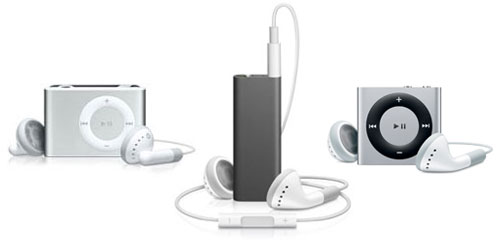
Photo Credit: Apple, Inc. (From Left — 2nd, 3rd, 4th Generation iPod shuffle)
The above product images are not precisely to scale, but provide a decent idea of the size difference. The iPod shuffle 2nd Gen is 1.07 inches tall, 1.62 inches wide, and 0.41 inches deep, the iPod shuffle 3rd Gen is 1.8 inches tall, 0.7 inches wide, and 0.3 inches deep, and the iPod shuffle 4th Gen is 1.14 inches tall, 1.24 inches wide and 0.34 inches deep. The "clip" on the back of the iPod shuffle 2nd and 4th Generation is colored to match the casing whereas the iPod shuffle 3rd Generation models have a mirrored finish.

Photo Credit: Apple, Inc. (iPod shuffle 4th Generation, 2012 Color Options)
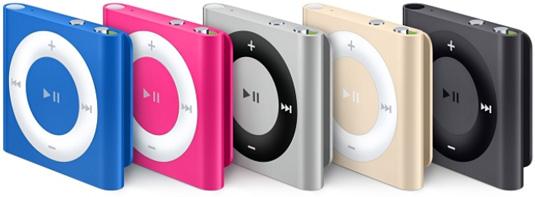
Photo Credit: Apple, Inc. (iPod shuffle 4th Generation, 2015 Color Options)
All use aluminum housings in a variety of color options. It also is worth noting that the iPod shuffle 2nd Gen models have a "dock" to connect the device to a computer whereas the 3rd and 4th Gen models use an extremely short headphone jack-to-USB cable for connectivity.
Identification Differences
As the iPod shuffle 3rd Gen and iPod shuffle 4th Gen models are quite different in terms of design, these are unlikely to be mistaken for one another. However, it is easy to mistake an iPod shuffle 2nd Gen and 4th Gen model if they are not side-by-side. Consequently, it still is useful to know the model number for identification purposes.
The 2nd Gen is model number A1204, the 3rd Gen is model number A1271, and the 4th Gen is model number A1373. This identifier is inconveniently located under the clip.
Everyi.com's Ultimate iLookup feature also can identify these iPod models by EMC number, order number (referred to as "model" in software), and most precisely by their serial numbers, as well.
Capacity & Battery Life Differences
The iPod shuffle 2nd Gen models have 1 GB or 2 GB of storage, holding a reported 240 or 500 songs, respectively, and the iPod shuffle 3rd Gen models have 2 GB or 4 GB of storage, capable of holding 500 or 1000 songs, respectively. Interestingly, for the 4th Gen models, Apple only offers 2 GB of storage. For the 4th Gen models, although Apple no longer provided an "official" estimate of song capacity, they can hold approximately 500 songs just like their predecessors with 2 GB of storage.
The official estimated battery life of the 2nd, 3rd, and 4th Generation models are 12 hours, 10 hours, and 15 hours, respectively. No iPod shuffle models have a screen, and consequently, only support music playback.
Operating System Support Differences
All of these iPod shuffle models require a "host" Mac or Windows PC for synchronization of music files, but operating system support varies:
| iPod shuffle | Minimum Mac OS | Minimum Windows |
| 2nd Gen (2006) | Mac OS X 10.3.9 | Windows 2000 SP4 |
| 2nd Gen (Early 2007) | Mac OS X 10.3.9 | Windows 2000 SP4 |
| 2nd Gen (Late 2007) | Mac OS X 10.4.8 | Windows XP SP2 |
| 2nd Gen (Late 2008) | Mac OS X 10.4.10 | Windows XP SP2 |
| 3rd Gen (Orig, Early 2009) | Mac OS X 10.4.11 | Windows XP SP3 |
| 3rd Gen (Late 2009) | Mac OS X 10.4.11 | Windows XP SP3 |
| 4th Gen (Original, 2010) | Mac OS X 10.5.8 | Windows XP SP3 |
| 4th Gen (Late 2012) | Mac OS X 10.6.8 | Windows XP SP3 |
| 4th Gen (Mid-2015) | OS X 10.7.5 | Windows 7 |
Be certain that your Mac or PC is compatible with the iPod shuffle of your choice to avoid potential disappointment.
Comparison Chart
For your convenience, the major differences between the three generations are summarized below:
 2nd Gen |
 3rd Gen |
 4th Gen |
|
|---|---|---|---|
| Flash Memory: | 1 GB, 2 GB* | 2 GB, 4 GB** | 2 GB |
| Song Capacity: | 240, 500 | 500, 1000 | 500 |
| Battery Life: | 12 Hours | 10 Hours | 15 Hours |
| Ring Buttons: | Yes | No† | Yes |
| VoiceOver: | No | Yes | Yes |
| Playlist Support: | No | Yes | Yes |
| Material: | Aluminum†† | Aluminum§ | Aluminum§§ |
| USB Connection: | Dock | Cable | Cable |
| Dimensions (In): | 1.07 x 1.62 x 0.41 | 1.8 x 0.7 x 0.3 | 1.14 x 1.24 x 0.34 |
| Model No: | A1204 | A1271 | A1373 |
| Intro Price: | US$79* | US$59, $79, $99** | US$49 |
* The 1 GB configuration of the iPod shuffle 2nd Generation was introduced for US$79 and dropped to US$49 on February 19, 2008 with the introduction of a 2 GB configuration for US$69. When the iPod shuffle 3rd Gen was introduced on March 11, 2009, the 2 GB configuration of the iPod shuffle 2nd Gen was discontinued and the 1 GB configuration continued to sell for US$49 until September 9, 2009 when it was discontinued.
** The original iPod shuffle 3rd Gen was introduced in silver and black with 4 GB of storage for US$79. On September 9, 2009, Apple started selling 2 GB configurations, as well as 4 GB configurations -- available in colors as well as silver and black for US$59 and US$79, respectively. Apple also introduced a stainless steel "Special Edition" in a 4 GB capacity for US$99.
† The iPod shuffle 3rd Gen has a three button controller -- volume up, volume down, and "action" (which varies depending on the number and duration of clicks) -- integrated with the headphone cable.
†† When first introduced on September 12, 2006, the iPod shuffle 2nd Gen was offered only in silver, subsequent models were offered in a variety of colors as well as silver.
§ When first introduced on March 11, 2009, the iPod shuffle 3rd Gen only was offered in silver or black. On September 9, 2009, Apple started selling it in blue, green, and pink, as well as the original silver and black and an obnoxious "Special Edition" stainless steel.
§§ The 2012 iPod shuffle 4th Gen models were offered in silver (which has a black "ring") and blue, green, orange (gold-ish) and pink (which have white "rings"). The 2015 models were offered in a medium toned "space" gray, gold, silver, hot pink, blue, and red (the gray and silver options have a black "control ring" and the other colors have a white one).
To dynamically compare any of these iPod models to all other iPod, iPhone, and iPad models -- new and old -- please see Everyi.com's Ultimate iComparison feature.
Permalink | Report an Error/Typo | Sign Up for Site Update Notices
Established in 1996, EveryMac.com has been created by experts with decades of experience with Apple hardware. EveryMac.com includes, and always has included, original research incorporating detailed, hands-on inspection of packaging, computers, and devices as well as extensive real-world use. All information is provided in good faith, but no website or person is perfect. Accordingly, EveryMac.com is provided "as is" without warranty of any kind whatsoever. EveryMac.com, and the authors thereof, shall not be held responsible or liable, under any circumstances, for any damages resulting from the use or inability to use the information within. For complete disclaimer and copyright information please read and understand the Terms of Use and the Privacy Policy before using EveryMac.com. Copying, scraping, or use of any content without expressed permission is not allowed, although links to any page are welcomed and appreciated.