
Hosted by site sponsor WebMate.
Intel Mac mini Q&A - Published October 25, 2009
To be notified of new Q&As, sign up for EveryMac.com's bimonthly email list.
What are the differences between the "Late 2009" Mac mini "Core 2 Duo" configurations? What are the differences between these Mac mini models and the models replaced?
The "Late 2009" Mac mini models -- the Mac mini "Core 2 Duo" 2.26, "Core 2 Duo" 2.53, and "Core 2 Duo" 2.53 (Server) -- are quite similar to one another and quite similar to the "Early 2009" Mac mini "Core 2 Duo" 2.0 as well.
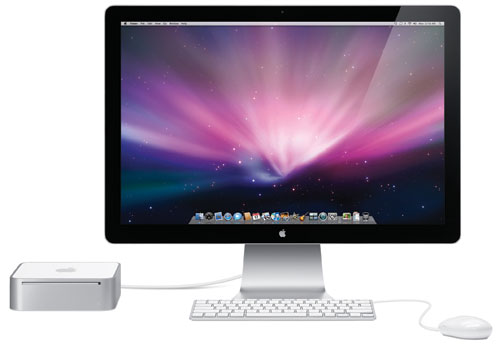
Photo Credit: Apple, Inc.
Like all Mac mini models, the "Early 2009" and "Late 2009" Mac mini models have their internal components enclosed in a tiny and elegant 2.9 lb, 6.5 inch square, two inch tall case.
Connectivity provided by the "Early 2009" and "Late 2009" Mac mini models is identical. All of these systems have 5 USB 2.0 ports, a Firewire "800" port, AirPort Extreme (802.11a/b/g/n), Bluetooth 2.1+EDR, Gigabit Ethernet, a combined "optical digital audio input/audio line in minijack", and a "optical digital audio output/headphone out minijack", and dual video ports -- Mini-DVI and Mini DisplayPort -- that can be used to simultaneously drive two displays.
With the exception of the Mac mini "Core 2 Duo" 2.53 (Server), which has a second internal hard drive in lieu of the optical drive -- as well as a slightly different case without an optical drive slot and a pre-installed copy of MacOS X 10.6 "Snow Leopard" Server rather than the standard version of MacOS X -- these models are identical internally apart from processor speeds, pre-installed RAM, and default hard drive size.
All have Intel "Core 2 Duo" processors with a 3 MB on-chip level 2 cache, a 1066 MHz frontside bus, support for 1066 MHz DDR3 SDRAM (PC3-8500), and a NVIDIA GeForce 9400M graphics processor with "integrated" graphics memory.
The "Late 2009" hardware configurations vary only by processor speed, pre-installed memory, hard drive, optical drive, and price. These differences are below:
| "Late 2009" | 2.26 | 2.53 | 2.53 (Server) |
|---|---|---|---|
| Processor Speed: | 2.26 GHz | 2.53 GHz | 2.53 GHz |
| Processor Type: | P8400 | P8700 | P8700 |
| Std. RAM: | 2 GB | 4 GB | 4 GB |
| Std. Hard Drive: | 160 GB | 320 GB | 500 GB x2 |
| Std. Optical Drive: | 8X DL | 8X DL | None |
| Apple Order No: | MC238LL/A | MC239LL/A | MC408LL/A |
| Price: | US$599 | US$799 | US$999 |
Likewise, the "Late 2009" and "Early 2009" models only differ by processor speed and configuration:
| "Early 2009" Mac mini | "Late 2009" Mac mini | |
|---|---|---|
| Processor Type: | Core 2 Duo (P7350) | Core 2 Duo (P8400, P8700) |
| Processor Speed: | 2.0 GHz | 2.26 GHz, 2.53 GHz |
| Standard RAM: | 1 GB, 2 GB | 2 GB, 4 GB |
| Hard Drive: | 120 GB, 320 GB | 160 GB, 320 GB, 500 GB x2* |
| Optical Drive: | 8X DL "SuperDrive" | 8X DL "SuperDrive" or None* |
| Video Type: | NVIDIA GeForce 9400M | NVIDIA GeForce 9400M |
| Integrated VRAM: | 128 MB, 256 MB† | 256 MB† |
| Apple Order No: | MB463LL/A, MB464LL/A | MC238LL/A, MC239LL/A, MC408LL/A |
| Price: | US$599, US$799 | US$599, US$799, US$999 |
* The Mac mini "Core 2 Duo" 2.53 (Server) has dual 500 GB hard drives with the second internal hard drive in lieu of the optical drive.
† The VRAM is "shared" with system memory. This is the minimum graphics memory usage with each configuration but the memory available to MacOS X "may vary depending on graphics needs". Installing 2 GB of memory in the low-end "Early 2009" MB463LL/A configuration automatically will increase the allocated VRAM to 256 MB.
In the US, site sponsor Other World Computing sells used and refurb Mac mini models at bargain prices with free shipping, as well. Finally, if you need to sell a Mac mini, A+ BBB-rated Cash for Your Mac will buy your older Mac mini with an instant quote and prompt payment.
In the UK, site sponsor Hoxton Macs sells used Mac mini models with a one-year warranty and free next day delivery throughout the UK. Delivery across Europe also is available starting at just £9.99 for two-day delivery to France and Germany.
Please refer to the Ultimate Mac Comparison feature to dynamically compare any Mac mini model to any other G3 or later Mac.
Permalink | Report an Error/Typo | Sign Up for Site Update Notices
Established in 1996, EveryMac.com has been created by experts with decades of experience with Apple hardware. EveryMac.com includes, and always has included, original research incorporating detailed, hands-on inspection of packaging, computers, and devices as well as extensive real-world use. All information is provided in good faith, but no website or person is perfect. Accordingly, EveryMac.com is provided "as is" without warranty of any kind whatsoever. EveryMac.com, and the authors thereof, shall not be held responsible or liable, under any circumstances, for any damages resulting from the use or inability to use the information within. For complete disclaimer and copyright information please read and understand the Terms of Use and the Privacy Policy before using EveryMac.com. Copying, scraping, or use of any content without expressed permission is not allowed, although links to any page are welcomed and appreciated.