
Hosted by site sponsor WebMate.
Intel Mac mini Q&A - Revised November 4, 2009
To be notified of new Q&As, sign up for EveryMac.com's bimonthly email list.
What external storage is available for the Intel Mac mini?
Although you can connect effectively any USB or USB 2.0 hard drive (or a Firewire "400" or "800" drive to a compatible Mac mini), there are a variety of drives designed for use specifically with the Mac mini systems. These hard drives mirror the appearance of the Mac mini and sit underneath the computer. Some also provide additional ports as well as additional storage.
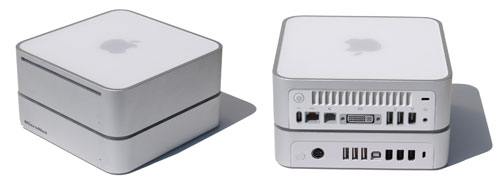
Photo Credit: MicroNet Technology
Three such hard drives with integrated Firewire/USB hubs have been offered from MicroNet, LaCie, and NewerTech, among others. MicroNet and LaCie no longer sell their products -- but some no doubt are floating around on the resale market -- and NewerTech continues to sell and improve its offering.
The MicroNet miniMate includes a variety of hard drive options, three USB 2.0 ports (and one USB 2.0 uplink port), three Firewire "400" ports, and a security slot.
The LaCie mini "Hard Drive and Hub", as the name implies, includes a hard drive, four USB 2.0 ports (and one USB 2.0 uplink port), three Firewire "400" ports, and a security slot. Configurations with a 300 GB or larger hard drive installed include a temperature controlled fan.
There are two versions of the Newer Technology miniStack. Version 2.5 includes a hard drive (a "bare bones" no drive option also is available), three USB 2.0 ports (and one USB 2.0 uplink port), three Firewire "400" ports, a security slot, and a "smart" power switch that can be turned on and off manually or set to power up and down in sync with the computer. Version 3 includes two Firewire "800" ports, one Firewire "400" port, three USB 2.0 ports and an eSATA port.
Each commands a modest premium compared to an off the shelf external hard drive and separate hubs, but for many users, the sleek design profile and convenience is well worth the cost.
Site sponsor Other World Computing sells the Newer miniStack as well as other Mac mini upgrades.
Permalink | Report an Error/Typo | Sign Up for Site Update Notices
Established in 1996, EveryMac.com has been created by experts with decades of experience with Apple hardware. EveryMac.com includes, and always has included, original research incorporating detailed, hands-on inspection of packaging, computers, and devices as well as extensive real-world use. All information is provided in good faith, but no website or person is perfect. Accordingly, EveryMac.com is provided "as is" without warranty of any kind whatsoever. EveryMac.com, and the authors thereof, shall not be held responsible or liable, under any circumstances, for any damages resulting from the use or inability to use the information within. For complete disclaimer and copyright information please read and understand the Terms of Use and the Privacy Policy before using EveryMac.com. Copying, scraping, or use of any content without expressed permission is not allowed, although links to any page are welcomed and appreciated.