
Hosted by site sponsor WebMate.
Silver Tower Mac Pro (Dual Optical) Q&A - Published February 6, 2008
All Mac Q&As >> Silver Tower Mac Pro Dual Optical Q&A (Home)
To be notified of new Q&As, sign up for EveryMac.com's bimonthly email list.
What are the differences between the "Early 2008" (Harpertown/Penryn) Mac Pro configurations?
Please note that all models mentioned in this Q&A have been discontinued. The "Early 2008" Mac Pro was replaced by the "Early 2009" series on March 3, 2009.
Just as the company did with the original Mac Pro, Apple decided to offer a single stock configuration of the "Early 2008" Mac Pro with literally millions of possible configurations available via build-to-order.
Regardless of configuration, the "Early 2008" Mac Pro models are powered by one or two quad-core Intel Xeon 5400 (Harpertown/Penryn) series processors -- either four or eight cores total -- with 12 MB of level 2 cache per processor (each pair of cores shares 6 MB), a 128-bit SSE4 SIMD vector engine, and 1.6 GHz "64-bit dual independent frontside buses."
All of the "Early 2008" Mac Pro systems use the same easy to upgrade case (introduced by the original Mac Pro), and have four easy to access "cable free" hard drive bays (marching across the middle in the photo below) that support Serial ATA 3Gb/s hard drives (or Serial Attached SCSI with the installation of the Mac Pro RAID card), two 5.25" optical drive bays (top left), eight fully buffered (FB-DIMM) slots on two easy access riser cards (bottom right), two PCIe x4 expansion slots, and two PCIe 2.0 x16 expansion slots (in the default confugration one PCIe 2.0 x16 slot is occupied by the graphics card).
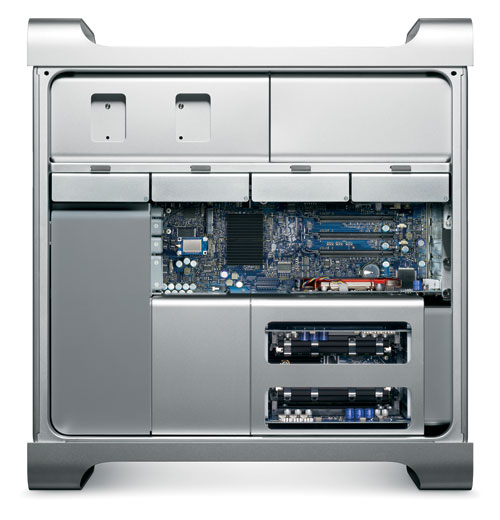
Photo Credit: Apple, Inc.
A rundown of all the millions of combinations would be painfully boring, but comparisons of the default to "bare bones", "better", and "best" configurations are provided below for your convenience.
This default to "bare bones" comparison shows the least expensive way possible to configure the Mac Pro. As you can see, the only "downgrade" Apple offers is to remove one of the quad core processors.
| Default | "Bare Bones" | |
|---|---|---|
| Processors: | 2.8 GHz Quad Core x2 | 2.8 GHz Quad Core (x1) |
| Memory: | 2 GB | 2 GB |
| Video Card: | ATI Radeon HD 2600 XT | ATI Radeon HD 2600 XT |
| Video Memory: | 256 MB | 256 MB |
| Hard Drive Capacity: | 320 GB | 320 GB |
| Optical Drive: | 16X "SuperDrive" | 16X "SuperDrive" |
| Price: | US$2799 | US$2299 |
This default to "better" comparison also may be of interest.
| Default | "Better" | |
|---|---|---|
| Processors: | 2.8 GHz Quad Core x2 | 3.0 GHz Quad Core x2 |
| Memory: | 2 GB | 4 GB |
| Video Card: | ATI Radeon HD 2600 XT | NVIDIA GeForce 8800 GT |
| Video Memory: | 256 MB | 512 MB |
| Hard Drive Capacity: | 320 GB | 500 GB |
| Optical Drive: | 16X "SuperDrive" | 16X "SuperDrive" |
| Price: | US$2799 | US$4399 |
This default to "best" -- but far from "maxed out" configuration -- shows one potential way for a "power user" to equip the Mac Pro (although "power users" generally choose to install their own memory and hard drive upgrades to save money).
| Default | "Best" | |
|---|---|---|
| Processors: | 2.8 GHz Quad Core x2 | 3.2 GHz Quad Core x2 |
| Memory: | 2 GB | 4 GB |
| Video Card: | ATI Radeon HD 2600 XT | NVIDIA GeForce 8800 GT |
| Video Memory: | 256 MB | 512 MB |
| Hard Drive Capacity: | 320 GB | 500 GB x2 |
| Optical Drive: | 16X "SuperDrive" | 16X "SuperDrive" |
| Price: | US$2799 | US$5449 |
To purchase a used Mac Pro, high-quality storage or memory for the Mac Pro, visit site sponsor Other World Computing.
Please refer to EveryMac.com's Ultimate Mac Comparison feature to dynamically compare any Mac Pro model to any other G3 or later Mac.
Permalink | Report an Error/Typo | Sign Up for Site Update Notices
<< Mac Pro Dual Optical Drives Q&A (Main) | All Mac Q&As
Established in 1996, EveryMac.com has been created by experts with decades of experience with Apple hardware. EveryMac.com includes, and always has included, original research incorporating detailed, hands-on inspection of packaging, computers, and devices as well as extensive real-world use. All information is provided in good faith, but no website or person is perfect. Accordingly, EveryMac.com is provided "as is" without warranty of any kind whatsoever. EveryMac.com, and the authors thereof, shall not be held responsible or liable, under any circumstances, for any damages resulting from the use or inability to use the information within. For complete disclaimer and copyright information please read and understand the Terms of Use and the Privacy Policy before using EveryMac.com. Copying, scraping, or use of any content without expressed permission is not allowed, although links to any page are welcomed and appreciated.