
Hosted by site sponsor WebMate.
Aluminum Unibody MacBook Q&A - Published November 7, 2008
To be notified of new Q&As, sign up for EveryMac.com's bimonthly email list.
What is "Mini DisplayPort"? Is it an industry-standard? How is it different from or better than Mini-DVI and Micro-DVI?
Apple describes the "Mini DisplayPort" that was introduced with the "Unibody" MacBook and MacBook Pro and the MacBook Air (NVIDIA/Late 2008) models as a "small port that makes a big difference". The MiniDisplay Port definitely is quite small, considerably smaller than Mini-DVI and even smaller than a USB port.
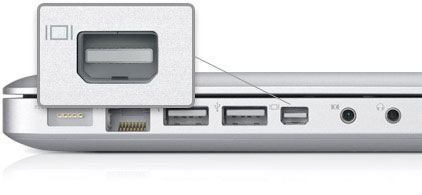
Photo Credit: Apple, Inc.
Apple also proclaims that:
The Mini DisplayPort is a brand-new, industry-standard port. It delivers a pure digital connection to external displays -- even large 30-inch displays -- quickly and without a glitch. No more multiple-pin connectors with unwieldy screws; the ultracompact Mini DisplayPort gives you plug-and-play performance with the new Apple LED Cinema Display. And it supports VGA, DVI, and dual-link DVI connections, too.
Those who were immediately concerned about whether or not this is a proprietary Apple standard like the ill-fated Apple Display Connector (ADC) need not worry as DisplayPort is an industry-standard backed by VESA.
However, it is worth noting that in the short-term there are few displays and projectors that use the new standard and Mini DisplayPort only supports VGA, DVI, and dual-link DVI connections with adapters. Apple sells adapters for Mini DisplayPort to VGA and DVI for US$29 each and Mini DisplayPort to dual-link DVI for a whopping US$99.
As for specifics regarding the "big difference" provided by Mini DisplayPort, Apple is a bit vague, but the official FAQ from DisplayPort.org addressed this question directly, explaining that:
The main product benefits are that DisplayPort provides improved performance as a standard feature relative to DVI, and can be packaged into a USB-sized connector for space-constrained applications like notebooks and graphics cards.
DisplayPort also enables ultra sleek, easy to use direct drive flat panel monitors and sets the stage for future display features such as single-cable multi-function monitor connectivity and daisy chained displays. DisplayPort enables a wide range of connectivity options to monitors, projectors and HDTVs via a single connector, making it an easy, universal and cross-application solution.
For those interested in more technical details, there also are a variety of archived White Papers available for download.
Permalink | Report an Error/Typo | Sign Up for Site Update Notices
<< Aluminum Unibody MacBook Q&A (Main)
Established in 1996, EveryMac.com has been created by experts with decades of experience with Apple hardware. EveryMac.com includes, and always has included, original research incorporating detailed, hands-on inspection of packaging, computers, and devices as well as extensive real-world use. All information is provided in good faith, but no website or person is perfect. Accordingly, EveryMac.com is provided "as is" without warranty of any kind whatsoever. EveryMac.com, and the authors thereof, shall not be held responsible or liable, under any circumstances, for any damages resulting from the use or inability to use the information within. For complete disclaimer and copyright information please read and understand the Terms of Use and the Privacy Policy before using EveryMac.com. Copying, scraping, or use of any content without expressed permission is not allowed, although links to any page are welcomed and appreciated.