
Hosted by site sponsor WebMate.
Unibody MacBook Pro Q&A
Published June 14, 2009
All Mac Q&As >> Unibody MacBook Pro Q&A | Also See: All MacBook Pro Specs
To be notified of new Q&As, sign up for EveryMac.com's bimonthly email list.
What are the differences between the "SD/Firewire 800 - Mid-2009" 13-Inch MacBook Pro Core 2 Duo models and the "Late 2008/Unibody" non-Pro MacBook notebooks that they replaced?
Please note that all MacBook Pro models mentioned in this Q&A have been discontinued. However, this Q&A is up-to-date and quite useful for anyone considering one of these notebooks on the used market.
In the comparison between the "Late 2008/Unibody" MacBook and MacBook Pro models, EveryMac.com noted that they had more in common than any series before them, and that "the models are so similar in many respects that branding them as separate lines largely is for marketing purposes alone".
On June 8, 2009, Apple effectively agreed and decided to "push" the "Unibody" MacBook line "up" into the "Pro" category and leave the "non-Pro" models again differentiated by polycarbonate rather than aluminum cases.
Without detailed inspection, one would be unlikely to notice a difference between the "SD/Firewire 800 - Mid-2009" 13-Inch MacBook Pro models -- the MacBook Pro "Core 2 Duo" 2.26 13" (SD/FW) and "Core 2 Duo" 2.53 13" (SD/FW) -- and the "Late 2008/Unibody" MacBook models -- the MacBook "Core 2 Duo" 2.0 13" (Unibody) and "Core 2 Duo" 2.4 13" (Unibody) -- that they replaced.
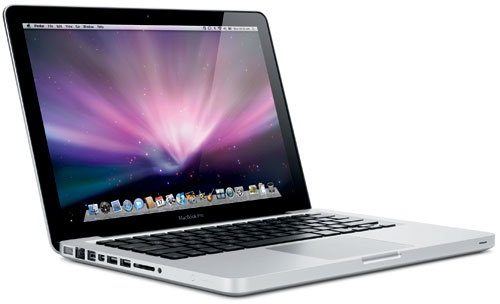
Photo Credit: Apple, Inc. (Mid-2009 13-Inch MacBook Pro)
Naturally, the "Mid-2009" MacBook Pro models have "MacBook Pro" printed on the bottom of the front black bezel and the "Late 2008/Unibody" MacBook models have "MacBook" printed in the same place. Both lines have a black and silver "Unibody" case -- milled from a single block of aluminum -- a "no button" glass "multi-touch" trackpad with support for "four finger" gestures and programmable "zones", and have LED-backlit displays.
Beyond the labeling difference, one viewing the two lines side-by-side might notice that all of these systems have a 13.3" widescreen (1280x800) LED-backlit "glossy" display, but that the display in the "Mid-2009" models is significantly higher-quality (said to have "60% greater color gamut"). One also might notice that the low-end "Late 2008" model -- the MacBook "Core 2 Duo" 2.0 13" (Unibody) -- does not have a backlit keyboard, whereas all of the other systems do.
The battery design of the "Mid-2009" models is quite different from the one used by their predecessors as it is non-swappable and not designed to be removed or serviced by end users. This may irritate some, but Apple reports that this design change makes it possible to pack a 58 W/Hr battery that provides 7 hours of runtime compared to a 45 W/Hr battery that provides 5 hours of runtime into the same amount of space. Some may find the increase in battery life to more than compensate for the loss of swapping/easy replacement.
Connectivity between the "Mid-2009" and "Late 2008" models is significantly different. All of these models include AirPort Extreme (802.11a/b/g/n), Bluetooth 2.1+EDR, Gigabit Ethernet, two USB 2.0 ports, and a "Mini DisplayPort" that supports an external display at 2560x1600. However, the "Late 2008" models have optical digital/analog audio in/out and the "Mid-2009" models lack optical audio in and instead packs the same "combined optical digital output/headphone out (user-selectable analog audio line in)" port used by the iPhone. The "Mid-2009" models, however, have an SD card slot and a single Firewire "800" port (much to the delight of videographers everywhere).
The internal differences actually are fairly modest. All use 45 nm "Penryn" Intel "Core 2 Duo" processors with two independent processor "cores" on a single silicon chip and a shared "on chip" 3 MB level 2 cache, a 1066 MHz frontside bus, 1066 MHz DDR3 SDRAM (PC3-8500), support for Serial ATA hard drives, a NVIDIA GeForce 9400M "graphics processor with 256 MB of DDR3 SDRAM shared with main memory", and an 8X DL "SuperDrive".
However, the "Mid-2009" models support 8 GB of RAM, whereas the "Late 2008" models only officially support 4 GB and actually support 6 GB (the chipset used by the "Late 2008" models supports 8 GB but Apple likely artificially capped the memory in firmware to protect sales of more expensive Macs).
These differences -- display, keyboard, battery design, connectivity, and expansion -- as well as configuration and introductory pricing differences are summarized below:
| MacBook (Late 2008) | MacBook Pro 13" (Mid-2009) | |
|---|---|---|
| Processor Types: | P7350, P8600 | P8400, P8700 |
| Processor Speeds: | 2.0, 2.4 GHz | 2.26, 2.53 GHz |
| Video System: | GeForce 9400M |
GeForce 9400M |
| Video Type: | Integrated* | Integrated* |
| Video Memory: | 256 MB* | 256 MB* |
| Display Size: | 13.3" | 13.3"** |
| Native Resolution: | 1280x800 | 1280x800 |
| Ext. Display: | 2560x1600 | 2560x1600 |
| Default Memory: | 2 GB | 2 GB, 4 GB |
| Maximum Memory: | 4 GB (6 GB)† | 8 GB |
| Hard Drive Size: | 160, 250 GB | 160, 250 GB |
| SuperDrive: | 8X DL | 8X DL |
| SD Card Slot: | No | Yes |
| Firewire 800: | No | Yes (1) |
| USB 2.0: | Yes (2) | Yes (2) |
| Ambient KB: | No††, Yes | Yes |
| Size (Inches): | 0.95 x 12.78 x 8.94 | 0.95 x 12.78 x 8.94 |
| Weight: | 4.5 lbs (2.04 kg) | 4.5 lbs (2.04 kg) |
| Battery Life: | 5 Hours§ | 7 Hours§ |
| Battery W/Hr: | 45 W/Hr | 58 W/Hr |
| Battery Swap: | Yes | No |
| Intro Price: | US$1299, US$1599 | US$1199, US$1499 |
* All of these systems have a NVIDIA GeForce 9400M "graphics processor with 256 MB of DDR3 SDRAM shared with main memory".
** The display in the "Mid-2009" MacBook Pro models is higher-quality and said to have a "60% greater color gamut".
† The "Late 2008" MacBook models only officially support 4 GB but actually support 6 GB of RAM.
†† The low-end MacBook "Core 2 Duo" 2.0 13" (Unibody) does not have a backlit keyboard.
§ Battery life as estimated by Apple in a "wireless productivity" test.
In the US, site sponsor Other World Computing sells used and refurb MacBook Pro models at bargain prices with free shipping, as well. On the other hand, if you need to sell a MacBook Pro, A+ BBB-rated Cash for Your Mac and GoRoostr will buy your older notebook with an instant quote and prompt payment.
In the UK, site sponsor Hoxton Macs sells used MacBook Pro models with a one-year warranty and free next day delivery throughout the UK. Delivery across Europe also is available starting at just £9.99 for two-day delivery to France and Germany.
Please refer to the Ultimate Mac Comparison feature to dynamically compare any MacBook or MacBook Pro model to any other G3 or later Mac.
Permalink | Report an Error/Typo | Sign Up for Site Update Notices
<< Unibody MacBook Pro Q&A (Main) | Also See: All MacBook Pro Specs
Established in 1996, EveryMac.com has been created by experts with decades of experience with Apple hardware. EveryMac.com includes, and always has included, original research incorporating detailed, hands-on inspection of packaging, computers, and devices as well as extensive real-world use. All information is provided in good faith, but no website or person is perfect. Accordingly, EveryMac.com is provided "as is" without warranty of any kind whatsoever. EveryMac.com, and the authors thereof, shall not be held responsible or liable, under any circumstances, for any damages resulting from the use or inability to use the information within. For complete disclaimer and copyright information please read and understand the Terms of Use and the Privacy Policy before using EveryMac.com. Copying, scraping, or use of any content without expressed permission is not allowed, although links to any page are welcomed and appreciated.