
Hosted by site sponsor WebMate.
Unibody MacBook Pro Q&A
Revision Published April 27, 2010
All Mac Q&As >> Unibody MacBook Pro Q&A | Also See: All MacBook Pro Specs
To be notified of new Q&As, sign up for EveryMac.com's bimonthly email list.
Is there a way to have a "matte" finish applied to a MacBook Pro with a "glossy" display?
When Apple introduced the 15-Inch "Late 2008/Unibody" MacBook Pro models -- the MacBook Pro "Core 2 Duo" 2.4 15" (Unibody) and MacBook Pro "Core 2 Duo" 2.53 15" (Unibody) -- only with "glossy" displays some users were frustrated by the lack of a "matte" display option.
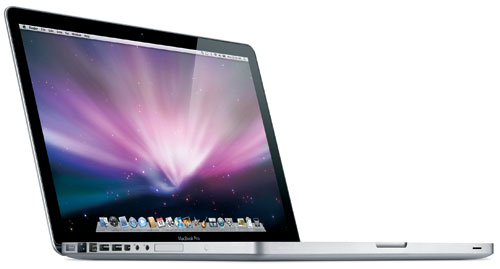
Photo Credit: Apple, Inc.
Subsequent 13-Inch and 15-Inch MacBook Pro models also were only offered with a glossy display until August 11, 2009, when Apple began offering the 15-Inch models with a matte option again until June 11, 2012, when Apple went back to glossy only displays.
Film Application Options
In an effort to cater to users irritated by glossy displays, at least two companies -- Photodon and Power Support -- started offering 15-Inch MacBook Pro "anti-glare films" for relatively inexpensive prices (subsequently discontinued). Both companies offer a variety of other anti-glare films for the 13-Inch MacBook models and other Apple products with glossy displays as well.
In a blog posting, iLounge's Jeremy Horwitz reported on the Power Support film specifically, and found:
So does the Anti-Glare Film work as expected? The simple answer is "yes." And nicely, at that. So nicely that we've been chuckling at recent news reports of other matte screen solutions -- that one company is now charging [US]$200 to replace the MacBook Pro's screen with a matte version, for instance, or that Apple wants [US]$50 extra to give 17" MacBook Pro users a matte screen instead of a glossy one. While [US]$35 for this film isn't cheap, it's a lot more reasonable than other available options, and achieves similar results.
Hardware Replacement Option
The "US$200 option" inferred above refers to a "Matte Finish Screen Upgrade" service from TechRestore (subsequently discontinued). For US$199.99, the company included:
Replacement of the super glossy, super shiny LCD screen on your MacBook Pro with a matte finish, non-glossy screen. We also remove the shiny glass cover on your MacBook Pro and replace it with a black bezel that surrounds the matte finish screen.
It was a serious commitment to have a fully-working glossy display replaced -- and invalidates the Apple display warranty (TechRestore provided a one-year warranty on the display the company installs) -- but MacWorld's Rob Griffiths was pleased to discover the option:
If glossy bothers you a lot, as it does me, but you really really want a new 15-inch MacBook Pro (TechRestore told me it's working on something similar for the 13-inch MacBook line), you might want to check out the TechRestore program. Sure, it's more money than is an anti-glare filter, but the end result appears to be well worth the investment.
Conclusion & More Recent Options
If you are the steady and patient type able to carefully apply a protective sheet to the display on a camera or iPod -- and find a glossy display to be a bigger distraction than the substantial likelihood of a few (or many) "air bubbles" -- you could consider buying anti-glare film for a 15-Inch "Unibody" MacBook Pro (naturally, after Apple began offering the option on August 11, 2009, it would make more sense to just configure a new system with a matte display option from Apple).
Prior to August 11, 2009, if you seriously detested glossy displays with a passion and would have rather incurred considerable expense and discard the Apple display warranty than be forced to use a glossy display -- and didn't consider purchasing a new 17-Inch "Unibody" MacBook Pro or a used 15-Inch MacBook Pro with an Apple provided matte display to be viable options -- the TechRestore solution might have been worth considering. After August 11, 2009, it is no longer needed.
In the US, site sponsor Other World Computing sells used and refurb MacBook Pro models at bargain prices with free shipping, as well. On the other hand, if you need to sell a MacBook Pro, A+ BBB-rated Cash for Your Mac and GoRoostr will buy your older notebook with an instant quote and prompt payment.
In the UK, site sponsor Hoxton Macs sells used MacBook Pro models with a one-year warranty and free next day delivery throughout the UK. Delivery across Europe also is available starting at just £9.99 for two-day delivery to France and Germany.
Permalink | Report an Error/Typo | Sign Up for Site Update Notices
<< Unibody MacBook Pro Q&A (Main) | Also See: All MacBook Pro Specs
Established in 1996, EveryMac.com has been created by experts with decades of experience with Apple hardware. EveryMac.com includes, and always has included, original research incorporating detailed, hands-on inspection of packaging, computers, and devices as well as extensive real-world use. All information is provided in good faith, but no website or person is perfect. Accordingly, EveryMac.com is provided "as is" without warranty of any kind whatsoever. EveryMac.com, and the authors thereof, shall not be held responsible or liable, under any circumstances, for any damages resulting from the use or inability to use the information within. For complete disclaimer and copyright information please read and understand the Terms of Use and the Privacy Policy before using EveryMac.com. Copying, scraping, or use of any content without expressed permission is not allowed, although links to any page are welcomed and appreciated.