
Hosted by site sponsor WebMate.
Power Macintosh G5 Q&A - Updated April 2, 2009
To be notified of new Q&As, sign up for EveryMac.com's bimonthly email list.
How many hard drives of what type are supported in the Power Mac G5? How do you replace the drive or add another one? Are there third-party products to use more drives than are "officially" supported?
Officially, all models in the Power Macintosh G5 series, regardless of architectural differences, support two 1.5 Gb/s Serial ATA (SATA) hard drives.
To replace the pre-installed hard drive or add a second one, site sponsor Other World Computing has provided a helpful step-by-step video of the process:
Fortunately, for those who need more than two internal hard drives, there are a variety of third-party products that make it possible to add additional internal 1.5 Gb/s SATA drives to the Power Macintosh G5.
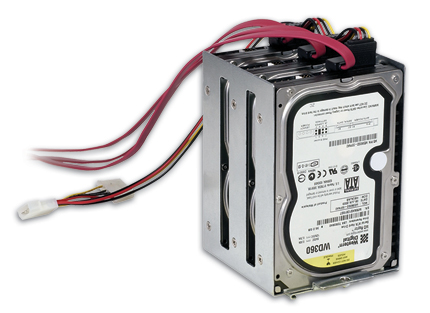
Photo Credit: Sonnet Technologies, Inc.
One such product is the Sonnet G5 Jive, which makes it possible to add three more internal drives to Power Macintosh G5 models with PCI-X or PCI-Express slots when installed along with a Serial ATA host adapter card. Although it is no longer available, it may pop up on the used market from time-to-time.
Sonnet notes that the Jive:
Consists of a custom metal base plate and mounting bracket, mounting screws, three internal SATA data cables, and a custom-designed 3-drive SATA power cable. It mounts in the space at the bottom of the case beneath the optical drive, and its installation has zero impact on PCI slots and adapter cards.
Sonnet also mentions that the G5 Jive places these additional drives in front of the CPU fans and as a result "there will be times when these fans will spin faster; it is normal and depends on system activity. Our testing indicates the G5 has plenty of cooling capacity and will run just fine."
If you choose to install more drives in the Power Mac G5 than are officially supported by Apple, you should carefully monitor the temperature of your system to ensure proper operation.
In addition to upgrade videos, as you would expect, Other World Computing sells the G5 Jive along with a number of other internal and external SATA solutions for the Power Mac G5.
Permalink | Report an Error/Typo | Sign Up for Site Update Notices
<< Power Macintosh G5 Q&A (Main)
Established in 1996, EveryMac.com has been created by experts with decades of experience with Apple hardware. EveryMac.com includes, and always has included, original research incorporating detailed, hands-on inspection of packaging, computers, and devices as well as extensive real-world use. All information is provided in good faith, but no website or person is perfect. Accordingly, EveryMac.com is provided "as is" without warranty of any kind whatsoever. EveryMac.com, and the authors thereof, shall not be held responsible or liable, under any circumstances, for any damages resulting from the use or inability to use the information within. For complete disclaimer and copyright information please read and understand the Terms of Use and the Privacy Policy before using EveryMac.com. Copying, scraping, or use of any content without expressed permission is not allowed, although links to any page are welcomed and appreciated.