
Hosted by site sponsor WebMate.
Aluminum iMac Q&A - Updated July 15, 2016
To be notified of new Q&As, sign up for EveryMac.com's bimonthly email list.
How do you upgrade the hard drive in the "Original/Mid-2007," "Early 2008," "Early 2009" and "Mid-2009" (20-Inch and 24-Inch) Aluminum iMac models? What type of hard drive do they support? Can you swap the hard drive for an SSD?
Please note that this Q&A covers Aluminum iMac models with 20-Inch and 24-Inch displays. EveryMac.com also provides instructions to upgrade the hard drive and SSD storage in more recent "Flat Edge" 21.5-Inch and 27-Inch aluminum models as well as the latest "Tapered Edge" 21.5-Inch and 27-Inch aluminum line.
The "Original/Mid-2007," "Early 2008," "Early 2009" and "Mid-2009" Aluminum iMac models -- all Aluminum iMacs with a 20-Inch or 24-Inch display -- each have a 3 Gb/s SATA connector for a 3.5" hard drive and different models have a variety of different hard drives installed by default.
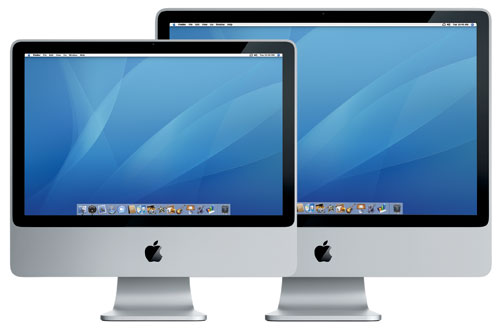
Photo Credit: Apple, Inc. (20-Inch & 24-Inch Aluminum iMac)
Apple considers the memory in these models to be a "customer installable part" but the hard drive is not intended to be upgraded by end users. Upgrading the memory is extremely easy -- there is a small removable "door" on the bottom of each system for this purpose -- but upgrading the hard drive requires one to remove the display and effectively disassemble the entire computer.
Disasembling the computer is not simple, but the hard drive in these models also can be swapped out with a faster 3 Gb/s SATA-equipped SSD, and the swap is no more difficult than upgrading the hard drive.
Identification Help
All of the 20-Inch and 24-Inch Aluminum iMac models have the same hard drive support. However, specific upgrade instructions are a bit different -- particularly for 20-Inch models -- so it still is important to be able to identify your iMac precisely.
These models can be most readily identified in software by Model Identifier as well as externally via EMC number (located inconveniently under the "foot" supporting the computer).
To locate the Model Identifier in software, select "About This Mac" under the Apple Menu on your computer and click the "More Info..." button. If the iMac is running OS X 10.7 "Lion" or later, you will need to click the "System Report" button after clicking "More Info..." as well. As always, EveryMac.com has carefully hand documented each EMC number and model identifier for your convenience.
These identifiers for each of the 20-Inch and 24-Inch iMac models follow:
iMac |
Subfamily |
EMC |
Model ID |
Mid-2007 |
|||
Mid-2007 |
|||
Mid-2007 |
|||
Mid-2007 |
|||
Early 2008 |
|||
Early 2008 |
|||
Early 2008 |
|||
Early 2008 |
|||
Early 2009 |
|||
Early 2009 |
|||
Early 2009 |
|||
Early 2009 |
|||
Mid-2009 |
|||
Mid-2009 |
EveryMac.com's Ultimate Mac Lookup feature also can uniquely identify these models by their Serial Number, which is listed on the underside of the foot along with the EMC number and within the operating system alongside the model identifier. More details about specific identifiers are provided in EveryMac.com's extensive Mac Identification section.
Hard Drive or SSD Upgrade Instructions
For adventurous -- and highly skilled -- users interested in replacing or upgrading the hard drive in 20-Inch or 24-Inch models themselves, site sponsor Other World Computing provides helpful step-by-step video instructions of the complex procedure:
20" Original/Mid-2007 & Early 2008 iMac Hard Drive Upgrade Video
20" Early 2009 and Mid-2009 iMac Hard Drive Upgrade Video
24" Original/Mid-2007 through Early 2009 iMac Hard Drive Upgrade Video
From watching the videos, it should be clear that upgrading the hard drive or SSD in these models is complicated. If you do not feel comfortable -- or have the time -- to perform the upgrade yourself, it always is a good idea to hire a professional.
Quality storage is important. Be sure to buy from a quality vendor that sells storage with a reputation for reliability.
Site sponsor Other World Computing sells SSDs for all iMac models (as well as hard drives) for do-it-yourself upgrades.
Also see:
- How do you upgrade the hard drive in the "Late 2009," "Mid-2010," "Mid-2011" and "Late 2011" (21.5-Inch and 27-Inch) Aluminum iMac models? What type of storage do they support? Is it even possible to upgrade these models?
- How do you upgrade the hard drive in the "Tapered Edge" Aluminum iMac models? What type of storage do they support? Is it possible to upgrade the hard drive or SSD?
Permalink | Report an Error/Typo | Sign Up for Site Update Notices
Established in 1996, EveryMac.com has been created by experts with decades of experience with Apple hardware. EveryMac.com includes, and always has included, original research incorporating detailed, hands-on inspection of packaging, computers, and devices as well as extensive real-world use. All information is provided in good faith, but no website or person is perfect. Accordingly, EveryMac.com is provided "as is" without warranty of any kind whatsoever. EveryMac.com, and the authors thereof, shall not be held responsible or liable, under any circumstances, for any damages resulting from the use or inability to use the information within. For complete disclaimer and copyright information please read and understand the Terms of Use and the Privacy Policy before using EveryMac.com. Copying, scraping, or use of any content without expressed permission is not allowed, although links to any page are welcomed and appreciated.