
Hosted by site sponsor WebMate.
"Tapered Edge" Aluminum iMac Q&A
Update Published April 14, 2022
All Mac Q&As >> "Tapered Edge" Aluminum iMac Q&A (Home)
To be notified of new Q&As, sign up for EveryMac.com's bimonthly email list.
How do you upgrade the RAM in the "Tapered Edge" Aluminum iMac models? Is it even possible? What type of RAM do they use? How much RAM does each model actually support?
Please note that this Q&A explains how to upgrade the RAM in "Tapered Edge" Aluminum iMac models that have RAM that can be upgraded. It also explains which of these models have RAM that cannot be upgraded. The "Tapered Edge" Aluminium iMac models use model numbers A1418, A1419, A2115 and A2116.
EveryMac.com also provides RAM upgrade instructions for earlier Aluminum iMac models shipped from 2007 to 2012 -- both the 20-Inch and 24-Inch Aluminum iMac models (model numbers A1224 and A1225) and the 21.5-Inch and 27-Inch Aluminum iMac models (model numbers A1311 and A1312).
Regardless of year, the "Tapered Edge" 27-Inch models all have RAM that is easy to upgrade. The 21.5-Inch models, however, range from needlessly difficult to impossible when it comes to the RAM upgrade procedure.
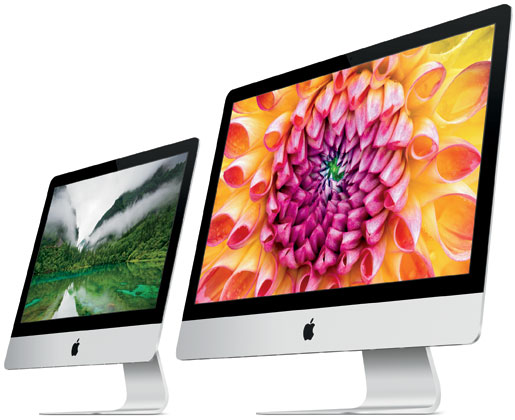
Photo Credit: Apple, Inc. (21.5" & 27" Tapered Edge iMac, Left & Right, Respectively)
Identification Help (Skip)
There are critical differences between different "Tapered Edge" iMac models. Different models use different types of RAM. Some models have RAM that is easy to upgrade, others are difficult to upgrade, and still others cannot be upgraded at all.
The "Late 2012" through "Mid-2017" "Tapered Edge" iMac models all share the A1418 and A1419 Model Numbers whereas the "2019" and "2020" iMac models use different A2116 and A2115 model numbers. Accordingly, more precise identifiers are crucial. For the purposes of upgrading the RAM, these models can be identified sufficiently by the Model Identifier in software and externally by EMC Number.
To locate the model identifier in software, select "About This Mac" under the Apple Menu on your computer, click the "More Info..." button, and finally click the "System Report" button.
The EMC number is inconveniently located on the bottom of the "foot" supporting the iMac, but EveryMac.com nevertheless has documented the EMC numbers by hand from the hardware itself -- as the site has done for many years -- because they are a unique external identifier.
More details about specific identifiers are provided in EveryMac.com's extensive Mac Identification section.
The relevant identifiers for these iMac models follow:
Tapered Edge iMac |
Subfamily |
Model ID |
EMC No. |
Late 2012 |
|||
Late 2012 |
|||
Late 2012 |
|||
Late 2012 |
|||
Late 2012 |
|||
Late 2012 |
|||
Early 2013 |
|||
Late 2013 |
|||
Late 2013 |
|||
Late 2013 |
|||
Late 2013 |
|||
Late 2013 |
|||
Late 2013 |
Mid-2014 |
Late 2014, 5K |
Late 2014, 5K |
Mid-2015, 5K |
Late 2015 |
Late 2015 |
Late 2015, 4K |
Late 2015, 4K |
Late 2015, 5K |
Late 2015, 5K |
Late 2015, 5K |
Mid-2017 |
|||
Mid-2017, 4K |
|||
Mid-2017, 4K |
|||
Mid-2017, 4K |
|||
Mid-2017, 5K |
|||
Mid-2017, 5K |
|||
Mid-2017, 5K |
|||
Mid-2017, 5K |
|||
2019, 4K |
|||
2019, 4K |
|||
2019, 4K |
|||
2019, 5K |
|||
2019, 5K |
|||
2019, 5K |
|||
2019, 5K |
|||
2020, 5K |
|||
2020, 5K |
|||
2020, 5K |
|||
2020, 5K |
|||
2020, 5K |
|||
2020, 5K |
EveryMac.com's Ultimate Mac Lookup feature also can identify these models by their Serial Numbers.
RAM Types & Actual Maximum RAM Capacities
For all of the "Late 2012", "Early 2013", "Late 2013", and "Late 2014" 21.5-Inch and 27-Inch "Tapered Edge" iMac models, Apple formally notes that the systems have "two 4 GB" of "1600 MHz DDR3 memory." However, for the 27-Inch models, Apple adds that these systems have "four user-accessible SO-DIMM slots."
After the "Late 2012" 21.5-Inch iMac models shipped, site sponsor Other World Computing disassembled one and discovered that it has two internal SO-DIMM slots (and subsequent "Early 2013" and "Late 2013" models are the same). Unfortunately, accessing these slots requires one to gingerly pry off the adhesive-attached display and remove the motherboard. By contrast, these 27-Inch models have a small panel that "pops off" the back with the press of a button. Needless to say, pressing a button to access the four SO-DIMM slots in the 27-Inch models is quick and easy.
Sadly, for the 21.5-Inch "Mid-2014" iMac -- the iMac "Core i5" 1.4 21.5-Inch (Mid-2014) -- Apple notes that it has "8 GB of 1600 MHz LPDDR3 onboard memory." OWC disassembled one and confirmed that the RAM is indeed soldered onboard and cannot be upgraded at all. This low-end model could not even be configured with more RAM at the time of initial purchase.
Likewise, the 21.5-Inch "Late 2015" iMac models (even the more expensive "Retina 4K" offerings), have a reported "8 GB of 1867 MHz LPDDR3 onboard memory" and OWC again confirmed that the RAM is soldered on these models. At the time of purchase, they could be upgraded to 16 GB for an extra US$200, but they cannot be upgraded at all after initial system purchase.
The 27-Inch "Late 2015" iMac models support four 204-pin 1867 MHz PC3-14900 DDR3 SDRAM SO-DIMMs. Officially, Apple supports 32 GB of memory, but OWC has determined that 64 GB actually will work if the memory conforms to exacting standards.
For the 21.5-Inch "Mid-2017" iMac models, Apple reports that they have 8 GB of "2133 MHz DDR4" or "2400 MHz DDR4" memory onboard. However, in a pleasant surprise, as first discovered by site sponsor OWC, the memory actually is not onboard and can be replaced or upgraded after the initial purchase of the Mac, it's just unnecessarily complicated. Some models actually can support more RAM than Apple officially supports, as well.
For the 27-Inch "Mid-2017" iMac models, these systems have four easy-to-access 2400 MHz PC4-19200 DDR4 SDRAM SO-DIMMs (260-pin). Apple only formally supports 32 GB of RAM in the iMac "Core i5" 3.4 27-Inch (Mid-2017), but it and all other 27" models from this line actually can support 64 GB of RAM.
For the 21.5-Inch "2019" iMac models, Apple reports that they have 8 GB of "2400 MHz DDR4" or "26666 MHz DDR4" memory "built into the computer" and "it can only be upgraded by an Apple Authorized Service Provider if you choose to upgrade at a later date." In a teardown, site sponsor OWC determined that the RAM in this model actually is not built into the computer and it can be replaced or upgraded later, it's just a pain to disassemble the computer to do so.
Finally, the 27-Inch "2019" and "2020" iMac models, like their predecessors, have four easy-to-access SO-DIMM slots. Unlike their predecessors, they use faster 2666 MHz PC4-21300 DDR4 DDR4 SDRAM SO-DIMMs (260-pin). Curiously, Apple formally allows up to 32 GB of RAM in the iMac "Core i5" 3.0 27" 5K and up to 64 GB of RAM in the other "2019" iMac 5K models, but site sponsor OWC has determined that all of these models actually support up to 128 GB of RAM.
For your convenience, these details are summarized accordingly:
| Tapered Edge iMac | RAM Speed | RAM Type | Slots | Actual Max |
| Late 2012 (21.5") | 1600 MHz | PC3-12800 DDR3L | 2 | 16 GB |
| Late 2012 (27") | 1600 MHz | PC3-12800 DDR3L | 4 | 32 GB |
| Early 2013 (21.5") | 1600 MHz | PC3-12800 DDR3L | 2 | 16 GB |
| Late 2013 (21.5") | 1600 MHz | PC3-12800 DDR3L | 2 | 16 GB |
| Late 2013 (27") | 1600 MHz | PC3-12800 DDR3L | 4 | 32 GB |
| Mid-2014 (21.5") | 1600 MHz | Soldered | 0 | 8 GB |
| Late 2014 (27", 5K) | 1600 MHz | PC3-12800 DDR3L | 4 | 32 GB |
| Mid-2015 (27", 5K) | 1600 MHz | PC3-12800 DDR3L | 4 | 32 GB |
| Late 2015 (21.5") | 1867 MHz | Soldered | 0 | 16 GB* |
| Late 2015 (21.5", 4K) | 1867 MHz | Soldered | 0 | 16 GB* |
| Late 2015 (27", 5K) | 1867 MHz | PC3-14900 DDR3 | 4 | 64 GB** |
| Mid-2017 (21.5") | 2133 MHz | PC4-17000 DDR4 | 2 | 16 GB |
| Mid-2017 (21.5", 4K) | 2400 MHz | PC4-19200 DDR4 | 2 | 32 GB† |
| Mid-2017 (27", 5K) | 2400 MHz | PC4-19200 DDR4 | 4 | 64 GB‡ |
| 2019 (21.5", 4K, i3) | 2400 MHz | PC4-19200 DDR4 | 2 | 32 GB |
| 2019 (21.5", 4K) | 2666 MHz | PC4-21300 DDR4 | 2 | 32 GB |
| 2019 (27", 5K) | 2666 MHz | PC4-21300 DDR4 | 4 | 128 GB♦ |
| 2020 (27", 5K) | 2666 MHz | PC4-21300 DDR4 | 4 | 128 GB |
* The 21.5-Inch "Late 2015" models could be upgraded from the standard 8 GB of RAM to 16 GB of RAM at the time of purchase for an extra US$200. The RAM cannot be upgraded afterwards at all.
** Officially, the 27-Inch "Late 2015" models support 32 GB of RAM, but they actually can support 64 GB.
† Officially, the entry-level iMac "Core i5" 3.0 21.5-Inch (4K, Mid-2017) only can be upgraded to 16 GB of RAM, but it actually supports 32 GB of RAM like the other models in its crew.
‡ Officially, the iMac "Core i5" 3.4 27-Inch (5K, Mid-2017) can be upgraded to 32 GB of RAM, but it supports 64 GB like all of the other 27-Inch "Mid-2017" iMac models.
♦ Officially, Apple formally allows up to 32 GB of RAM in the iMac "Core i5" 3.0 27" 5K (2019) and up to 64 GB of RAM in the other "2019" iMac 5K models, but all of these models actually support up to 128 GB of RAM.
RAM Upgrade Official Disclaimer & Cautions
Apple's own support site provides simple text instructions to upgrade the RAM in these 27-Inch iMac models. For the "Late 2012", "Early 2013", "Late 2013", "Mid-2017" and "2019" 21.5-Inch iMac models, however, Apple instead notes that the system "has no user-accessible RAM compartment. RAM replacement on the iMac (21.5-inch, Late 2012, [Early 2013, Late 2013, Mid-2017 or 2019]) must be done by an Apple Retail Store or Apple Authorized Service Provider."
It certainly is unfortunate that Apple decided to make it so difficult, or even impossible, to upgrade the RAM on the 21.5-Inch models. In particular, using adhesive to attach the display to the chassis -- rather than magnets like previous Aluminum iMac models -- is a design decision that is inelegant at best. As Apple does not consider the RAM in the applicable 21.5-Inch iMac models to be a "customer installable part," EveryMac.com cannot recommend that users perform the upgrade themselves.
When these iMac models were new, most interested in a 21.5-Inch system were best off considering upgrading the RAM on an applicable model at the time of purchase -- which unfortunately meant paying a higher upfront price overall -- or alternately hiring a professional to perform the upgrade on models that can be upgraded. However, now on the used market, independent RAM upgrades are your only option.
If it is important to you to be able to upgrade the RAM yourself, particularly as higher capacity memory modules may become available in the future, you may instead prefer to avoid these 21.5-Inch iMac models altogether in favor of a 27-Inch "Late 2012", "Late 2013", "Late 2014", "Late 2015", "Mid-2017", "2019" or "2020" model.
Given the relative challenge to upgrade the RAM in applicable 21.5-Inch iMac models, this certainly is not a good system to upgrade yourself without substantial experience upgrading computers. Likewise, be absolutely certain to correctly identify your 21.5-Inch iMac to make sure that the RAM can be upgraded at all before prying it open.
For highly experienced users, upgrading the RAM in the "Late 2012," "Early 2013," "Late 2013," "Mid-2017" and "2019" 21.5-Inch iMac models is entirely possible, just difficult. It is not possible to upgrade the RAM in the "Mid-2014" or "Late 2015" 21.5-Inch models after initial system purchase at all. By contrast, upgrading the RAM in these 27-Inch iMac models is easy for just about everyone.
One should review Apple's official text-based instructions for the 27-Inch model prior to performing the RAM upgrade, but even better, site sponsor Other World Computing provides excellent step-by-step videos for applicable models:
21.5-Inch "Late 2012" through "Mid-2014" iMac RAM Upgrade Video
21.5-Inch "Mid-2017" iMac RAM Upgrade Video
21.5-Inch "2019" iMac RAM Upgrade Video
27-Inch "Late 2012" & "Late 2013" iMac RAM Upgrade Video
27-Inch "Late 2014" & "Mid-2015" (Retina 5K) iMac RAM Upgrade Video
27-Inch "Late 2015" through "2020" (Retina 5K) iMac RAM Upgrade Video
After watching these videos, it should be clear that upgrading the RAM in applicable 21.5-Inch iMacs is a pain whereas it is a simple procedure for the 27-Inch iMacs.
For applicable 21.5-Inch models, it is strongly recommended that you hire a professional (yet again, the RAM in the 21.5-Inch "Mid-2014" and "Late 2015" iMac models cannot be upgraded after initial system purchase at all). For the 27-Inch models, if you do not feel comfortable -- or have the time -- to perform the upgrade yourself, hiring a professional always is a good option.
iMac RAM Purchase & Professional Installation Options
Just because RAM meets the minimum listed criteria does not mean that it will necessarily function as intended in a particular Mac. Be sure to buy from a quality vendor that has tested their RAM with your Mac to ensure full compatibility.
In the US (and many other countries), site sponsor Other World Computing sells memory compatible with all iMac models (and all other Macs).
In Germany, site sponsor CompuRAM sells quality memory for all iMac models with affordable delivery country-wide and in person pick up and professional installation service available in Munich.
Also see:
- How do you upgrade the RAM in the "Mid-2007," "Early 2008," "Early 2009" and "Mid-2009" (20-Inch and 24-Inch) Aluminum iMac models? What type of RAM do they use? How much RAM do they actually support?
- How do you upgrade the RAM in the "Late 2009," "Mid-2010," "Mid-2011" and "Late 2011" (21.5-Inch and 27-Inch) Aluminum iMac models? What type of RAM do they use? How much RAM do they actually support?
Permalink | Report an Error/Typo | Sign Up for Site Update Notices
Suggest a New Q&A | Sign Up for Bimonthly Site Update Notices
<< "Tapered Edge" Aluminum iMac Q&A (Main) | All Mac Q&As
Established in 1996, EveryMac.com has been created by experts with decades of experience with Apple hardware. EveryMac.com includes, and always has included, original research incorporating detailed, hands-on inspection of packaging, computers, and devices as well as extensive real-world use. All information is provided in good faith, but no website or person is perfect. Accordingly, EveryMac.com is provided "as is" without warranty of any kind whatsoever. EveryMac.com, and the authors thereof, shall not be held responsible or liable, under any circumstances, for any damages resulting from the use or inability to use the information within. For complete disclaimer and copyright information please read and understand the Terms of Use and the Privacy Policy before using EveryMac.com. Copying, scraping, or use of any content without expressed permission is not allowed, although links to any page are welcomed and appreciated.