
Hosted by site sponsor WebMate.
iPhone Troubleshooting & Repair Q&A - Updated April 18, 2014
All Apple Q&As >> iPhone Repair Q&A (Home) | Also See: All iPhone Specs
To be notified of new Q&As, sign up for EveryMac.com's bimonthly email list.
How long is the maximum battery life of each iPhone? Why does my iPhone run out of power so quickly? How can I conserve battery life?
The maximum battery life for each iPhone model can vary considerably depending on how it is used -- for phone calls, Internet use over 2G, 3G, or 4G networks, Internet use over Wi-Fi, music playback, and video playback, for example.
EveryiPhone.com lists the maximum battery life for each task, as estimated by Apple, on the specs page for each iPhone.
These battery life estimates, in hours, also are provided below:
| Talk | 2G | 3G | 4G | Wi-Fi | Audio | Video | Standby | |
| Original iPhone | 8 | 6 | -- | -- | 6 | 24 | 7 | 250 |
| iPhone 3G | 10/5 | -- | 5 | -- | 6 | 24 | 7 | 300 |
| iPhone 3GS | 12/5 | -- | 5 | -- | 9 | 30 | 10 | 300 |
| iPhone 4 GSM | 14/7 | -- | 6 | -- | 10 | 40 | 10 | 300 |
| iPhone 4 CDMA | 7 | -- | 6 | -- | 10 | 40 | 10 | 300 |
| iPhone 4S | 14/8 | -- | 6 | -- | 9 | 40 | 10 | 200 |
| iPhone 5 | 8 | -- | 8 | 8 | 10 | 40 | 10 | 225 |
| iPhone 5c | 10 | -- | 8 | 10 | 10 | 40 | 10 | 250 |
| iPhone 5s | 10 | -- | 8 | 10 | 10 | 40 | 10 | 250 |
Of course, these estimates are maximum usage numbers when performing a single task. In the real world, one is unlikely to only perform a single task in a day and instead will mix phone calls, texting, Internet use, listening to music, video playback, and gaming, for example.
Enhancing Real-World Battery Life
A mix of uses that is demanding on the battery will make your iPhone run out of power more quickly. However, you probably can change your settings and usage habits to squeeze out a bit more runtime.
Based both on Apple's own "simple guidelines" and years of hands-on use (and often hunting for an outlet), ten straightforward tips to increase the battery life of your iPhone follow.
You likely will not be able to use all of these tips simultaneously, but even some of them will make a difference to extend the battery life of your iPhone:
1) Turn Off All Antennas Not in Active Use
The iPhone has many antennas that consume battery life. If you're not using Bluetooth at the moment, turn it off. If you're not using Cellular networking (3G or 4G), turn it off. If you're not using Wi-Fi, turn it off. These settings all are on the first screen of the "Settings" app.
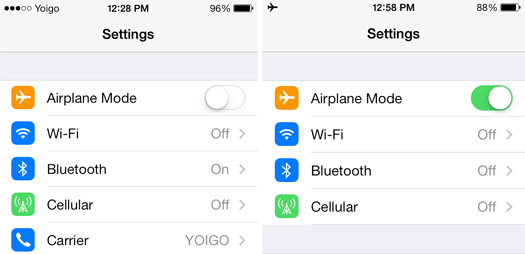
Image Credit: EveryiPhone.com (Some Antennas On, Left; Airplane Mode/Off, Right)
When you are in an area that is equipped with Wi-Fi, Apple explains that Wi-Fi uses less power than 3G/4G, so using Wi-Fi instead (and turning off Cellular networking) will improve your battery life.
You even could switch to Airplane Mode and turn off all antennas if you're really trying to stretch runtime, but that would mean you cannot even receive calls or texts. If you're that desperate to extend the battery life, you might consider just turning the iPhone off altogether and only turning it on again when really needed.
2) Reduce Screen Brightness
The big, pretty screens on the iPhone models draw a lot of power. Like just about all portable devices, dimming the display helps the battery last longer.
In iOS 7, swipe up from the bottom on the home screen to quickly access the "Control Center" and adjust the brightness slider. In iOS 6, use the "Wallpapers & Brightness" option within the "Settings" app.
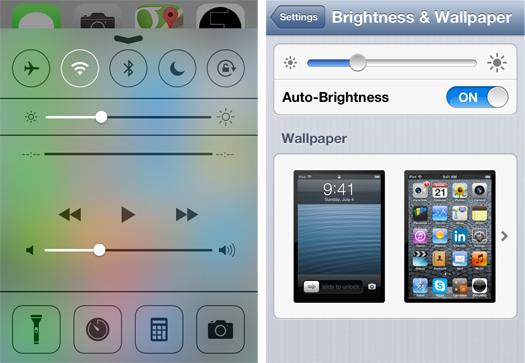
Image Credit: EveryiPhone.com (Reducing Brightness: iOS 7 - Left; iOS 6 - Right)
Alternately, you may prefer to just switch "Auto-Brightness" on under the "Wallpapers & Brightness" section of the "Settings" app. This will automatically make an effort to balance battery life and usability, although based on hands-on use, you may prefer it brighter than the default auto setting when battery life is not an issue.
3) Turn Off or Reduce Usage of Location Services
The GPS unit in the iPhone uses quite a bit of power. If you don't actively need the GPS capability at the moment, turn off Location Services or at least carefully select the applications that have access to the feature to reduce the usage of GPS.
In iOS 6 and iOS 7 alike, go to "Settings" and navigate to Privacy > Location Services.
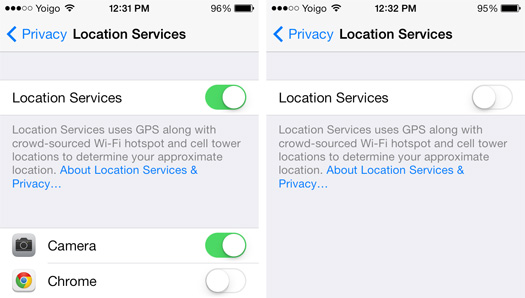
Image Credit: EveryiPhone.com (Location Services: Partially On - Left; Off - Right)
While you are using the Location Services control panel, it also would be wise to make sure you are comfortable sharing your location with the apps on the list the next time you have Location Services activated. No doubt there are some apps that don't really need to know where you are at any given moment to function.
4) Turn Off Push or Reduce Fetch Frequency
Turning off push or reducing the frequency that e-mail and other data is retrieved will reduce the amount of time data antennas are used and increase battery life.
In iOS 6 and iOS 7 alike, launch the "Settings" app and navigate to Mail, Contacts, Calendars > Fetch New Data.
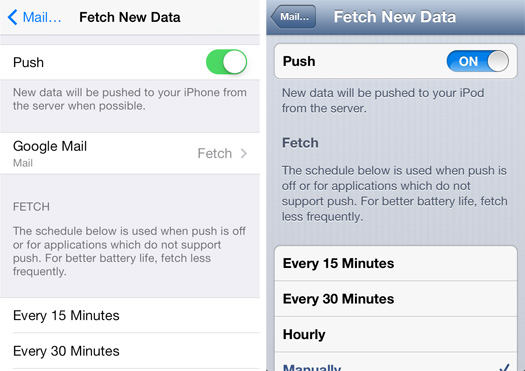
Image Credit: EveryiPhone.com (Fetch New Data: iOS 7 - Left; iOS 6 - Right)
Of course, you may really need to see e-mail and other data more quickly, so should you change "Fetch" to manual, be sure to change it back later when battery life is less of an issue.
5) Turn Off Automatic Updates
Automatic app updates use antennas and consume battery life. To turn off automatic updates, launch "Settings" and navigate to iTunes & App Store, scroll to "Updates" and switch it to off.
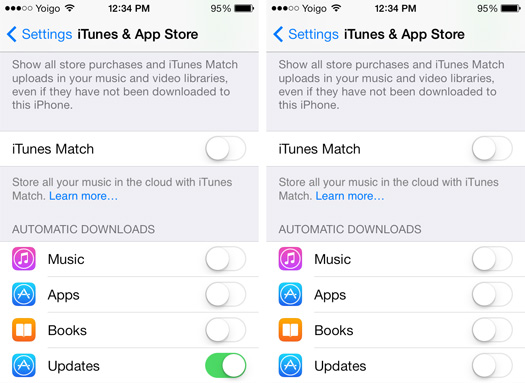
Image Credit: EveryiPhone.com (iOS 7 - Turning Off Automatic Updates)
If you are the type of user who prefers letting others test new operating systems and apps and only update once bugs are fixed, you may prefer to leave automatic updates off regardless of battery life and later perform updates on a schedule of your choosing.
6) Turn Off or Reduce Push Notifications
The more apps you have that retrieve data and turn the screen on to show notifications, the quicker it will run down the battery.
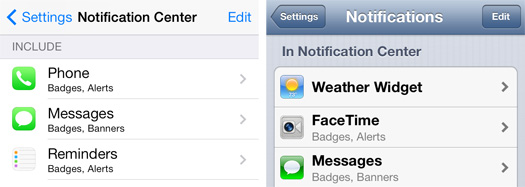
Image Credit: EveryiPhone.com (Notifications: iOS 7 - Left; iOS 6 - Right)
In iOS 7, select the "Settings" app and then "Notification Center." Swipe up and individually turn off specific apps. In iOS 6, select the "Settings" app and then "Notifications" to perform the same function.
While you're in the Notification Center or Notifications control panel, it is a good time to also turn off push notifications from apps that you don't particularly want bugging you regardless of battery life.
7) Turn Off or Reduce Background App Refresh
iOS 7 helpfully allows apps to automatically update content in the background. This does consume some battery life, though.
To turn off this functionality, go to "Settings" and select General > Background App Refresh. Either turn the feature off entirely or limit it to apps that you find most useful to have refreshed frequently.
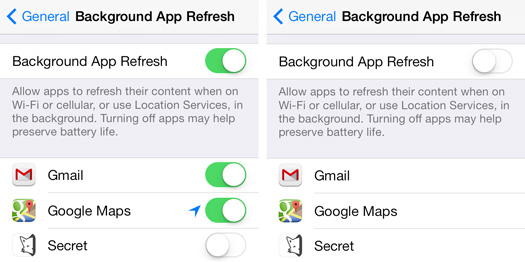
Image Credit: EveryiPhone.com (Background Refresh: Partially On - Left; Off - Right)
Regardless of battery life, you likely will find there are some apps that you do not really need to have automatically refreshed, either. Keep in mind, though, that when you launch these apps later, it may take a while to update data at that time.
8) Decrease Auto-Lock Time
The longer the display stays illuminated, the quicker the battery runs down. Decrease the auto-lock time to one minute and the battery will last longer.
In iOS 6 and iOS 7, launch the "Settings" app and navigate to General > Auto-Lock.
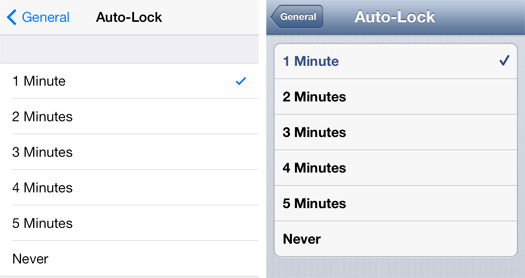
Image Credit: EveryiPhone.com (Decreasing Auto-Lock: iOS 7 - Left; iOS 6 - Right)
The downside to decreasing the Auto-Lock time is that you may find yourself entering your passcode more often than you would like should you not have a "Touch ID" enabled iPhone 5s.
9) Turn Off Silly iOS 7 Nonsense
Two largely unnecessary iOS 7 "features" that consume battery life are "Background Motion" (which makes icons look like they "float" a bit when the device is shifted from side-to-side) and "Dynamic Backgrounds" which are animated.
In iOS 7, to turn off Background Motion, launch the "Settings" app and select General > Accessibility > Reduce Motion and switch it to on. If you're using an animated background, go to Settings > Wallpapers & Brightness and choose a wallpaper that is not in the "Dynamic" collection or otherwise animated.
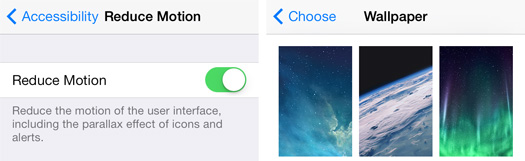
Image Credit: EveryiPhone.com (iOS 7: Reduce Motion Setting, Static Wallpapers)
It seems unlikely that you will miss these features a great deal -- and they actually make some people nauseous -- but they're easy to turn back on later if you do.
10) Reduce & Modify Usage
It's obviously not much fun to use your iPhone less, but that will increase its battery life. In particular, using mobile Internet, watching video, and playing games will reduce the battery life the quickest as these activities hit the battery consuming display and graphics systems the hardest. If you need to stretch the battery life, reducing those activities will make the battery life longer.
If the battery in your iPhone isn't lasting for as long as it used to, particularly if the device is two or three years old, it very likely may be time to replace the battery, as well.
Also see:
Permalink | Report an Error/Typo | Sign Up for Site Update Notices
<< iPhone Troubleshooting & Repair Q&A (Main)
Established in 1996, EveryMac.com has been created by experts with decades of experience with Apple hardware. EveryMac.com includes, and always has included, original research incorporating detailed, hands-on inspection of packaging, computers, and devices as well as extensive real-world use. All information is provided in good faith, but no website or person is perfect. Accordingly, EveryMac.com is provided "as is" without warranty of any kind whatsoever. EveryMac.com, and the authors thereof, shall not be held responsible or liable, under any circumstances, for any damages resulting from the use or inability to use the information within. For complete disclaimer and copyright information please read and understand the Terms of Use and the Privacy Policy before using EveryMac.com. Copying, scraping, or use of any content without expressed permission is not allowed, although links to any page are welcomed and appreciated.