
Hosted by site sponsor WebMate.
Silver Tower Mac Pro (Dual Optical) Q&A - Updated December 1, 2017
All Mac Q&As >> Silver Tower Mac Pro Dual Optical Q&A (Home)
To be notified of new Q&As, sign up for EveryMac.com's bimonthly email list.
What are the default graphics cards provided with each Mac Pro? What Mac Pro compatible video cards are available for purchase later? What is the best video card for the Mac Pro? Which video cards have which ports?
All silver tower Mac Pro models have removable video cards with dedicated graphics and can support additional video cards, too.
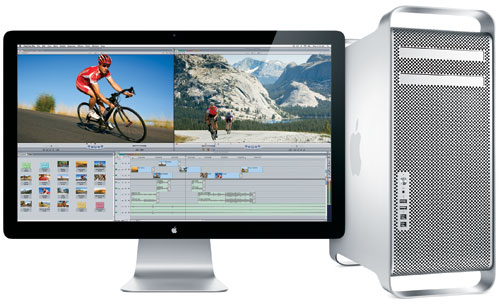
Photo Credit: Apple, Inc. (Mac Pro)
Identification Help
If you're not certain which Mac Pro you have, all Mac Pro lines can be identified "closely enough" by the Model Identifier in software to determine the default video card as well as confirm compatibility with aftermarket video cards.
To locate the model identifier, select "About This Mac" under the Apple Menu on your computer and click the "More Info..." button. If the Mac Pro is running OS X "Lion" (10.7) or later, click the "System Report" button after clicking "More Info..." as well.
Externally, the Mac Pro lines can be uniquely identified by EMC Number. The EMC number is listed on the rear of the system in small type.
Useful identifiers for the Mac Pro lines include:
Mac Pro Subfamily |
Model Number |
Model ID |
EMC Number |
Original (2006) |
|||
Original (2007) |
|||
Early 2008 |
|||
Early 2009 |
|||
Mid-2010 |
|||
Mid-2012 |
More details about specific identifiers are provided in EveryMac.com's extensive Mac Identification section.
EveryMac.com's Ultimate Mac Lookup feature also can identify these systems by their Serial Numbers.
Default Mac Pro Video Cards
Information on the default graphics cards -- as well as original options available via custom configuration -- are provided on the EveryMac.com specs pages for each Mac Pro model.

Photo Credit: NVIDIA, Left - GeForce 7300 GT & ATI, Right - Radeon HD 2600 XT
However, default Mac Pro video cards for each series, as well as the ports provided by each video card, also are provided below for your convenience:
Mac Pro Subfamily |
Default Video Card |
VRAM |
Ports |
Original |
NVIDIA GeForce 7300 GT |
256 MB GDDR2 | 1 SL DVI |
Early 2008 |
ATI Radeon HD 2600 XT |
256 MB GDDR3 | 2 DL DVI |
Early 2009 |
NVIDIA GeForce GT 120 |
512 MB GDDR3 | 1 Mini DP |
Mid-2010 |
ATI Radeon HD 5770 |
1 GB GDDR5 | 2 Mini DP |
Mid-2012 |
ATI Radeon HD 5770 |
1 GB GDDR5 | 2 Mini DP |
Custom Configuration Mac Pro Video Card Options
At the time of purchase, each Mac Pro could be configured with at least one higher performance video card as an optional upgrade.
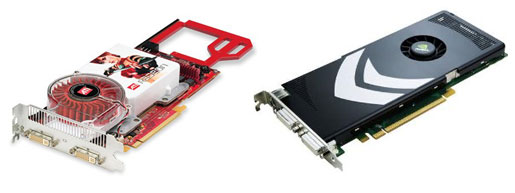
Photo Credit: ATI, Left - Radeon X1900 XT & NVIDIA, Right - GeForce 8800 GT
The video cards available via custom configuration for each Mac Pro line include:
Mac Pro Subfamily |
Video Card Options |
VRAM |
Ports |
Original |
ATI Radeon X1900 XT |
512 MB GDDR3 |
2 DL DVI |
|
NVIDIA Quadro FX 4500 |
512 MB GDDR3 |
2 DL DVI |
Early 2008 |
NVIDIA GeForce 8800 GT |
512 MB GDDR3 |
2 DL DVI |
|
NVIDIA Quadro FX 5600 |
1.5 GB GDDR3 |
2 DL DVI |
Early 2009 |
ATI Radeon HD 4870 |
512 MB GDDR5 |
1 Mini DP |
Mid-2010 |
ATI Radeon HD 5870 |
1 GB GDDR5 |
2 Mini DP |
Mid-2012 |
ATI Radeon HD 5870 |
1 GB GDDR5 |
2 Mini DP |
Aftermarket Mac Pro Video Card Options
Of course, it always is possible to purchase one of the higher performance video cards that was offered with a particular Mac Pro after the initial system purchase. For the original Mac Pro models, this is your only readily available option without hacking the system by also installing a newer, officially unsupported, version of OS X.
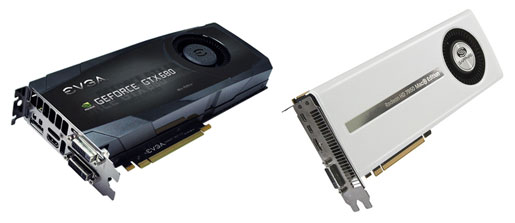
Photo Credit: EVGA, Left - GeForce GTX 680 & AMD/Sapphire, Right - Radeon HD 7950
However, for subsequently released Mac Pro models there also are compatible aftermarket video cards available, including the NVIDIA GeForce GTX Titan X with 12 GB of GGDR5 VRAM, the most powerful video card available for these Mac Pro models.
These all are intended to work with the Mac Pro either with default OS X support or with provided drivers:
Video Card |
VRAM |
Ports |
OS X |
1.5 GB GDDR5 |
2 DL DVI |
10.5.7+ |
|
2 GB GDDR5 |
1 DL DVI |
10.6.5+ |
|
3 GB GDDR5 |
1 HDMI |
10.7.5+ |
|
2 GB GDDR5 |
1 HDMI |
10.8.3+ |
|
4 GB GDDR5 |
2 DVI |
10.8.3+ |
|
6 GB GDDR5 |
1 DL DVI |
10.9.5+ |
|
6 GB GDDR5 |
1 DL DVI |
10.9.5+ |
|
12 GB GDDR5 |
1 DVI |
10.10.5+ |
* Please note that the Sapphire Radeon HD 7950 only is compatible with the "Mid-2010" and "Mid-2012" Mac Pro models. The other video cards above are compatible with the "Early 2008" and "Early 2009" as well as the "Mid-2010" and "Mid-2012" Mac Pro models.
The excellent BareFeats has various "shootouts" that compares several of the above video cards with one another as well as stock Mac Pro video cards that are well worth reviewing.
ArsTechnica, Architosh, MacsOnly, and others also offer in-depth reviews of the NVIDIA Quadro FX 4800, NVIDIA Quadro 4000, AMD Sapphire Radeon HD 7950, EVGA GeForce GTX 680, PNY NVIDIA Quadro K5000, NVIDIA GeForce GTX 780, and NVIDIA GeForce GTX Titan X that may be of interest, too.
Site sponsor Other World Computing sells a selection of Mac Pro compatible video cards including default options, video cards that originally were offered as custom configurations, and some aftermarket options listed above.
Upgraded the video card in your Mac Pro? Please share your experiences. Thank you.
Also see: How many PCI slots of what type are provided by the Mac Pro models? How do you install a PCIe card in the Mac Pro?
Permalink | Report an Error/Typo | Sign Up for Site Update Notices
<< Mac Pro Dual Optical Drives Q&A (Main) | All Mac Q&As
Established in 1996, EveryMac.com has been created by experts with decades of experience with Apple hardware. EveryMac.com includes, and always has included, original research incorporating detailed, hands-on inspection of packaging, computers, and devices as well as extensive real-world use. All information is provided in good faith, but no website or person is perfect. Accordingly, EveryMac.com is provided "as is" without warranty of any kind whatsoever. EveryMac.com, and the authors thereof, shall not be held responsible or liable, under any circumstances, for any damages resulting from the use or inability to use the information within. For complete disclaimer and copyright information please read and understand the Terms of Use and the Privacy Policy before using EveryMac.com. Copying, scraping, or use of any content without expressed permission is not allowed, although links to any page are welcomed and appreciated.