
Hosted by site sponsor WebMate.
Cylinder Mac Pro Q&A - Updated May 3, 2017
All Mac Q&As >> Cylinder Mac Pro Q&A (Home) | Also see: All Mac Pro Specs
To be notified of new Q&As, sign up for EveryMac.com's bimonthly email list.
What are the default graphics cards provided with the Gray Cylinder Mac Pro? What graphics card options are available? How do you upgrade the graphics card(s)? Do these models use standard PC graphics cards?
The standard Cylinder Mac Pro models both have dual graphics cards.
Specifically, the original entry-level Mac Pro "Quad Core" 3.7 shipped with dual AMD FirePro D300 graphics processors with 2 GB of GDDR5 memory each and the higher-end original standard Mac Pro "Six Core" 3.5 first shipped with dual AMD FirePro D500 graphics processors with 3 GB of GDDR5 memory each.
On April 4, 2017, Apple made the Mac Pro "Eight Core" 3.0 a standard configuration at a lower price point and equipped it with more powerful dual AMD FirePro D700 graphics processors with 6 GB of GDDR5 memory each by default.
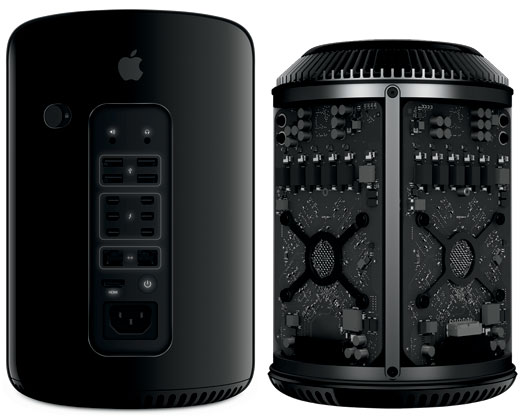
Photo Credit: Apple, Inc. (Cylinder Mac Pro - Back, Left; Graphics Cards Visible, Right)
Standard & Custom Configured Graphics Cards
Apple originally offered dual AMD FirePro D700 graphics cards each with 6 GB of GDDR5 memory as a US$1000 upgrade for the entry-level Mac Pro "Quad Core" 3.7 and a US$600 upgrade for the Mac Pro "Six Core" 3.5.
On April 4, 2017, Apple discontinued the entry-level Mac Pro "Quad Core" 3.7 altogether and dropped the price of the dual AMD FirePro D700 graphics processors as an upgrade for the Mac Pro "Six Core" 3.5 to US$200.
The technical differences between these three graphics cards include the following:
AMD FirePro |
GDDR5 Memory |
Stream Processors |
Memory Bus |
Memory Bandwidth |
Teraflops Performance |
D300 |
2 GB |
1280 |
256-Bit |
160 GB/s |
2.0 Teraflops |
D500 |
3 GB |
1526 |
384-Bit |
240 GB/s |
2.2 Teraflops |
D700 |
6 GB |
2048 |
384-Bit |
264 GB/s |
3.5 Teraflops |
For those interested in how these graphics cards compare to AMD's offerings for PCs, the always detailed AnandTech did some digging and reported that the "D300 is Pitcairn based, the D500 appears to use a Tahiti LE with a wider 384-bit memory bus, while the D700 is a full blown Tahiti XT."
Preliminary Upgrade Information
Officially, only the memory and SSD storage in the Cylinder Mac Pro are designed to be upgraded by end-users. Apple does not state whether or not the graphics processors can be upgraded.
However, as first confirmed in a teardown by site sponsor Other World Computing, both graphics cards are removable.
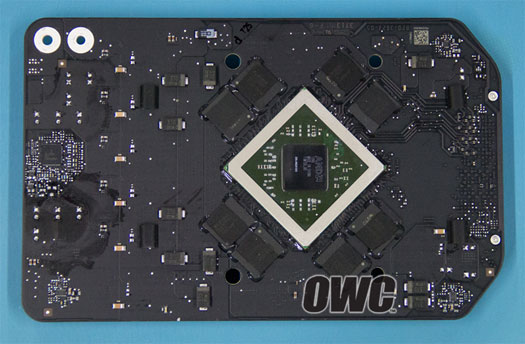
Photo Credit: Other World Computing (Cylinder Mac Pro Graphics Card Removed)
These graphics cards are custom designed for the Cylinder Mac Pro, and although they use a PCI 3.0 x16 interface, the Cylinder Mac Pro is not compatible with any standard Mac or Windows compatible PCIe video card. Both the physical dimensions of the card and the connector are specific to the Cylinder Mac Pro.
Unlike earlier Mac Pro models that have industry-standard PCIe slots and support a fairly wide variety of video cards as a result, the Cylinder Mac Pro models would require third-parties to create video cards specifically for the Cylinder Mac Pro.
Although it is technically possible for third-parties to create custom video card upgrades, because Apple has effectively discontinued the design of this system and the potential market size for such a product is low, it is unlikely that anyone will release new graphics cards for the Cylinder Mac Pro.
What is the maximum resolution supported by the default configuration of the Gray Cylinder Mac Pro? How many displays can it support with the default graphics card?
Regardless of the graphics cards installed in the Gray Cylinder Mac Pro -- the dual AMD FirePro D300 or D500 graphics processors that are provided by default or the dual FirePro D700 graphics processors that are available as a custom upgrade -- the maximum supported resolutions and number of displays are the same.
Originally, Apple specified that each Cylinder Mac Pro supported as many as three 4K displays (3840x2160) -- two using Thunderbolt 2 ports and one using the HDMI port -- or as many as six 2560x1600 displays using all six Thunderbolt 2 ports.
However, on June 16, 2015, without updating the graphics cards themselves, Apple quietly increased the official support to as many as three 5K displays (5120x2880) -- two using Thunderbolt 2 ports and one using the HDMI port. The support for as many as six 2560x1600 displays using all six Thunderbolt 2 ports remained unchanged.
Permalink | Report an Error/Typo | Sign Up for Site Update Notices
<< Cylinder Mac Pro Q&A (Main) | All Mac Q&As | All Mac Pro Specs
Established in 1996, EveryMac.com has been created by experts with decades of experience with Apple hardware. EveryMac.com includes, and always has included, original research incorporating detailed, hands-on inspection of packaging, computers, and devices as well as extensive real-world use. All information is provided in good faith, but no website or person is perfect. Accordingly, EveryMac.com is provided "as is" without warranty of any kind whatsoever. EveryMac.com, and the authors thereof, shall not be held responsible or liable, under any circumstances, for any damages resulting from the use or inability to use the information within. For complete disclaimer and copyright information please read and understand the Terms of Use and the Privacy Policy before using EveryMac.com. Copying, scraping, or use of any content without expressed permission is not allowed, although links to any page are welcomed and appreciated.