
Hosted by site sponsor WebMate.
MacBook Air Q&A
Update Published August 10, 2019
All Mac Q&As >> MacBook Air Q&A (Home) | Also See: All MacBook Air Specs
To be notified of new Q&As, sign up for EveryMac.com's bimonthly email list.
What kind of video processor is provided by the MacBook Air models? How much system memory is reserved by each for graphics? Which models have which type of port for video out? What is the maximum resolution each can support on an external display?
All MacBook Air models have "integrated" graphics that share memory with the system.
Although each subsequent MacBook Air typically has had faster graphics than the model replaced, integrated graphics still tend to have slower graphics performance than systems that have dedicated memory exclusively for graphics use.
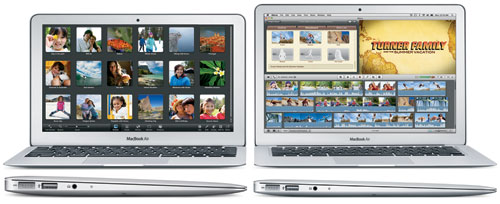
Photo Credit: Apple, Inc. (11-Inch & 13-Inch MacBook Air)
Details regarding the video processor, memory reserved by the system for video use, the video out port, and maximum resolution on a second display are all provided on the specs page for each model, but basics also are provided below for your convenience:
| MacBook Air | Video Processor | VRAM* | 2nd Display | Video Out |
| Original | GMA X3100 | 144 MB | 1920x1200 | Micro-DVI |
| "Late 2008" | GeForce 9400M | 256 MB | 2560x1600 | Mini DisplayPort |
| "Mid-2009" | GeForce 9400M | 256 MB | 2560x1600 | Mini DisplayPort |
| "Late 2010" | GeForce 320M | 256 MB | 2560x1600 | Mini DisplayPort |
| "Mid-2011" | HD Graphics 3000 | 256 MB 384 MB |
2560x1600 | Thunderbolt |
| "Mid-2012" | HD Graphics 4000 | 384 MB | 2560x1600 | Thunderbolt |
| "Mid-2013" | HD Graphics 5000 | 1.5 GB | 2560x1600 | Thunderbolt |
| "Early 2014" | HD Graphics 5000 | 1.5 GB | 2560x1600 | Thunderbolt |
| "Early 2015" | HD Graphics 6000 | 1.5 GB | 3840x2160† | Thunderbolt 2 |
| "Mid-2017" | HD Graphics 6000 | 1.5 GB | 3840x2160† | Thunderbolt 2 |
*Please note that this is system memory reserved for video function. No MacBook Air models have dedicated VRAM.
† Apple originally only reported that the "Early 2015" MacBook Air models could support a single external display up to 2560x1600, but third-parties discovered that it actually could support a 3840x2160 (4K) display, and Apple subsequently revised their official documentation to confirm this, as well.
Although Apple makes no mention of it, third-parties likewise have discovered that the "Mid-2012" and later MacBook Air models can simultaneously support two external displays up to 2560x1600 "daisy chained" via Thunderbolt.
However, it is possible that these models may overheat in real-world use in such a "dual external display" scenario, though. If you have experimented with two Thunderbolt connected external displays with your "Mid-2012" or subsequent MacBook Air (A1465 and A1466), please do share the results of your experiment.
What is a "micro-DVI" port? How is it different from DVI and mini-DVI?
On basic terms, "micro-DVI" is even smaller than mini-DVI, which in turn, is smaller than the full-sized DVI. Even though micro-DVI is smaller than the mini-DVI provided by the "White and Black" MacBook models, it still is capable of supporting 1920x1200 on an external display in dual display or mirroring mode.
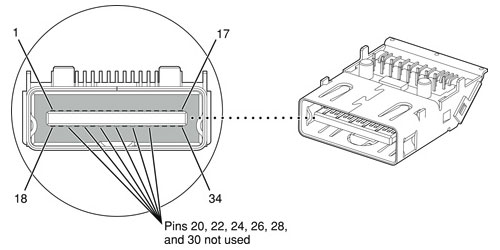
Diagram Credit: Apple, Inc.
Please note that micro-DVI only is provided by the original MacBook Air model, which can be externally identified by model number A1237 and in software by model identifier MacBookAir1,1.
Subsequently released MacBook Air systems use different display standards called Mini DisplayPort, Thunderbolt, or Thunderbolt 2.
Also see:
- What is "Mini DisplayPort"? Is it an industry standard? How is it different from or better than Mini-DVI and Micro-DVI?
- What is "Thunderbolt"? Is it an industry standard? What advantages does it offer? Are there any disadvantages?
Permalink | Report an Error/Typo | Sign Up for Site Update Notices
Established in 1996, EveryMac.com has been created by experts with decades of experience with Apple hardware. EveryMac.com includes, and always has included, original research incorporating detailed, hands-on inspection of packaging, computers, and devices as well as extensive real-world use. All information is provided in good faith, but no website or person is perfect. Accordingly, EveryMac.com is provided "as is" without warranty of any kind whatsoever. EveryMac.com, and the authors thereof, shall not be held responsible or liable, under any circumstances, for any damages resulting from the use or inability to use the information within. For complete disclaimer and copyright information please read and understand the Terms of Use and the Privacy Policy before using EveryMac.com. Copying, scraping, or use of any content without expressed permission is not allowed, although links to any page are welcomed and appreciated.