
Hosted by site sponsor WebMate.
Retina Display MacBook Pro Q&A
Published August 27, 2012
All Mac Q&As >> Retina Display MacBook Pro Q&A (Home)
To be notified of new Q&As, sign up for EveryMac.com's bimonthly email list.
What are all the differences between the "Mid-2012" regular MacBook Pro and 15-Inch Retina Display MacBook Pro? Which is best for me?
Please note that the "Mid-2012" Retina Display MacBook Pro models have been discontinued. However, this Q&A is up-to-date and is quite useful for anyone buying or selling either model on the used market. This Q&A also explains the general advantages and disadvantages of subsequent Retina Display MacBook Pro notebooks and can be helpful to decide whether to purchase a non-Retina Display or Retina Display model.
At first glance, the "Mid-2012" regular MacBook Pro models -- the MacBook Pro "Core i5" 2.5 13-Inch, "Core i7" 2.9 13-Inch, MacBook Pro "Core i7" 2.3 15-Inch, and "Core i7" 2.6 15-Inch -- and the "Mid-2012" Retina Display MacBook Pro models -- the MacBook Pro "Core i7" 2.3 15" (Retina), "Core i7" 2.6 15" (Retina), and MacBook Pro "Core i7" 2.7 15" (Retina) -- look similar.
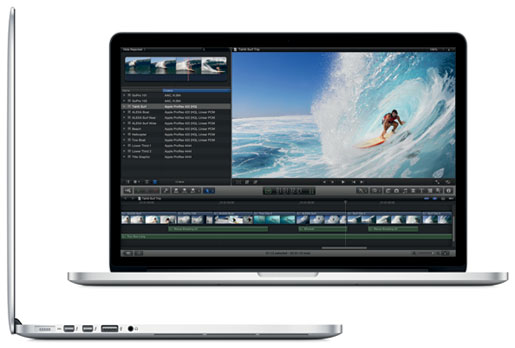
Photo Credit: Apple, Inc. (Retina Display MacBook Pro)
Although the Retina Display MacBook Pro is readily distinguishable as thinner, both lines share a similar overall design ethos and both are milled from a single piece of aluminum and have black backlit keyboards. However, there are major differences that go well beyond dimensions.
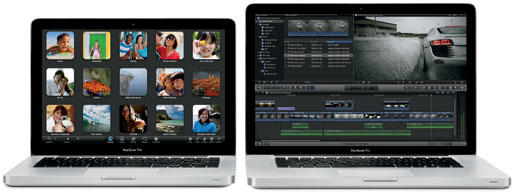
Photo Credit: Apple, Inc.(Regular Mid-2012 MacBook Pro Models)
External Differences
The regular "Mid-2012" MacBook Pro models use essentially the same, but not identical, general black and silver design as earlier "Unibody" MacBook Pro lines. The Retina Display MacBook Pro model is clearly inspired by the same, but it is thinner and lacks battery and sleep indicator lights. It also is only branded "MacBook Pro" on the bottom unlike the regular models which are branded under the display. All of these models have a backlit keyboard, a "no button" glass multi-touch trackpad with support for "inertial scrolling" and a 720p "FaceTime HD" webcam as well.
The Retina Display MacBook Pro models are 0.71 of an inch thick and weigh a little less than 4.5 pounds. The regular MacBook Pro models are 0.95 of an inch thick and weigh either 4.5 pounds or 5.6 pounds, for the 13" and 15" models, respectively.
The regular MacBook Pro models have either a 13.3" or a 15.4" glossy display at native resolutions of 1280x800 or 1440x900, respectively, although the 15-Inch models also are offered with a high-resolution 1680x1050 display in either a glossy or anti-glare finish for an additional US$100. As a minor point worth noting, when configured with an anti-glare display, the system will have a silver "frame" around the display rather than a black one.
The Retina Display MacBook Pro models, by contrast, have a 15.4" widescreen 2880x1800 (220 ppi) "retina" display. It is a glossy display, although Apple does not cover it with glass, which gives it a less glossy appearance than the display on the regular models.
Connectivity Differences
Connectivity on these models is quite different from one another. All of these models include 802.11a/b/g/n Wi-Fi, Bluetooth 4.0, two USB 3.0 ports and an SDXC-capable SD card slot.
The regular MacBook Pro models, however, have Gigabit Ethernet, a single Firewire "800" port, and one "Thunderbolt" port. The regular 13-Inch models have a single "audio line out" port, whereas the regular 15-Inch models have an independent audio line in minijack (digital/analog) and an independent audio line out/headphone minijack (digital/analog).
The Retina Display MacBook Pro models have two "Thunderbolt" ports, an HDMI port, a single "audio line in/out" port, and a thinner "MagSafe 2" power connector port. They lack Gigabit Ethernet and Firewire "800."
None of these models have an ExpressCard/34 expansion slot.
Identification Differences
The regular "Mid-2012" MacBook Pro models only can be externally differentiated by the serial number courtesy of EveryMac.com's Ultimate Mac Lookup feature. The "Mid-2012" Retina Display MacBook Pro models can be identified externally by a unique EMC number -- 2512 -- as well as the serial number. As always, EveryMac.com has painstakingly hand documented these details for your convenience.
In software, the regular "Mid-2012" 13-Inch and 15-Inch MacBook Pro also can be uniquely spotted by the MacBookPro9,2 and MacBookPro9,1 model identifiers, respectively. The 15-Inch Retina Display models can be pinpointed by MacBookPro10,1.
Regardless of the identifier that is most convenient for you, EveryMac.com's Ultimate Mac Lookup feature can be helpful to identify these MacBook Pro models and all other G3 and later Macs.
Internal Differences
Internally, there are some similarities between these models -- all use "Ivy Bridge" architectures with a 5 GT/s Direct Media Interface (DMI) and the regular 15-Inch models and Retina Display models use the same processors -- but otherwise the lines are quite different.
Most notably, the regular MacBook Pro models have two RAM slots that support 204-pin 1600 MHz PC3-12800 DDR3L SDRAM SO-DIMMs (and officially support up to 8 GB of RAM, but third-parties like site sponsor Other World Computing have discovered that they actually support 16 GB), support for a Serial ATA (6 Gb/s) 2.5" hard drive or SSD, and an internal 8X DL "SuperDrive" (as well as support for aftermarket options to install a second hard drive or SSD in place of the optical drive). They are easy to upgrade.
The Retina Display MacBook Pro models, by contrast, have internal upgrades severely limited. They have onboard 1600 MHz DDR3L SDRAM that is soldered in place and cannot be upgraded after purchase (8 GB standard with a 16 GB option, but only if configured at the time of purchase). They also have internal flash storage rather than a hard drive and this storage is not intended to be upgraded after purchase, but as first discovered by site sponsor OWC, it is mounted on a removable module, so upgrades to larger storage capacities than those provided by default is possible. They do not have an internal optical drive, either.
The regular 13-Inch models only have "integrated" Intel HD Graphics 4000 graphics processors that share memory with the system, whereas the regular 15-Inch models and Retina Display models all have dual graphics systems -- dedicated NVIDIA GeForce GT 650M graphics in addition to the same integrated graphics as the lower-end models.
All have a built-in non-swappable battery design, and this battery is not designed to be removed or serviced by end users, although the battery in the regular models is straightforward to replace whereas the Retina Display models unfortunately have the battery glued in place. Apple estimates that all of these models provide seven hours of battery life based on an Apple "wireless web" test.
Comparison Chart
The major differences between the standard configurations of the regular 13-Inch and 15-Inch "Mid-2012" MacBook Pro and the Retina Display MacBook Pro models are summarized below:
 13-Inch |
 15-Inch |
 Retina |
|
|---|---|---|---|
| Processor: | I5-3210M I7-3520M |
I7-3615QM I7-3720QM |
I7-3615QM I7-3720QM |
| Cores: | 2 | 4 | 4 |
| Speed: | 2.3 GHz, 2.9 GHz | 2.3 GHz, 2.6 GHz | 2.3 GHz, 2.6 GHz |
| Turbo Boost: | 3.1 GHz, 3.6 GHz | 3.3 GHz, 3.6 GHz | 3.3 GHz, 3.6 GHz |
| L3 Cache: | 3 MB, 4 MB | 6 MB | 6 MB |
| Storage Capacity: | 500 GB, 750 GB | 500 GB, 750 GB | 256 GB, 512 GB |
| Storage Type: | Hard Drive | Hard Drive | SSD |
| Optical: | 8X DL | 8X DL | None |
| Std RAM: | 4 GB, 8 GB | 4 GB, 8 GB | 8 GB |
| RAM Slots: | 2 | 2 | None |
| GDDR5: | Integrated Only | 512 MB, 1 GB | 1 GB |
| Thunderbolt: | 1 | 1 | 2 |
| HDMI: | None | None | 1 |
| USB 3.0: | 2 | 2 | 2 |
| FW 800: | 1 | 1 | None |
| Ethernet: | Gigabit | Gigabit | None |
| Opt Audio: | No | Yes | No |
| SDXC Slot: | Yes | Yes | Yes |
| Display: | 13.3" | 15.4" | 15.4" |
| Matte Opt: | No | Yes | No |
| Standard Res: | 1280x800 | 1440x900 | 2880x1800 (220 ppi) |
| Res Opt: | N/A | 1680x1050 | N/A |
| Battery Life: | 7 Hours | 7 Hours | 7 Hours |
| Battery Design: | Integrated | Integrated | Glued |
| Height (In): | 0.95 | 0.95 | 0.71 |
| Width (In): | 12.78 | 14.35 | 14.13 |
| Depth (In): | 8.94 | 9.82 | 9.73 |
| Weight: | 4.5 lbs | 5.6 lbs | 4.46 lbs |
| Order No (US): | MD101LL/A MD102LL/A |
MD103LL/A MD104LL/A |
MC975LL/A MC976LL/A |
| EMC No: | N/A | N/A | 2512 |
| Model ID: | MacBookPro9,2 | MacBookPro9,1 | MacBookPro10,1 |
| Intro. Price (US): | US$1199, US$1499 | US$1799, US$2199 | US$2199, US$2799 |
So, which "Mid-2012" MacBook Pro is best for me?
Ultimately, the regular "Mid-2012" and Retina Display MacBook Pro models provide very different advantages and disadvantages and only you can decide which set is most important to you.
If you place high priority on an amazing high-quality display, excellent performance, and advanced connectivity in a relatively compact package -- and are not concerned by meager upgrade options, poor repair prospects, limited legacy connectivity, and/or a high price tag -- a Retina Display MacBook Pro could be perfect for you.
Alternately, if you place higher priority on excellent performance (essentially equal performance for the 15" models on tasks that are not drive-related) and extensive upgrade and repair options, diverse legacy connectivity, and/or a potentially lower price tag -- but are not concerned by a much lower resolution display and/or a modestly larger and heavier housing -- a regular MacBook Pro could be a better choice.
MacBook Pro Purchase & Sale Options
There are any number of places to purchase a new or used MacBook Pro. However, purchasing from a quality merchant with years of service in the Mac market -- and after sales support -- will provide the best experience and save you money and time, too.
In the US, site sponsor Adorama sells new MacBook Pro models with free shipping. Other World Computing sells used and refurb MacBook Pro models at bargain prices with free shipping, as well. On the other hand, if you need to sell a MacBook Pro, A+ BBB-rated Cash for Your Mac and GoRoostr will buy your older notebook with an instant quote and prompt payment.
In the UK, site sponsor Hoxton Macs sells used MacBook Pro models with a one-year warranty and free next day delivery throughout the UK. Delivery across Europe also is available starting at just £9.99 for two-day delivery to France and Germany.
Please refer to EveryMac.com's Ultimate Mac Comparison feature to dynamically compare any MacBook Pro model to any other Mac.
Permalink | Report an Error/Typo | Sign Up for Site Update Notices
Suggest a New Q&A | Sign Up for Bimonthly Site Update Notices
<< Retina Display MacBook Pro Q&A (Main) | All Mac Q&As
Established in 1996, EveryMac.com has been created by experts with decades of experience with Apple hardware. EveryMac.com includes, and always has included, original research incorporating detailed, hands-on inspection of packaging, computers, and devices as well as extensive real-world use. All information is provided in good faith, but no website or person is perfect. Accordingly, EveryMac.com is provided "as is" without warranty of any kind whatsoever. EveryMac.com, and the authors thereof, shall not be held responsible or liable, under any circumstances, for any damages resulting from the use or inability to use the information within. For complete disclaimer and copyright information please read and understand the Terms of Use and the Privacy Policy before using EveryMac.com. Copying, scraping, or use of any content without expressed permission is not allowed, although links to any page are welcomed and appreciated.