
Hosted by site sponsor WebMate.
Intel Mac mini Q&A - Updated October 11, 2012
To be notified of new Q&As, sign up for EveryMac.com's bimonthly email list.
How do you upgrade the RAM in the Polycarbonate Intel Mac mini models? What type of RAM do they use? How much RAM do they actually support?
Please note that this Q&A covers Mac mini models with polycarbonate (plastic) cases and Intel Core Solo, Core Duo, and Core 2 Duo processors.
EveryMac.com also provides RAM upgrade instructions for the earlier PowerPC G4 polycarbonate Mac mini and the subsequently introduced Intel Aluminum Mac mini.
There are five different lines of Intel Mac mini models with polycarbonate cases released from 2006 through 2009 and these five lines use two different types of memory. Capacity varies between different lines and almost all of these models actually are capable of supporting more memory than "officially" reported.
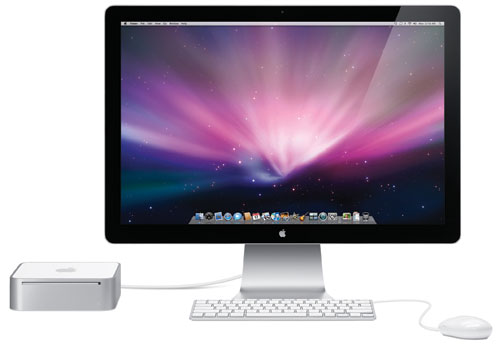
Photo Credit: Apple, Inc. (Polycarbonate Mac mini & Cinema Display)
Identification Help
If you're not sure which polycarbonate Intel Mac mini model you have, these models can be most precisely identified by the model identifier in software for the purposes of upgrading the RAM. More details are provided in EveryMac.com's extensive Mac Identification section, but to locate the model identifier, select "About This Mac" under the Apple Menu on your computer and click the "More Info..." button.
More specifically, if it is a polycarbonate Intel Mac mini, you should see a model identifier of either Macmini1,1, Macmini2,1 or Macmini3,1. If it is PowerMac10,1 or PowerMac10,2, you have a PowerPC G4 Mac mini.
These models also can be externally identified via model number and EMC number, both of which are in small type on the underside of the case toward the ports. These identifiers are close enough to an exact match to determine RAM type by itself -- and enough to determine the actual maximum RAM, as well, when combined with a secondary identifier like processor speed and/or processor type.
RAM Types & Actual Maximum RAM Capacities
The officially dubbed "Early 2006," "Late 2006," and "Mid-2007" Mac mini models -- which are easier to identify by the Macmini1,1 and Macmini2,1 model identifiers -- use 667 MHz PC2-5300 DDR2 SO-DIMMs and officially support a maximum of 2 GB of RAM. However, third-parties have discovered that the "Core 2 Duo" powered models actually can support 4 GB of memory with dual 2 GB memory modules.
The "Early 2009" and "Late 2009" configurations -- which share the Macmini3,1 model identifier -- use 1066 MHz PC3-8500 DDR3 SO-DIMMs and officially support a maximum of 4 GB of memory. However, as first reported by MacminiColo -- and confirmed by site sponsor OWC -- the "Early 2009" models unofficially can use 8 GB of RAM after applying EFI Firmware Update 1.2 and the "Late 2009" models unofficially support 8 GB of RAM by default (as these models shipped with the EFI firmware already updated).
This is most easily visualized as a chart:
Intel Mac mini |
Subfamily |
Model ID |
SO-DIMM |
Max |
Early 2006 |
667 MHz DDR2 |
2 GB* |
||
Early/Late 2006 |
667 MHz DDR2 |
2 GB* |
||
Late 2006 |
667 MHz DDR2 |
2 GB* |
||
Mid-2007 |
667 MHz DDR2 |
4 GB• |
||
Mid-2007 |
667 MHz DDR2 |
4 GB• |
||
Early 2009 |
1066 MHz DDR3 |
8 GB† |
||
Early 2009 |
1066 MHz DDR3 |
8 GB† |
||
Late 2009 |
1066 MHz DDR3 |
8 GB§ |
||
Late 2009 |
1066 MHz DDR3 |
8 GB§ |
||
Late 2009 |
1066 MHz DDR3 |
8 GB§ |
||
Late 2009 |
1066 MHz DDR3 |
8 GB§ |
* 2 GB is both the official and actual RAM capacity of the Macmini1,1 models without serious hacks.
• Officially, the Macmini2,1 models only support 2 GB of memory, but third-parties have successfully installed 4 GB using dual 2 GB memory modules. However, please note that with 4 GB of RAM installed, not all memory in excess of 3 GB can be used by the system. This is the same limitation shared by the "Late 2006" MacBook Pro models.
† Officially, the "Early 2009" Macmini3,1 models support 4 GB of RAM. As originally shipped, they both officially and unofficially supported 4 GB of RAM as speculated at the time due to an artificial EFI limitation rather than a true technical limitation. This speculation was accurate, and after applying Apple's EFI Firmware Update 1.2 it is capable of supporting 8 GB of RAM.
§ Officially, the "Late 2009" Macmini3,1 models support 4 GB of RAM, but actually are capable of supporting 8 GB.
Macmini1,1 (Early 2006/Late 2006) Hack Option
For those interested in serious effort, and who have the requisite technical skills, it also is possible to "hack" the Macmini1,1 to support 4 GB of RAM, but with the limitation that not all memory above 3 GB will be accessible by the system.
A clever hacker sporting the moniker of "Shinso" posted a step-by-step tutorial in the Netkas forums that explains how to first upgrade the processor in these models to a Core 2 Duo and then how to upgrade the firmware to the same version as that used by the Macmini2,1.
This method of swapping the processor and firmware essentially "tricks" the system into recognizing the Mac as a Macmini2,1 model. After the swaps, one finally can install 4 GB of RAM.
RAM Upgrade Instructions
Apple does not provide instructions for end users to upgrade the RAM in the Intel-powered polycarbonate Mac mini, and instead warns that "additional memory should be installed by an Apple Retail Store or Apple Authorized Service Provider."
Consequently, EveryMac.com cannot recommend that users upgrade their own memory. Given the small and densely packed nature of the Intel-based Mac mini models this is not the ideal system to upgrade yourself without previous experience upgrading the RAM in similar systems.
Macmini1,1 & Macmini2,1 RAM Upgrade Video
However, for experienced and technical users, this video covering "pre-Early 2009" models -- the Macmini1,1 and Macmini2,1 -- from Apple Specialist CityMac explains the procedure:
Other good upgrade videos include ones from Other World Computing and helpful individuals -- MrBit10 and Loweded Wookie. Between the four, you have a variety of sound track options and text and verbal instruction options from which to choose.
Please note that all of the above cover models released prior to the "Early 2009" line.
Macmini3,1 RAM Upgrade Videos
Although the overall procedure for the "Early 2009" and "Late 2009" models (Macmini3,1) -- is similar to the earlier models, there are a handful of interior differences, particularly with regards to antenna and power cable placement.
For these models, Other World Computing provides a helpful instructional video:
Although the upgrade procedure is similar, Other World Computing kindly provides a video for the dual hard drive-equipped Mac mini Server as well:
By watching the above videos, you should have a good idea whether or not you feel comfortable performing this upgrade yourself or alternately if you would prefer to hire a professional.
Mac mini RAM Purchase & Professional Installation Options
In the US (and many other countries), site sponsor Other World Computing sells memory compatible with all of the Mac mini models and provides a professional upgrade service for the Mac mini as well.
In Germany, site sponsor CompuRAM sells quality memory for all Mac mini models with affordable delivery country-wide and in person pick up and professional installation service available in Munich.
Also see: How do you upgrade the hard drive in the Polycarbonate Intel Mac mini models? What type of hard drive do they support? Is it possible to replace the optical drive with a second hard drive?
Permalink | Report an Error/Typo | Sign Up for Site Update Notices
Established in 1996, EveryMac.com has been created by experts with decades of experience with Apple hardware. EveryMac.com includes, and always has included, original research incorporating detailed, hands-on inspection of packaging, computers, and devices as well as extensive real-world use. All information is provided in good faith, but no website or person is perfect. Accordingly, EveryMac.com is provided "as is" without warranty of any kind whatsoever. EveryMac.com, and the authors thereof, shall not be held responsible or liable, under any circumstances, for any damages resulting from the use or inability to use the information within. For complete disclaimer and copyright information please read and understand the Terms of Use and the Privacy Policy before using EveryMac.com. Copying, scraping, or use of any content without expressed permission is not allowed, although links to any page are welcomed and appreciated.