
Hosted by site sponsor WebMate.
Silver Tower Mac Pro (Dual Optical) Q&A - Updated May 21, 2013
All Mac Q&As >> Silver Tower Mac Pro Dual Optical Q&A (Home)
To be notified of new Q&As, sign up for EveryMac.com's bimonthly email list.
How do you upgrade the RAM in the original Mac Pro? What type of RAM does it use? How much RAM does it actually support?
Please note that this Q&A explains how to upgrade the RAM in the original Mac Pro models (model identifiers MacPro1,1 and MacPro2,1).
EveryMac.com also provides RAM upgrade instructions for subsequent Mac Pro models -- the "Early 2008" (MacPro3,1), "Early 2009" (MacPro4,1), and "Mid-2010" and "Mid-2012" (MacPro5,1) systems.
Installing RAM in the original Mac Pro models is a simple procedure, but it is important to purchase the exact memory needed by the system and install it correctly for optimum performance. These systems also can use more RAM than is officially supported, too.
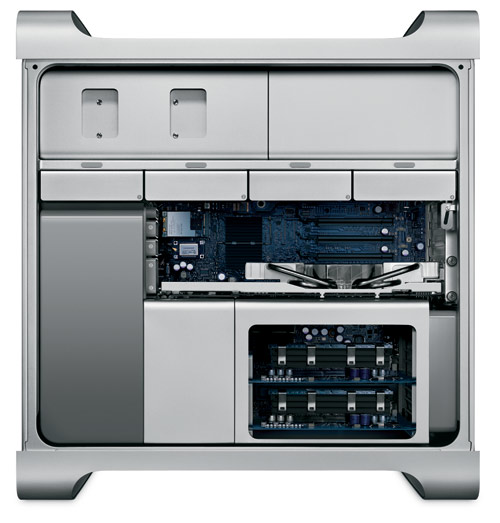
Photo Credit: Apple, Inc. (Mac Pro)
Identification Help
If you're not sure if you have an original Mac Pro or a later model, the A1186 Model Number is insufficient as this identifier is shared by the subsequent "Early 2008" line, which supports a different type of RAM.
However, for the purposes of upgrading the RAM, the original Mac Pro models can be properly identified by the Model Identifier in software and externally by EMC Number. More details about specific identifiers are provided in EveryMac.com's extensive Mac Identification section.
To locate the model identifier, select "About This Mac" under the Apple Menu on your computer and click the "More Info..." button. If the Mac Pro is running OS X "Lion" (10.7), click the "System Report" button after clicking "More Info..." as well. The original Quad Core Mac Pro models are model identifier MacPro1,1 and the Mac Pro "Eight Core" 3.0 (2,1) is model identifier MacPro2,1.
The EMC number is located on the rear of the system in small type. As carefully hand documented by EveryMac.com, the original Quad Core Mac Pro models -- the Mac Pro "Quad Core" 2.0, "Quad Core" 2.66, and "Quad Core" 3.0 -- are EMC number 2113 and the Mac Pro "Eight Core" 3.0 (2,1) is EMC number 2138.
EveryMac.com's Ultimate Mac Lookup feature also can identify these models by their Serial Numbers.
RAM Type & Actual Maximum Capacity
In basic terms, all original Mac Pro models require "667 MHz DDR2 ECC fully-buffered DIMM (FB-DIMM) memory", but more precisely, Apple states that the memory must meet these specifications:
- 667 MHz, FB-DIMMs
- 72-bit wide, 240-pin modules
- 36 devices maximum per DIMM
- Error-correcting code (ECC)
Each FB-DIMM has its own chip called an "Advanced Memory Buffer" (AMB) and "heatsinks on either side". Some less expensive versions of FB-DIMM memory do not have heatsinks that meet Apple's minimum standards for use in the Mac Pro. According to Apple, the "Clovertown Eight Core" Mac Pro is even more strict regarding memory standards (although the company no longer provides specific documentation).
Apple also reports that "DIMMs must be installed in pairs of equal size from the same vendor." There are eight FB-DIMM slots in total on two "riser cards" (four slots per card) that can officially hold 16 GB of RAM. However, third-parties have determined that the original Mac Pro models actually can support 32 GB of memory using eight 4 GB modules that meet the same precise standards.
As is printed on the inside of the door of the Mac Pro, FB-DIMMs must be installed in a particular order.
The default configuration shipped with a pair of 512 MB FB-DIMMs installed in the first and second slots (towards the "gold fingers" in the top riser card), which leaves six slots free. The next pair of FB-DIMMs must be installed in the first and second slots of the bottom riser card, the next pair in the remaining slots of the top riser card (slots three and four), and finally the last pair in the last two slots (three and four) of the bottom riser card.
If the instructions on the inside of the door are insufficient, Apple provides a PDF version of the instructions as well. Perhaps even better, though, Apple Specialist CityMac provides a step-by-step video of the process:
From watching the above video, it is clear that the RAM installation procedure is simple. However, if you do not feel comfortable -- or have the time -- to upgrade the RAM yourself, professional installation never is a bad idea.
Mac Pro RAM Purchase & Professional Installation Options
Just because RAM meets the minimum listed criteria does not mean that it will necessarily function as intended in the Mac Pro. Be sure to buy from a quality vendor that has tested their RAM with each type of Mac to ensure full compatibility.
In the US (and many other countries), site sponsor Other World Computing sells memory compatible with all Mac Pro models (and all other Macs).
In the UK and Ireland, site sponsor Flexx sells Mac Pro compatible memory with free shipping. The company provides flat rate shipping to France, Germany, and Switzerland and inexpensive shipping for all of Europe, too.
In Germany, site sponsor CompuRAM sells quality memory for all Mac Pro models with affordable delivery country-wide and in person pick up and professional installation service available in Munich.
Also see:
- How do you upgrade the RAM in the "Early 2008" (Harpertown/Penryn) Mac Pro? What type of RAM does it use? How much RAM does it actually support? Is it backwards compatible with RAM from the original Mac Pro?
- How do you upgrade the RAM in the "Early 2009/Nehalem" Mac Pro? What type of RAM does it use? How much RAM does it actually support?
- How do you upgrade the RAM in the "Mid-2010" and "Mid-2012" (Nehalem/Westmere) Mac Pro models? What type of RAM do these models use? How much RAM do they actually support?
Permalink | Report an Error/Typo | Sign Up for Site Update Notices
<< Mac Pro Dual Optical Drives Q&A (Main) | All Mac Q&As
Established in 1996, EveryMac.com has been created by experts with decades of experience with Apple hardware. EveryMac.com includes, and always has included, original research incorporating detailed, hands-on inspection of packaging, computers, and devices as well as extensive real-world use. All information is provided in good faith, but no website or person is perfect. Accordingly, EveryMac.com is provided "as is" without warranty of any kind whatsoever. EveryMac.com, and the authors thereof, shall not be held responsible or liable, under any circumstances, for any damages resulting from the use or inability to use the information within. For complete disclaimer and copyright information please read and understand the Terms of Use and the Privacy Policy before using EveryMac.com. Copying, scraping, or use of any content without expressed permission is not allowed, although links to any page are welcomed and appreciated.