
Hosted by site sponsor WebMate.
Silver Tower Mac Pro (Dual Optical) Q&A - Updated May 23, 2013
All Mac Q&As >> Silver Tower Mac Pro Dual Optical Q&A (Home)
To be notified of new Q&As, sign up for EveryMac.com's bimonthly email list.
How do you upgrade the processors in the "Mid-2010" and "Mid-2012" Mac Pro models? How are the processors mounted?
Please note that this Q&A explains how to upgrade the processors in the "Mid-2010" and "Mid-2012" Mac Pro models (model identifier MacPro5,1).
EveryMac.com also provides processor upgrade instructions for earlier Mac Pro models -- the original and "Early 2008" (MacPro1,1, MacPro2,1, and MacPro3,1) and "Early 2009" (MacPro4,1) systems.
Formally, just as it has been for all previous Mac Pro models, Apple does not state whether or not the processors in the "Mid-2010" or "Mid-2012" Mac Pro lines can be upgraded.
The memory and hard drives are designed to be upgraded by end-users, and doing so is straightforward, but Apple does not intend for one to upgrade their own processor(s). Consequently, EveryMac.com does not recommend that one upgrade the processor(s) in a "Mid-2010" or "Mid-2012" Mac Pro themselves.
However, for the technically skilled, upgrading the processors in the "Mid-2010" and "Mid-2012" Mac Pro models is quite possible.
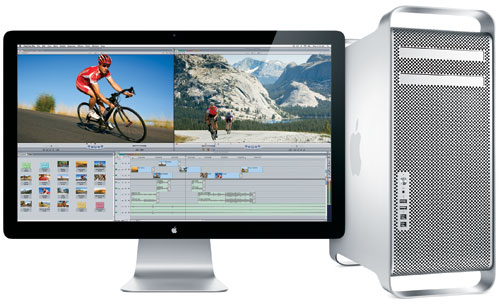
Photo Credit: Apple, Inc. (Mac Pro)
Identification Help
If you're not sure if you have an "Mid-2010" or "Mid-2012" Mac Pro or an earlier model, the A1289 Model Number is not precise enough as this identifier is shared by the previous "Early 2009" Mac Pro models, as well.
However, for the purpose of a processor upgrade, the "Mid-2010" and "Mid-2012" Mac Pro models can be identified collectively to a reasonable degree of certainty by the Model Identifier in software and uniquely externally by EMC Number. More information about specific identifiers is provided in EveryMac.com's extensive Mac Identification section.
To locate the model identifier, select "About This Mac" under the Apple Menu on your computer and click the "More Info..." button. If the Mac Pro is running OS X "Lion" (10.7) or later, click the "System Report" button after clicking "More Info..." as well. Regardless of the release date or the number of processor cores, all "Mid-2010" and "Mid-2012" Mac Pro models share model identifier MacPro5,1. Note that the "Early 2009" Mac Pro models also can be firmware upgraded to MacPro5,1, and this may be an issue on the resale market.
Consequently, the EMC number, which is listed on the rear of the system in small type, is the most certain identifier. As carefully hand documented by EveryMac.com, the "Mid-2010" Mac Pro models share EMC number 2314-2 and the "Mid-2012" Mac Pro models share EMC number 2629. The "Late 2009" Mac Pro models are EMC number 2314 (note the lack of the "-2" at the end).
Specifically, these are the systems that are included in the "Mid-2010" and "Mid-2012" Mac Pro lines:
Mac Pro |
Subfamily |
Model ID |
EMC Number |
Mid-2010 |
|||
Mid-2010 |
|||
Mid-2010 |
|||
Mid-2010 |
|||
Mid-2010 |
|||
Mid-2010 |
|||
Server Mid-2010 |
|||
Server Mid-2010 |
|||
Server Mid-2010 |
|||
Server Mid-2010 |
|||
Server Mid-2010 |
|||
Server Mid-2010 |
|||
Mid-2012 |
|||
Mid-2012 |
|||
Mid-2012 |
|||
Mid-2012 |
|||
Mid-2012 |
|||
Server Mid-2012 |
|||
Server Mid-2012 |
|||
Server Mid-2012 |
|||
Server Mid-2012 |
|||
Server Mid-2012 |
EveryMac.com's Ultimate Mac Lookup feature also can identify these models by their Serial Numbers.
Original Custom Processor Options
By custom configuration, Apple originally offered the "Mid-2010" "Quad Core" model with a 3.2 GHz Quad Core "Nehalem" Xeon (W3565) processor for an additional US$400 or a single 3.33 GHz Six Core "Westmere" Xeon (W3680) processor for an additional US$800. Likewise, by custom configuration, Apple offered the stock "Mid-2010" "Eight Core" model with two 2.66 GHz Six Core Xeon X5650 processors for an additional US$1500 or two 2.93 GHz Six Core Xeon X5670 processors for an additional US$2700.
Starting on June 11, 2012, when Apple quietly introduced the "Mid-2012" Mac Pro models -- which effectively are just processor upgraded "Mid-2010" Mac Pro models themselves -- Apple began to offer the stock "Quad Core" model with a single 3.33 GHz Six Core "Westmere" Xeon (W3680) processor for an additional US$500. Likewise, Apple offers the stock "Mid-2012" "Twelve Core" model with two 2.66 GHz Six Core "Westmere" Xeon (X5650) processors or two 3.06 GHz Six Core "Westmere" Xeon (X5675) processors for an additional US$1200 or US$2400, respectively.
Processor Upgrade Instructions
Just like the "Late 2009" Mac Pro models, the "Mid-2010" and "Mid-2012" Mac Pro models have the processor or processors mounted on a removable processor "tray" and the processors themselves use LGA 1366 sockets.
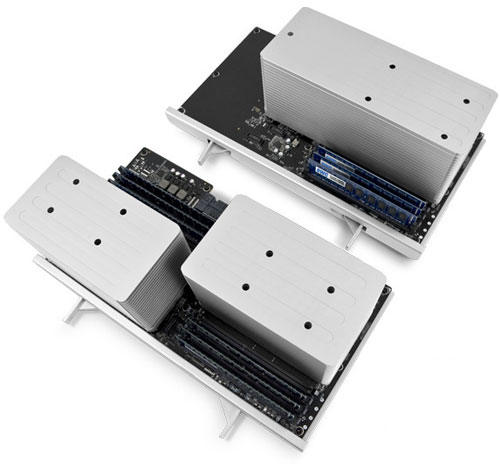
Photo Credit: OWC, Inc.
The general procedure for the "Mid-2010" and "Mid-2012" Mac Pro lines also is the same as it is for the "Late 2009" models -- slide the processor tray out of the computer, unscrew the heatsinks with a 3mm hex key, remove the heatsinks, clean off thermal paste residue, remove the processors, install the new processors, re-apply thermal paste, reattach the heatsinks, reinsert the processor tray, and close up the computer.
However, on the "Mid-2010" and "Mid-2012" Mac Pro models, Apple uses standard processors rather than ones that lack a "lid" like their predecessors.
If you are interested in performing the upgrade, you may find this forum posting with detailed photos from helpful hardware hacker "philipma1957" to be particularly useful. The author successfully upgraded an entry-level Mac Pro "Quad Core" 2.8 (2010) with its Quad Core Xeon W3530 to a 3.2 GHz "Six Core" W3670 processor for roughly 50% more performance than the stock processor and reported that a 3.33 GHz "Six Core" W3680 will work, as well.
Professional Upgrade Service Option
For those interested in a professional upgrade service -- site sponsor Other World Computing offers a simple and easy "Turnkey" Mac Pro processor upgrade program for the "Mid-2010" and "Mid-2012" models.
With this service, you first should backup your Mac Pro, verify the backup was successful, and turn the system off. Then you only have to open it up, remove the processor tray and mail it to OWC, rather than the entire system, in a provided anti-static bag and box.
Typically within 48 hours, OWC will return your processor tray with the faster processor pre-installed. All you have to do is slide the tray back in your Mac Pro. It's not cheap, but it's not much more than the cost of a new processor and it makes the upgrade process fast, simple, and effectively foolproof.
Processor Upgrade Summary
Ultimately, it is quite possible for one to upgrade the stock processors in the "Mid-2010" and "Mid-2012" Mac Pro models with faster ones. However, even a skilled person should proceed with caution as this is most definitely not an upgrade for those with limited hardware upgrading experience.
By reading the above as well as the linked forum posting and the details of OWC's professional upgrade service, it is hoped that you will be able to decide if this is an upgrade you feel comfortable to perform yourself or if you would rather hire a professional. Hiring a professional always is a good idea, particularly for an upgrade of this expense and complexity.
Also see:
- How do you upgrade the processors in the "Original/Early 2008" Mac Pro models? How are the processors mounted?
- How do you upgrade the processors in the "Early 2009" Mac Pro models? How are the processors mounted?
Permalink | Report an Error/Typo | Sign Up for Site Update Notices
<< Mac Pro Dual Optical Drives Q&A (Main) | All Mac Q&As
Established in 1996, EveryMac.com has been created by experts with decades of experience with Apple hardware. EveryMac.com includes, and always has included, original research incorporating detailed, hands-on inspection of packaging, computers, and devices as well as extensive real-world use. All information is provided in good faith, but no website or person is perfect. Accordingly, EveryMac.com is provided "as is" without warranty of any kind whatsoever. EveryMac.com, and the authors thereof, shall not be held responsible or liable, under any circumstances, for any damages resulting from the use or inability to use the information within. For complete disclaimer and copyright information please read and understand the Terms of Use and the Privacy Policy before using EveryMac.com. Copying, scraping, or use of any content without expressed permission is not allowed, although links to any page are welcomed and appreciated.