
Hosted by site sponsor WebMate.
Retina Display MacBook Pro Q&A
Update Published June 25, 2015
Mac Q&As >> Retina MacBook Pro Q&A | Unibody MacBook Pro Q&A | MacBook Air Q&A
To be notified of new Q&As, sign up for EveryMac.com's bimonthly email list.
What are the major differences between the 13-Inch Retina Display MacBook Pro, the "regular" 13-Inch MacBook Pro, and the 13-Inch MacBook Air? Which is best for me?
There are many different 13-Inch Retina Display MacBook Pro, regular "pre-Retina" 13-Inch MacBook Pro, and 13-Inch MacBook Air models. In fact, as diligently documented by EveryMac.com, there have been dozens of distinct models released over several years.
Based on e-mail received, most readers who decide they want the smallest notebook possible historcally gravitated toward an 11-Inch MacBook Air -- although they now need to debate the 11-Inch MacBook Air and 12-Inch Retina MacBook, as well -- and those who want the biggest display and the most performance possible choose a 15-Inch Retina Display MacBook Pro. These are fairly easy decisions. However, those who find value in a compromise in terms of size, performance, battery life, upgrades, or cost, often find themselves debating the assorted 13-Inch options available.
EveryMac.com provides many detailed technical comparisons -- between the current 11-Inch and 13-Inch MacBook Air and 13-Inch and 15-Inch Retina Display MacBook Pro models, for example -- but this Q&A is for the purpose of general comparison to help one interested in a less technical answer find the best 13-Inch Apple notebook.
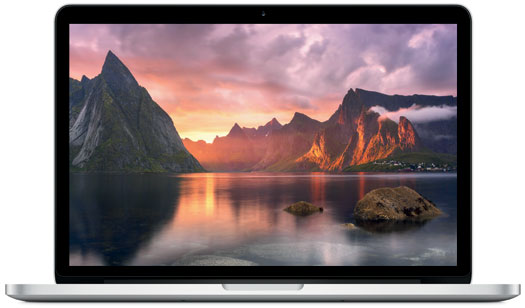
Photo Credit: Apple, Inc. (13-Inch Retina Display MacBook Pro)
External Differences
There are significant external and design differences between these models.
Regardless of release date, the 13-Inch Retina Display MacBook Pro models use an effectively sealed (as well as difficult and sometimes impossible to upgrade), uniformly thin design -- around three quarters of an inch thick -- and weigh around 3.5 pounds.
The "regular" 13-Inch MacBook Pro models -- such as the still sold as new MacBook Pro "Core i5" 2.5 13-Inch Mid-2012 -- also use a "Unibody" design that looks similar, but it is easy to upgrade albeit thicker and heavier (a bit less than an inch thick and a relatively hefty 4.5 pounds).
There have been a long line of MacBook Air models, but they all have a tapered design that is thicker at the back and thinner at the front, which makes them look much thinner than the other models. Recent and current models are just 0.68 of an inch at the rear and a razor thin 0.11 of an inch at the front and weigh just under 3 pounds.
The 13-Inch Retina Display MacBook Pro models have a 13.3" widescreen 2560x1600 (227 ppi) display that runs "pixel doubled" at 1280x800, but with four times the detail of a "traditional" display. The regular MacBook Pro has a 13.3" 1280x800 glossy display, and the MacBook Air has a display that is relatively high-resolution for its physical dimensions -- 13.3" 1440x900 -- but nowhere near the resolution of the Retina Display model.
All have a full-size "chiclet-style" backlit keyboard, glass "no button" trackpads with "inertial scrolling" support or better, integrated stereo speakers, at least one microphone, and an integrated 720p FaceTime HD webcam.
Finally, neither the Retina Display MacBook Pro nor the MacBook Air models have a built-in optical drive, but the regular MacBook Pro model does.
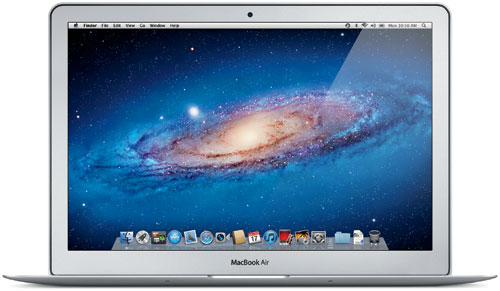
Photo Credit: Apple, Inc. (13-Inch MacBook Air)
Connectivity Differences
Connectivity on these models can be quite different, particularly from different years. However, they all include Wi-Fi, Bluetooth, USB ports, and a headphone jack. Recent and current models all have an SDXC-capable SD card slot, too.
In general, though, the 13-Inch Retina Display models have more advanced connectivity, specifically two Thunderbolt or Thunderbolt 2 ports and an HDMI port. The "regular" MacBook Pro has some useful "legacy" connectivity -- Gigabit Ethernet and Firewire "800" support -- in addition to a single Thunderbolt port on current and recent models. Recent and current MacBook Air models also have a single Thunderbolt or Thunderbolt 2 port but none have Gigabit Ethernet or Firewire "800" capabilities.
Identification Differences
Just as the site has for many years, EveryMac.com has carefully hand documented unique identifiers for each of the dozens of different models -- such as the Model Number, EMC Number, Model Identifier, and more.
However, for the purpose of general identification for a less technical Q&A, it is suitable to note that the 13-Inch Retina Display MacBook Pro models have no name on the display bezel (and instead are identified as "MacBook Pro" only on the bottom), the 13-Inch "regular" MacBook Pro models have "MacBook Pro" on the display bezel (and have an internal optical drive on the right hand side), and the 13-Inch MacBook Air models likewise all have "MacBook Air" on the display bezel.
However, if you are trying to buy one of these models on the used market, more specific identification details are quite necessary.
EveryMac.com's Ultimate Mac Lookup feature can identify exact systems using the Model Number, EMC Number, and Model Identifier mentioned above as well as the Serial Number.
Internal Differences
Internally, there are major differences between these systems, particularly from year-to-year. However, in general, the 13-Inch Retina Display MacBook Pro models are more powerful than the 13-Inch MacBook Air, but the MacBook Air models typically provide better battery life. As the 13-Inch "regular" MacBook Pro models are older, they use a less powerful architecture with shorter runtime than recent MacBook Pro and MacBook Air models.
However, the regular models have RAM that can be upgraded inexpensively after purchase -- up to 16 GB for recent and current models -- whereas the MacBook Air and Retina Display MacBook Pro models have RAM soldered in place and it cannot be upgraded after purchase at all.
The current 13-Inch MacBook Air models can be upgraded only to 8 GB of RAM, even at the time of purchase, and 13-Inch Retina Display MacBook Pro models prior to the current series have this limitation as well. However, the current and recent Retina Display MacBook Pro models can be upgraded to 16 GB of RAM at the time of purchase (but, again, not after the initial system purchase).
By default, the regular MacBook Pro has large capacity, but slow hard drives instead of small capacity, but fast removable SSD modules like the Retina Display and MacBook Air models. However, the regular models can be easily upgraded with fast and large capacity SSDs inexpensively after initial purchase and can remain competitive for many tasks particularly if upgraded with performance in mind (and even support aftermarket options to install a second hard drive or SSD in place of the optical drive, if desired).
The batteries are quite different as well. The battery in the regular models, although not nearly as high capacity as the battery in the Retina Display MacBook Pro and MacBook Air, is easy to replace. At least for now, the MacBook Air batteries also are straightforward to replace. The 13-Inch Retina Display MacBook Pro models, however, have an internal battery design that is glued in place and essentially impossible to replace yourself.
Comparison Chart
The major differences between the 13-Inch Retina Display MacBook Pro, 13-Inch "regular" MacBook Pro, and 13-Inch MacBook Air models are summarized below:
 13" Retina |
 Regular 13" Pro |
 13" Air |
|
|---|---|---|---|
| Key Advantages: | Display Resolution Overall Speed |
Easy & Fast Upgrades Internal Optical Drive |
Size & Weight Battery Life |
| Key Disadvantages: | Limited Upgrades Battery Glued In |
Size & Weight Slower Architectures |
Limited Upgrades Relatively Slow |
| Approx. Weight: | ~3.5 Pounds | ~4.5 Pounds | <3 Pounds |
| Design: | Unibody | Unibody (Upgradable) | Tapered |
| Std. Resolution: | 2560x1600 | 1280x800 | 1440x900 |
| Std. Storage Type: | SSD | Hard Drive | SSD |
| Storage Upgrades: | Yes | Yes | Yes |
| Optical: | None | 8X DL | None |
| Max RAM: | 16 GB | 16 GB | 8 GB |
| RAM Upgrades: | No | Yes | No |
| RAM Slots: | None | 2 | None |
| Thunderbolt (1/2): | 2 | 1 | 1 |
| HDMI: | 1 | None | None |
| USB (2.0/3.0): | 2 | 2 | 2 |
| FW 800: | None | 1 | None |
| Ethernet: | None | Gigabit | None |
| Battery Design: | Glued | Integrated | Integrated |
| Current Price (US): | US$1299-US$1799 | US$1199 | US$999, US$1199 |
| Current Price (UK): | £999-£1399 | £999 | £849, £999 |
| Current Price (CA): | C$1549-C$2199 | C$1229 | C$1199, C$1449 |
| Current Price (AU): | A$1799-A$2499 | A$1349 | A$1399, A$1699 |
For pricing details in dozens of other countries, please refer to the MacBook Pro or MacBook Air specs page for the model of interest as well as EveryMac.com's extensive Global Original Prices section.
So, which is ideal for my needs?
Ultimately, if size, weight, connectivity, and battery life are most important to you, get a MacBook Air (if connectivity and performance are less important, also consider a Retina MacBook). If easy and inexpensive upgrades, legacy connectivity, and an optical drive are most important, get a regular MacBook Pro.
If a beautiful, high resolution display and performance are most important to you -- but not important enough to get a physically larger 15-Inch Retina Display MacBook Pro with an even bigger display and massively better performance -- and you are not bothered by the effectively sealed design and glued in battery, the 13-Inch Retina Display MacBook Pro is your best choice.
MacBook Pro & MacBook Air Purchase & Sale Options
There are any number of places to purchase a new or used MacBook Pro or MacBook Air. However, purchasing from a quality company with years of service in the Mac market will provide the best experience and save you money and time, too.
In the US, site sponsor Adorama sells new MacBook Pro and MacBook Air models with free shipping. Other World Computing sells used and refurb MacBook Pro and MacBook Air models at bargain prices with free shipping, as well. On the other hand, if you need to sell a Mac notebook, A+ BBB-rated Cash for Your Mac and GoRoostr will buy your older notebook with an instant quote and prompt payment.
In the UK, site sponsor Hoxton Macs sells used MacBook Pro models with a one-year warranty and free next day delivery throughout the UK. Delivery across Europe also is available starting at just £9.99 for two-day delivery to France and Germany.
Please refer to EveryMac.com's Ultimate Mac Comparison feature to dynamically compare any MacBook Pro or MacBook Air model to any other Mac.
Permalink | Report an Error/Typo | Sign Up for Site Update Notices
Suggest a New Q&A | Sign Up for Bimonthly Site Update Notices
<< Retina Display MacBook Pro Q&A (Main) | All Mac Q&As
Established in 1996, EveryMac.com has been created by experts with decades of experience with Apple hardware. EveryMac.com includes, and always has included, original research incorporating detailed, hands-on inspection of packaging, computers, and devices as well as extensive real-world use. All information is provided in good faith, but no website or person is perfect. Accordingly, EveryMac.com is provided "as is" without warranty of any kind whatsoever. EveryMac.com, and the authors thereof, shall not be held responsible or liable, under any circumstances, for any damages resulting from the use or inability to use the information within. For complete disclaimer and copyright information please read and understand the Terms of Use and the Privacy Policy before using EveryMac.com. Copying, scraping, or use of any content without expressed permission is not allowed, although links to any page are welcomed and appreciated.