
Hosted by site sponsor WebMate.
Aluminum Unibody MacBook Q&A - Updated November 11, 2016
To be notified of new Q&As, sign up for EveryMac.com's bimonthly email list.
How do you upgrade the RAM in the "Unibody" Aluminum 13-Inch MacBook models? What type of RAM do they use? How much RAM do they actually support?
Please note that this Q&A explains how to upgrade the RAM in the Aluminum "Unibody" MacBook models shipped in 2008 (model identifier MacBook5,1). This should not be confused with the 13-Inch "Unibody" MacBook *Pro* models, which EveryMac.com covers separately.
EveryMac.com also provides RAM upgrade instructions for the "White & Black" MacBook models shipped from 2006-2009 (model number A1181) and the White Polycarbonate "Unibody" MacBook models shipped from 2009-2010 (model number A1342).
Upgrading the memory in the "Unibody" Aluminum 13-Inch MacBook models -- the MacBook "Core 2 Duo" 2.0 13" (Unibody) and "Core 2 Duo" 2.4 13" (Unibody) -- is not quite as simple as it is for the earlier MacBook models, but it still is easy.
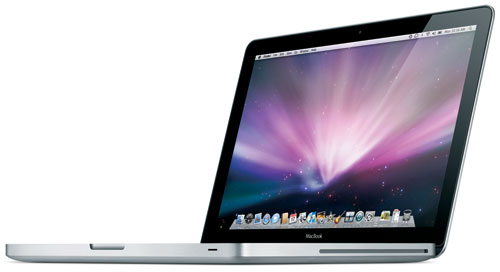
Photo Credit: Apple, Inc. (Aluminum Unibody MacBook -- MacBook5,1)
Identification Help
The Aluminum "Unibody" MacBook models are fairly easy to spot as they're the only Apple notebooks with an optical drive and a silver-colored aluminum case that say "MacBook" on the lower display bezel. If your Apple notebook is branded "MacBook Pro" rather than just MacBook, it is a different model. EveryMac.com covers RAM upgrades for the 13-Inch MacBook Pro models separately.
Both Aluminum "Unibody" MacBook models use the same type of RAM, and the above visual information likely is sufficient for unique identification.
However, it still is theoretically possible to mix up the Aluminum "Unibody" MacBook with the much newer and thinner Retina MacBook. Consequently, identifier confirmation always is a good idea. The Aluminum "Unibody" MacBook can be collectively identified externally by the 2254 EMC Number in tiny print on the bottom of the notebook toward the hinge and in software by the MacBook5,1 Model Identifier.
EveryMac.com's Ultimate Mac Lookup feature also can uniquely identify these systems by their Serial Numbers and more.
Additional details about specific identifiers are provided in EveryMac.com's extensive Mac Identification section.
Official RAM Details
Apple has a detailed article on "How to Install Memory" in the Aluminum "Unibody" MacBook that provides much of what you need to upgrade the stock memory, but not everything.
This document starts by noting that the Aluminum "Unibody" MacBook models:
Have two memory slots that you access by removing the access door, battery, and bottom case. Your MacBook comes with at least 2 GB (1 GB in each slot) of 1066 MHz Double Date Rate (DDR3) Synchronous Dynamic Random-Access Memory (SDRAM) installed.
Both memory slots can accept an SDRAM module that meets the following specifications:
- Double Data Rate Small Outline Dual Inline Memory Module (DDR SO-DIMM) format
- 1.25 inch or smaller (3.18 cm)
- 1 Gigabyte (GB) or 2 Gigabyte (GB)
- 204-pin
- PC3-8500 DDR3 1066 MHz Type RAM
Official & Actual Maximum RAM Capacity
Officially, Apple only supports 4 GB of RAM in the Aluminum "Unibody" MacBook.
Initial tests at the time these models shipped from site sponsor Other World Computing and the always excellent BareFeats demonstrated that they were capable of stably supporting 6 GB of RAM with one 2 GB module and one 4 GB module. It was physically possible to install 8 GB of RAM as well, but the system was not stable and it was not recommended to install 8 GB of RAM.
However, some time after OWC and BareFeats published their findings, EveryMac.com readers and other third-parties reported that these models were capable of stably supporting 8 GB of RAM.
In detailed follow up testing, OWC was able to confirm that the Aluminum "Unibody" MacBook models are capable of supporting 8 GB of RAM, but if -- and only if -- they have been upgraded to run Mac OS X 10.6 "Snow Leopard" or higher and have Boot ROM Version MB51.007D.B03. Note that you may be required to manually update the firmware for the update to work properly. Earlier versions of the operating system (OWC tested running Mac OS X 10.6.6) and earlier Boot ROM versions are not supported.
RAM Upgrade Video Instructions
The Apple document provides installation instructions complete with drawings, which absolutely should be read in their entirety before one installs memory. Even better, though, OWC provides a convenient step-by-step video of the process:
After watching the video, it should be clear that upgrading the RAM in these models is a simple procedure. However, if you do not feel comfortable -- or have the time -- to perform the upgrade yourself, hiring a professional always is a good idea.
MacBook RAM Purchase Options
Just because RAM meets the minimum listed criteria does not mean that it will necessarily function as intended in your Mac. Be sure to buy from a quality vendor that has tested their RAM with the specific type of MacBook to ensure full compatibility.
In the US (and many other countries), site sponsor Other World Computing sells memory as well as storage for just about all MacBook models for do-it-yourself upgrades.
In Germany, site sponsor CompuRAM sells quality memory for all MacBook models with affordable delivery country-wide and in person pick up and professional installation service available in Munich.
Also see:
- How do you upgrade the hard drive in the Aluminum "Unibody" MacBook models? Do these models support an SSD?
- How do you upgrade the RAM in the "White & Black" MacBook models (A1181)? What type of RAM do they use? How much RAM do they actually support?
- How do you upgrade the RAM in the White "Unibody" MacBook models (A1342)? What type of RAM do they use? How much RAM do they actually support?
Permalink | Report an Error/Typo | Sign Up for Site Update Notices
<< Aluminum Unibody MacBook Q&A (Main)
Established in 1996, EveryMac.com has been created by experts with decades of experience with Apple hardware. EveryMac.com includes, and always has included, original research incorporating detailed, hands-on inspection of packaging, computers, and devices as well as extensive real-world use. All information is provided in good faith, but no website or person is perfect. Accordingly, EveryMac.com is provided "as is" without warranty of any kind whatsoever. EveryMac.com, and the authors thereof, shall not be held responsible or liable, under any circumstances, for any damages resulting from the use or inability to use the information within. For complete disclaimer and copyright information please read and understand the Terms of Use and the Privacy Policy before using EveryMac.com. Copying, scraping, or use of any content without expressed permission is not allowed, although links to any page are welcomed and appreciated.