
Hosted by site sponsor WebMate.
Unibody MacBook Pro Q&A
Published April 30, 2010
All Mac Q&As >> Unibody MacBook Pro Q&A | Also See: All MacBook Pro Specs
To be notified of new Q&As, sign up for EveryMac.com's bimonthly email list.
What are the "pros and cons" of the "Mid-2010" MacBook Pro models? Is one right for my needs?
Please note that all MacBook Pro models mentioned in this Q&A have been discontinued. However, this Q&A is up-to-date and quite useful for anyone considering one of these notebooks on the used market.
Like any other purchase, only you can make the decision whether or not the one of the 13-Inch, 15-Inch, or 17-Inch "Mid-2010" MacBook Pro models is the right notebook for you, but you can evaluate the pros and cons of each to see if your needs are met.
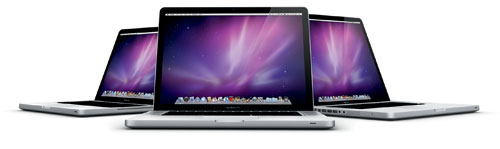
Photo Credit: Apple, Inc.
This "run down" may be helpful in making a decision:
Pros (All Models):
- Sleek, durable industrial design.
- Quality, widescreen LED-backlit displays.
- Solid performance and impressive battery life.
- Backlit keyboards.
- Reasonably quick and easy to upgrade the RAM and hard drive.
- Firewire "800" standard in all models.
- Innovative multi-touch trackpad.
- Mini DisplayPort can pass an audio signal as well as video.
Cons (All Models):
- Glossy display casts a glare in direct lighting (matte option on 15-Inch and 17-Inch models).
- Non-swappable battery, not designed for user replacement.
- No Firewire "400" port (adapters are available).
- Mini DisplayPort requires adapters to use with older display connectivity standards.
Additional Pros (13-Inch):
- Comparatively compact and lightweight.
- SD Card slot standard.
- Yes, it has a Firewire "800" port (like all other models in the series).
Additional Cons (13-Inch):
- Comparatively small display and weaker performance compared to 15-Inch and 17-Inch models.
- No optical audio in, and instead has the same "combined optical digital output/headphone out (user-selectable analog audio line in)" port used by the iPhone.
- No ExpressCard/34 expansion slot.
Additional Pros (15-Inch):
- Autoswitching graphics technology conserves battery life.
- SD Card slot standard.
Additional Cons (15-Inch):
- Cannot use both graphics processors simultaneously.
- No ExpressCard/34 expansion slot.
Additional Pros (17-Inch):
- Autoswitching graphics technology conserves battery life.
- ExpressCard/34 expansion slot standard.
Additional Cons (17-Inch):
- Comparatively large and heavy.
- Cannot use both graphics processors simultaneously.
- No SD Card slot.
Basically, if you are looking for a sleek and powerful 13-Inch, 15-Inch, or 17-Inch notebook Mac -- and the connectivity and graphics options meet your needs -- one of the "Mid-2010/Unibody" MacBook Pro systems would be an excellent choice.
If weight is a high priority, the MacBook Air is worth considering. If cost is a high priority, the "White" MacBook (or a used MacBook or MacBook Pro) would be a good choice as well.
In the US, site sponsor Other World Computing sells used and refurb MacBook Pro models at bargain prices with free shipping, as well. On the other hand, if you need to sell a MacBook Pro, A+ BBB-rated Cash for Your Mac and GoRoostr will buy your older notebook with an instant quote and prompt payment.
In the UK, site sponsor Hoxton Macs sells used MacBook Pro models with a one-year warranty and free next day delivery throughout the UK. Delivery across Europe also is available starting at just £9.99 for two-day delivery to France and Germany.
Also see: What are the differences between the "Mid-2010" 13-Inch, 15-Inch, and 17-Inch MacBook Pro models? Which is best for my needs?
Permalink | Report an Error/Typo | Sign Up for Site Update Notices
<< Unibody MacBook Pro Q&A (Main) | Also See: All MacBook Pro Specs
Established in 1996, EveryMac.com has been created by experts with decades of experience with Apple hardware. EveryMac.com includes, and always has included, original research incorporating detailed, hands-on inspection of packaging, computers, and devices as well as extensive real-world use. All information is provided in good faith, but no website or person is perfect. Accordingly, EveryMac.com is provided "as is" without warranty of any kind whatsoever. EveryMac.com, and the authors thereof, shall not be held responsible or liable, under any circumstances, for any damages resulting from the use or inability to use the information within. For complete disclaimer and copyright information please read and understand the Terms of Use and the Privacy Policy before using EveryMac.com. Copying, scraping, or use of any content without expressed permission is not allowed, although links to any page are welcomed and appreciated.