
Hosted by site sponsor WebMate.
iPad Q&A
Update Published April 10, 2018
All Apple Q&As >> iPad Q&A (Home) | Also see: All iPad Specs
To be notified of new Q&As, sign up for EveryMac.com's bimonthly email list.
What exactly is the iPad? What is the iPad used for?
In basic terms, the iPad is a tablet computer. Upon the release of the original iPad, Apple formally declared that it is a "magical and revolutionary" device for "browsing the web, reading and sending email, enjoying photos, watching videos, listening to music, playing games, reading e-books and more."
Although "magical" might be a bit much, the iPad definitely is a new type of product.
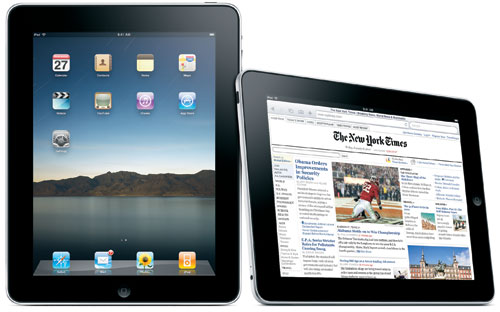
Photo Credit: Apple, Inc. (Original iPad)
Software Support & Lineage
Specifically, Apple originally designed the iPad to occupy a new product category between the iPod touch/iPhone and the Mac, and consequently, it is really neither an iPod or iPhone nor a Mac.
However, it does run a version of the same operating system as the iPod touch and iPhone. Likewise, the iPad is compatible with the vast majority of applications written for the iPhone and iPod touch as well, it is not unreasonable to consider it a member of the iPhone/iPod touch "family" of products.
The iPad does not run Mac OS X or Mac OS X applications, so it is not Mac, although the iOS is derived from Mac OS X.
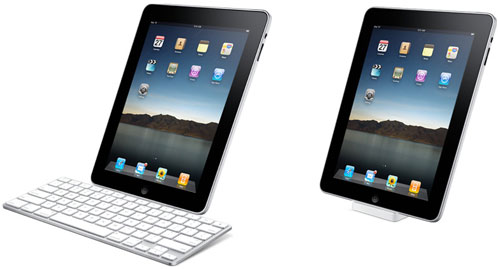
Photo Credit: Apple, Inc. (Original iPad with Keyboard/Regular Dock)
Additional Usage
In addition to its original list of "official" uses, the iPad also can be used like a basic computer with the original external keyboard dock accessory (above, subsequently discontinued) or any number of Bluetooth wireless keyboards.
When combined with the iWork software Pages, the external keyboard capability makes it possible to comfortably compose full documents on the iPad, which can then be saved in Pages, Word, or PDF format and printed, if needed. Spreadsheets and presentations, likewise, can be prepared with versions of the Numbers and Keynote applications from the iWork suite and saved in either native formats or in Excel or PowerPoint, respectively. Native versions of Microsoft Word, Excel, and PowerPoint are available now, too.
Of course, the iPad can be used for any number of other tasks by taking advantage of thousands of third-party apps. Like an iPod or iPhone, the iPad models also can be synchronized with a compatible Mac or Windows PC, if desired.
Later iPad models, especially the iPad Pro line, have been created with the production of creative content -- music, photos, and video -- very much in mind, and elevate the iPad to the level of a definite competitor with "traditional" computers.
Also see:
- What market is the iPad designed to reach? What type of needs does it address? Who is expected to buy it?
- Can the iPad be used to type documents? Can it open and save Microsoft Office files? Can it open and save PDF files?
- How do you print directly from the iPad without transferring files to a computer first? Is it possible?
- How do you connect an iPad to a television or projector to display photos or video? What formats and resolutions does it support? What are the video out differences between the iPad models?
- Can you connect a camera to the iPad to transfer photos? How do you connect a camera to transfer photos? Does it have an SD card slot? Does the iPad work with the iPod Camera Connector?
Permalink | Report an Error/Typo | Sign Up for Site Update Notices
<< iPad Q&A (Main) | All Apple Q&As
Established in 1996, EveryMac.com has been created by experts with decades of experience with Apple hardware. EveryMac.com includes, and always has included, original research incorporating detailed, hands-on inspection of packaging, computers, and devices as well as extensive real-world use. All information is provided in good faith, but no website or person is perfect. Accordingly, EveryMac.com is provided "as is" without warranty of any kind whatsoever. EveryMac.com, and the authors thereof, shall not be held responsible or liable, under any circumstances, for any damages resulting from the use or inability to use the information within. For complete disclaimer and copyright information please read and understand the Terms of Use and the Privacy Policy before using EveryMac.com. Copying, scraping, or use of any content without expressed permission is not allowed, although links to any page are welcomed and appreciated.