
Hosted by site sponsor WebMate.
Aluminum "Unibody" Mac mini Q&A
Published July 24, 2011
All Mac Q&As >> Aluminum Mac mini Q&A (Home)
To be notified of new Q&As, sign up for EveryMac.com's bimonthly email list.
What are all the differences between the "Mid-2011" Aluminum "Unibody" Mac mini models and the "Mid-2010" models replaced?
Please note that the "Mid-2010" and "Mid-2011" Mac mini models have been discontinued. However, this Q&A is up-to-date and can be quite helpful for anyone buying or selling one of these systems on the used market.
With just a mere glance at the stock "Mid-2011" Mac mini models -- the Mac mini "Core i5" 2.3 (Mid-2011), "Core i5" 2.5 (Mid-2011) and "Core i7" 2.0 Server (Mid-2011) -- and the stock "Mid-2010" Mac mini models -- the Mac mini "Core 2 Duo" 2.4 (Mid-2010) and 2.66 Server (Mid-2010) -- there is one obvious difference, but there are a number of less obvious and internal differences as well.
A sharp-eyed reader also will notice that three stock models replaced two, and this change is well worth evaluating, also.
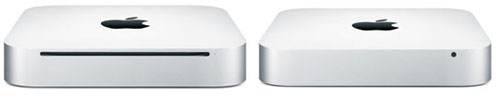
Photo Credit: Apple, Inc. (Non-Server Mid-2010 - Left, Mid-2011 - Right)
External Differences
All of the "Mid-2010" and "Mid-2011" Mac mini models use tiny "cuboid" aluminum cases -- just 7.7 inches across and deep and a miniscule 1.4 inches tall -- that have a "spin off" black plastic base on the bottom that can be removed quickly to access the RAM slots.
However, as is quickly apparent from the above image, the standard non-server Mac mini "Core 2 Duo" 2.4 (Mid-2010) has an internal optical drive whereas the Mac mini "Core 2 Duo" 2.66 Server (Mid-2010) and all "Mid-2011" Mac mini models lack an internal optical drive (although Apple sells an external one for US$79).
Connectivity Differences
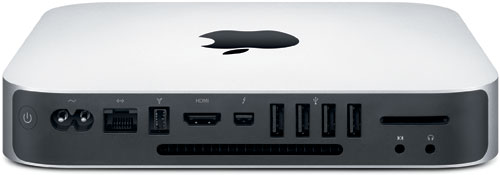
Photo Credit: Apple, Inc. (Rear - Mid-2011 Mac mini)
Connectivity is similar between the "Mid-2010" and "Mid-2011" lines, but there are a couple of significant differences as well.
Both lines share 802.11a/b/g/n Wi-Fi (although Apple stopped branding the wireless internet capabilities as "AirPort Extreme" for the "Mid-2011" models even though the technology is the same), four USB 2.0 ports, a single Firewire "800" port, combined "audio line in (digital/analog)" and combined "audio line out/headphone (digital/analog)" minijacks, a 10/100/1000Base-T Gigabit Ethernet port, an HDMI port, and an SDXC-capable SD card slot (unofficially for the "Mid-2010" models and officially for the "Mid-2011" ones). All support IR for a remote, too.
Other connectivity is different, though. The "Mid-2011" models substitute the Mini DisplayPort from the "Mid-2010" models with a new "Thunderbolt" port. Thunderbolt is backwards compatible with Mini DisplayPort and likewise supports an external display at 2560x1600 and passes an audio signal as well. Thunderbolt also supports other peripherals that use the Thunderbolt standard which provides up to 10 Gbps of bandwidth in both directions. The "Mid-2011" models additionally support Bluetooth 4.0 rather than the older Bluetooth 2.1+EDR standard.
Identification Differences
Externally, the "Mid-2011" and "Mid-2010" Mac mini lines share a single A1347 Model Number, and as a result, it is not convenient to use for identification. However, these lines can be identified externally by EMC Number -- visible upon removing the bottom "spin off" panel to the right of the memory slots (when the ports are pointing toward you) -- and EveryMac.com has hand noted these differences accordingly. The "Mid-2010" Mac mini models display EMC Number 2364 whereas the "Mid-2011" Mac mini models display EMC Number 2442.
In software, the "Mid-2010" Mac mini models all share the Macmini4,1 Model Identifier whereas the "Mid-2011" Mac mini models can be identified by Model Identifiers of Macmini5,1, Macmini5,2 and Macmini5,3 for the entry-level 2.3 GHz model, the mid-level 2.5 GHz model and the Server model, respectively.
EveryMac.com's Ultimate Mac Lookup feature also can identify all of these systems by their Serial Numbers.
Internal Differences
For all the external similarities, the "Mid-2010" and "Mid-2011" models differ substantially internally.
The "Mid-2010" models have Core 2 Duo processors, have a 1066 MHz frontside bus, support 1066 MHz PC3-8500 DDR3 SDRAM and 3 Gb/s Serial ATA connectors, and have NVIDIA GeForce 320M graphics. The "Mid-2011" models, by contrast, have significantly faster "Sandy Bridge" Core i5 or Core i7 processors, a 5 GT/s "Direct Media Interface" in lieu of the system bus, support 1333 MHz PC3-10600 DDR3 SDRAM, 6 Gb/s Serial ATA connectors, and have either Intel HD Graphics 3000 or AMD Radeon HD 6630 graphics.
Comparison Charts
The specific differences between processors, architectures, configurations and price for the "Mid-2010" and "Mid-2011" models are summarized below.
Regular/Non-Server Models
The single "regular" configuration of the "Mid-2010" Mac mini -- the Mac mini "Core 2 Duo" 2.4 (Mid-2010) -- was replaced with two configurations in the "Mid-2011" line -- the Mac mini "Core i5" 2.3 (Mid-2011) and "Core i5" 2.5 (Mid-2011) -- which provide widespread improvement (particularly for graphics performance on the higher-end model), and a lower entry-level price tag, but lost the optical drive:
 "Mid-2010" Mac mini |
 "Mid-2011" Mac mini |
|
|---|---|---|
| Processor Type: | Core 2 Duo (P8600)* | Core i5 (2415M, 2520M)** |
| Processor Speed: | 2.4 GHz* | 2.3 GHz, 2.5 GHz** |
| System Bus/DMI: | 1066 MHz | 5 GT/s |
| Std. RAM: | 2 GB | 2 GB, 4 GB |
| RAM Type: | 1066 MHz DDR3 | 1333 MHz DDR3 |
| Std. Hard Drive: | 320 GB | 500 GB |
| SATA Support: | 3 Gb/s | 6 Gb/s |
| Optical Drive: | 8X DL "SuperDrive" | None |
| Graphics Processor: | NVIDIA GeForce 320M | HD Graphics 3000 Radeon HD 6630M |
| VRAM Type: | Integrated | Integrated Dedicated |
| Standard VRAM: | 256 MB (Shared) | 288 MB (Shared) 256 MB (GDDR5) |
| Display Ports: | HDMI, Mini DisplayPort | HDMI, Thunderbolt |
| Bluetooth: | 2.1+EDR | 4.0 |
| Order Numbers: | MC270LL/A | MC815LL/A MC816LL/A |
| EMC Number: | 2364 | 2442 |
| Model Identifier: | Macmini4,1 | Macmini5,1 Macmini5,2 |
| Intro Price: | US$699 | US$599 US$799 |
* The "Mid-2010" model also was available via custom configuration with a 2.66 GHz "Core 2 Duo" (P8800) processor for an additional US$150. As requested by readers, EveryMac.com additionally has documented this custom configuration as its own model.
** The 2.5 GHz "Mid-2011" model also was available via custom configuration with a 2.7 GHz "Core i7" (I7-2620M) processor for an extra US$100. As requested by readers, EveryMac.com additionally has documented this custom configuration as its own model.
Server Models
The "Mid-2011" server configuration -- the Mac mini "Core i7" 2.0 Server (Mid-2011) -- has a massively faster quad core processor as well as architecture improvements compared to the "Mid-2010" server -- the Mac mini "Core 2 Duo" 2.66 Server (Mid-2010) -- replaced:
 "Mid-2010" Mac mini Server |
"Mid-2011" Mac mini Server |
|
|---|---|---|
| Processor Type: | Core 2 Duo (P8800) | Core i7 (2635QM) |
| Processor Cores: | 2 | 4 |
| Processor Speed: | 2.66 GHz | 2.0 GHz |
| L2/L3 Cache: | 3 MB | 256k x4, 6 MB |
| System Bus/DMI: | 1066 MHz | 5 GT/s |
| Std. RAM: | 4 GB | 4 GB |
| RAM Type: | 1066 MHz DDR3 | 1333 MHz DDR3 |
| Std. Hard Drive: | 500 GB x2 | 500 GB |
| SATA Support: | 3 Gb/s | 6 Gb/s |
| Optical Drive: | None | None |
| Graphics Processor: | NVIDIA GeForce 320M | HD Graphics 3000 |
| VRAM Type: | Integrated | Integrated |
| Standard VRAM: | 256 MB (Shared) | 384 MB (Shared) |
| Display Ports: | HDMI, Mini DisplayPort | HDMI, Thunderbolt |
| Bluetooth: | 2.1+EDR | 4.0 |
| Order Number: | MC438LL/A | MC936LL/A |
| EMC Number: | 2364 | 2442 |
| Model Identifier: | Macmini4,1 | Macmini5,3 |
| Intro Price: | US$999 | US$999 |
Comparison Summary
Ultimately, the "Mid-2011" Mac mini models are a "four steps forward, one step back" kind of upgrade. For most users, losing the optical drive is well worth the lower entry-level price, the substantially enhanced performance, and the additional connectivity.
However, for others, the internal optical drive still is a valued feature, and the "Mid-2010" line remains well worth consideration as a result. Naturally, both lines are offered at a discount to their original prices on the used market.
Used Mac mini Purchase Options
There are many places to purchase a used or new Mac mini. However, buying from a quality merchant with an extensive track record in the Mac market will provide the best experience and save you money and time, too.
In the US, site sponsor Other World Computing sells used and refurb Mac mini models at bargain prices with free shipping, as well. Finally, if you need to sell a Mac mini, A+ BBB-rated Cash for Your Mac will buy your older Mac mini with an instant quote and prompt payment.
In the UK, site sponsor Hoxton Macs sells used Mac mini models with a one-year warranty and free next day delivery throughout the UK. Delivery across Europe also is available starting at just £9.99 for two-day delivery to France and Germany.
Please refer to the Ultimate Mac Comparison feature to dynamically compare any Mac mini model to any other G3 or later Mac.
Permalink | Report an Error/Typo | Sign Up for Site Update Notices
Suggest a New Q&A | Sign Up for Bimonthly Site Update Notices
<< Aluminum "Unibody" Mac mini Q&A (Main) | All Mac Q&As
Established in 1996, EveryMac.com has been created by experts with decades of experience with Apple hardware. EveryMac.com includes, and always has included, original research incorporating detailed, hands-on inspection of packaging, computers, and devices as well as extensive real-world use. All information is provided in good faith, but no website or person is perfect. Accordingly, EveryMac.com is provided "as is" without warranty of any kind whatsoever. EveryMac.com, and the authors thereof, shall not be held responsible or liable, under any circumstances, for any damages resulting from the use or inability to use the information within. For complete disclaimer and copyright information please read and understand the Terms of Use and the Privacy Policy before using EveryMac.com. Copying, scraping, or use of any content without expressed permission is not allowed, although links to any page are welcomed and appreciated.