
Hosted by site sponsor WebMate.
Silver Tower Mac Pro (Dual Optical) Q&A - Updated May 28, 2013
All Mac Q&As >> Silver Tower Mac Pro Dual Optical Q&A (Home)
To be notified of new Q&As, sign up for EveryMac.com's bimonthly email list.
How do you install a second optical drive or replace the primary one in the Mac Pro models? What options are available for the second Mac Pro "optical drive bay"?
Although the default optical drive in early models is an IDE/ATA, all Mac Pro models have two front-facing optical drive bays that can support two standard dimension 5.25" 3 Gb/s Serial ATA devices (also called SATA 2.0 or SATA II) courtesy of two Serial ATA ports.
Replacing the primary optical drive or installing a second optical drive in the Mac Pro models is a simple procedure, but installation instructions still are useful nevertheless. Apple provides official support for individuals installing optical drive(s) in the Mac Pro, as well.
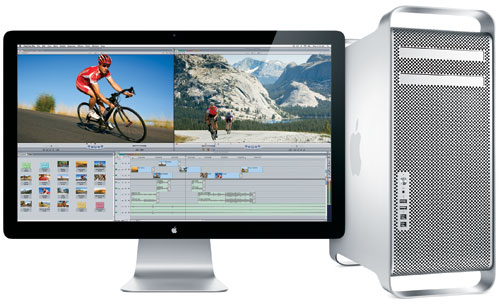
Photo Credit: Apple, Inc. (Mac Pro)
Identification Help
To replace the primary optical drive or install a second one in the Mac Pro, the process is similar for all systems. However, there are some differences between the earlier A1186 and later A1289 Model Number Mac Pro models, perhaps most notably that the earlier models do not include the necessary cables for a second drive. It is important to know whether you have an original (2006/2007) or "Early 2008" model (A1186) or alternately a "Early 2009," "Mid-2010" or "Mid-2012" model (A1289).
In addition to the "close enough" Model Number identifier, the Mac Pro lines each can be uniquely identified by EMC Number. The EMC number is listed on the rear of the system in small type.
Additionally, all Mac Pro lines can be identified to some extent by the Model Identifier in software. To locate the model identifier, select "About This Mac" under the Apple Menu on your computer and click the "More Info..." button. If the Mac Pro is running OS X "Lion" (10.7) or later, click the "System Report" button after clicking "More Info..." as well.
Useful identifiers for the Mac Pro lines include:
Mac Pro Subfamily |
Model Number |
Model ID |
EMC Number |
Original (2006) |
|||
Original (2007) |
|||
Early 2008 |
|||
Early 2009 |
|||
Mid-2010 |
|||
Mid-2012 |
More details about specific identifiers are provided in EveryMac.com's extensive Mac Identification section.
EveryMac.com's Ultimate Mac Lookup feature also can identify these systems by their Serial Numbers.
SuperDrive & Blu-ray Options
The only official custom configuration option Apple offers for the second 5.25" external Mac Pro "optical drive bay" is a second 18X double layer DVD±R DL/DVD±RW/CD-RW SuperDrive for an additional US$100.
However, the Mac Pro is capable of supporting third-party optical drive options that include Blu-ray. Apple provides no support for commercial Blu-ray movies, but commercial movies can be played with third-party software and the Blu-ray format can be used for convenient backups up to 50 GB.
Site sponsor Other World Computing sells a variety of Mac Pro compatible optical drives including internal Blu-ray drives that are capable of both reading and writing Blu-ray media.
Hard Drive & SSD Options
Particularly if you already have filled the four hard drive bays in your Mac Pro, you also can install additional storage in either of the Mac Pro optical drive bays using a third-party adapter from OWC's Multi-Mount series.
Which adapter to use depends on which Mac Pro you have and what you want to install -- a single 3.5" hard drive, a 3.5" hard drive and a 2.5" SSD, or two 2.5" SSDs -- but there are a variety of options that make the process easy.
Optical Drive Upgrade Instructions
Apple provides a PDF with instructions on how to install a second optical drive or replace the primary one in the Mac Pro -- and covers this information in the instruction manuals for each model as well (pages 63-68 for the "Early 2009" line and pages 68-73 for the "Mid-2010" and "Mid-2012" lines).
The official documentation absolutely should be read before performing an optical drive installation. However, perhaps even better than the official drawings, OWC provides step-by-step videos of the upgrade process.
Mac Pro Optical Drive Upgrade Video
Original (2006 & 2007) & Early 2008 (A1186)
Mac Pro Optical Drive Upgrade Video
Early 2009, Mid-2010 & Mid-2012 (A1289)
After watching these videos, it should be clear that installing an optical drive in all Mac Pro models is straightforward. However, if you do not feel comfortable -- or have the time -- to perform the installation yourself, hiring a professional always is a good idea.
Optical Drive Upgrade Purchase & Professional Installation Options
To ensure full compatibility, it always is best to buy an optical drive and other upgrades from a trusted company with Mac knowledge for the most trouble-free experience.
In the US (and many other countries), site sponsor Other World Computing sells Mac Pro compatible internal Blu-ray drives as well as Multi-Mount adapter kits and other Mac Pro upgrades.
Also see:
- How do you upgrade the hard drives in the Mac Pro to SSDs? What SSD options are available? Which SSD configuration provides the fastest performance?
- How do you install a second optical drive or replace the primary one in the Mac Pro models? What options are available for the second Mac Pro "optical drive bay"?
- How many PCI slots of what type are provided by the Mac Pro models? How do you install a PCIe card in the Mac Pro?
Permalink | Report an Error/Typo | Sign Up for Site Update Notices
<< Mac Pro Dual Optical Drives Q&A (Main) | All Mac Q&As
Established in 1996, EveryMac.com has been created by experts with decades of experience with Apple hardware. EveryMac.com includes, and always has included, original research incorporating detailed, hands-on inspection of packaging, computers, and devices as well as extensive real-world use. All information is provided in good faith, but no website or person is perfect. Accordingly, EveryMac.com is provided "as is" without warranty of any kind whatsoever. EveryMac.com, and the authors thereof, shall not be held responsible or liable, under any circumstances, for any damages resulting from the use or inability to use the information within. For complete disclaimer and copyright information please read and understand the Terms of Use and the Privacy Policy before using EveryMac.com. Copying, scraping, or use of any content without expressed permission is not allowed, although links to any page are welcomed and appreciated.