
Hosted by site sponsor WebMate.
Silver Tower Mac Pro (Dual Optical) Q&A - Updated May 17, 2017
All Mac Q&As >> Silver Tower Mac Pro Dual Optical Q&A (Home)
To be notified of new Q&As, sign up for EveryMac.com's bimonthly email list.
How do you upgrade the hard drives in the Mac Pro to SSDs? What SSD options are available? Which SSD configuration provides the fastest performance?
When this Q&A first was published eons ago, Apple did not offer an SSD option for the Mac Pro and equipping any Mac Pro model with an SSD involved a creative use of zip ties or some other method to delicately anchor a 2.5" SSD in a 3.5" hard drive bay.
Thankfully, times have changed. Starting on July 27, 2010, with the introduction of the "Mid-2010" Mac Pro models, Apple began to offer SSDs as a standard configuration (albeit at significantly higher prices than SSD options from other companies available for self-installation).
Also, third-party options have emerged that make it quick and easy to install SSDs in the traditional Mac Pro hard drive bays as well as in the optical drive bays. Much faster PCIe 2.0-based SSDs have been developed, too.
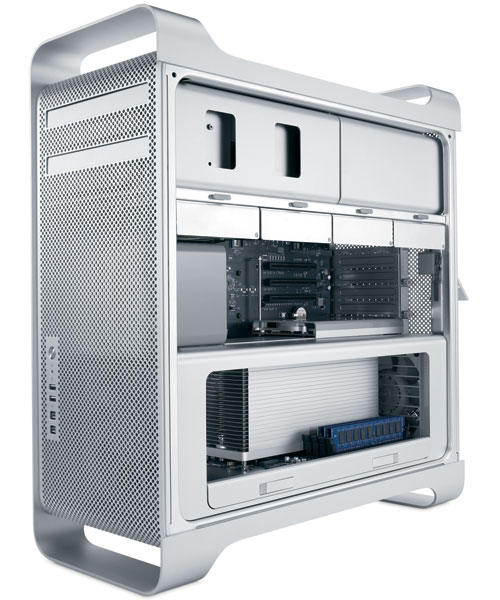
Photo Credit: Apple, Inc. (Mac Pro)
Identification Help
As the SSD installation options available vary depending on the Mac Pro model, it is particularly important to know which Mac Pro model you have.
Each Mac Pro line can be identified by the Model Identifier in software and externally by EMC Number.
To locate the model identifier, select "About This Mac" under the Apple Menu on your computer and click the "More Info..." button. If the Mac Pro is running OS X "Lion" (10.7) or later, click the "System Report" button after clicking "More Info..." as well.
The EMC number is listed on the rear of the system in small type.
The specific identifiers for each model are easiest to visualize as a chart:
Mac Pro |
Subfamily |
Model ID |
EMC |
Original (2006) |
|||
Original (2006) |
|||
Original (2006) |
|||
Original (2007) |
|||
Early 2008 |
|||
Early 2008 |
|||
Early 2008 |
|||
Early 2008 |
|||
Early 2009 |
|||
Early 2009 |
|||
Early 2009 |
|||
Early 2009 |
|||
Early 2009 |
|||
Early 2009 |
|||
Mid-2010 |
|||
Mid-2010 |
|||
Mid-2010 |
|||
Mid-2010 |
|||
Mid-2010 |
|||
Mid-2010 |
|||
Server Mid-2010 |
|||
Server Mid-2010 |
|||
Server Mid-2010 |
|||
Server Mid-2010 |
|||
Server Mid-2010 |
|||
Server Mid-2010 |
|||
Mid-2012 |
|||
Mid-2012 |
|||
Mid-2012 |
|||
Mid-2012 |
|||
Mid-2012 |
|||
Server Mid-2012 |
|||
Server Mid-2012 |
|||
Server Mid-2012 |
|||
Server Mid-2012 |
|||
Server Mid-2012 |
EveryMac.com's Ultimate Mac Lookup feature also can identify these systems by their Serial Numbers.
SSD Hard Drive Bay Installation Options (Easiest)
Each Mac Pro system -- regardless of series -- has "four independent 3 Gb/s Serial ATA [2.0] cable-free, direct attach hard drive bays" with "four internal hard drive carriers included." As these hard drive carriers are designed for a 3.5" hard drive, an adapter is needed to properly accommodate a 2.5" SSD.
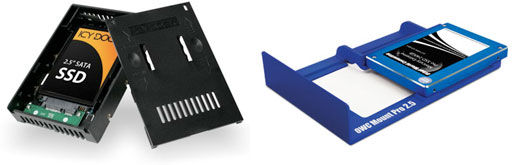
Photo Credit: Icy Dock (Left), OWC Mount Pro (Right)
For all Mac Pro models (and even Windows PCs), the Icy Dock makes it easy to "convert" just about any 2.5" SSD to fit in any 3.5" drive bay. For the "Early 2009," "Mid-2010," and "Mid-2012" (A1289) Mac Pro models, the Mount Pro, from site sponsor Other World Computing, is a clever 2.5" drive adapter that smoothly replaces the stock Mac Pro drive sleds.
With the exception of the adapters, the SSD installation procedure is the same as it is for installing a hard drive in the Mac Pro models. For video instructions of this installation method, please refer to "How do you upgrade the hard drives in the Mac Pro?"
SSD Optical Drive Bay Installation Options
Both optical drive bays in all Mac Pro models each have a 3 Gb/s Serial ATA 2.0 connector and it is entirely possible to use either optical drive bay for SSD installation. OWC offers a variety of "Multi-Mount" adapters and some of these make it easy to install as many as two 2.5" SSDs in each of the 5.25" Mac Pro optical drive bays.
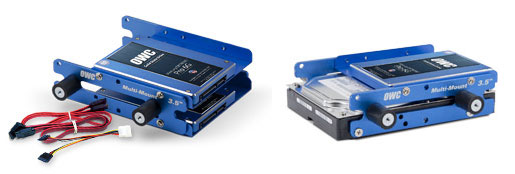
Photo Credit: OWC (Multi-Mount Adapters)
Which adapter to purchase, however, depends on which Mac Pro you have.
For the original and "Early 2008" Mac Pro models (A1186), you will need to purchase the MM352A52MP Multi-Mount adapter kit (on the left), which supports two 2.5" SSDs. For the "Early 2009," "Mid-2010," and "Mid-2012" (A1289) Mac Pro models, you will instead need to purchase the MM352A52MP8 Multi-Mount adapter kit (on the right, which is shown with a 2.5" SSD and a traditional 3.5" hard drive).
After installing the SSD(s) in the Multi-Mount adapter itself, plugging in the SSD-equipped Multi-Mount adapters is essentially the same process as installing a second optical drive in the Mac Pro.
See "How do you install a second optical drive or replace the primary one in the Mac Pro models?" for video installation instructions that cover this process.
SSD PCIe 2.0 Card Installation Options (Highest Performance)
Whether installed in a hard drive bay or an optical drive bay, however, the SSD will be limited by the 300 MB/s maximum data rate of the SATA 2.0 connection itself.
Because of PCIe bus limitations, those with original Mac Pro models from 2006 and 2007 should stick with the above hard drive and optical drive bay options unless there is value in more storage capacity, even at a slower speed.
However, for those interested in the maximum possible performance from an SSD in "Early 2008" and later Mac Pro models, bypassing the drive bays entirely and installing an SSD-equipped PCIe 2.0 card definitely is the way to go.
Three such modern, fast SSD-equipped PCIe 2.0 cards for these increasingly vintage Mac Pro models include the Sonnet Tempo SSD Pro Plus, Kingston HyperX Predator PCIe SSD, and OWC Mercury Accelsior Pro Q.
Sonnet Tempo SSD Pro Plus
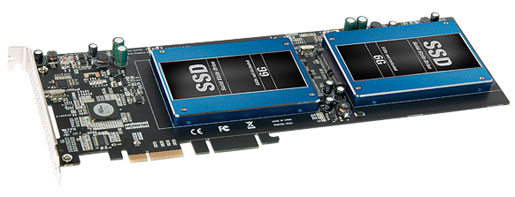
Photo Credit: Sonnet Technologies (Tempo SSD Pro Plus)
The Sonnet Tempo SSD Pro Plus supports standard, and comparatively inexpensive, 2.5" SSDs, although it is large and occupies a full length PCIe 2.0 slot as a result. As 2.5" SSDs continue to increase in capacity and fall in price, this card makes it easy to swap out SSD modules as your needs change. It has two external eSATA ports for additional connectivity, as well.
This PCIe 2.0 card uses a PLX PCIe Switch to bypass the internal limitations of the Mac Pro and reach data transfer speeds up to 960 MB/s. With two cards installed, it can reach an incredible maximum data transfer speed of up to 1700 MB/s.
OWC Mercury Accelsior Q
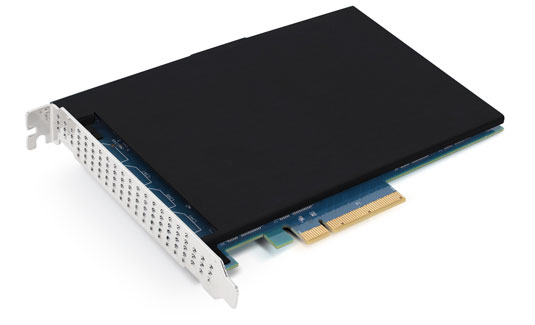
Photo Credit: OWC, Inc. (Mercury Accelsior Pro Q)
The OWC Mercury Accelsior Pro Q is a full height, half length PCIe 2.0 x16 card with integrated flash memory storage. It is available in 480 GB as well as massive 1 TB and 2 TB capacities and provides maximum writes and reads of a whopping 1362 MB/s and 1450 MB/s, respectively.
Installation Videos
For the Mercury Accelsior Pro Q series, OWC also provides helpful installation videos:
Mac Pro (Early 2008)
Mac Pro (Early 2009-Mid-2012)
From watching the videos above, it should be clear that the installation procedure is simple and effectively like any other PCIe card.
Mac Pro SSD Upgrade Conclusion
It once was reasonable to question whether or not the extra performance of an SSD was worth the extra price compared to a hard drive, but those days have since passed. As SSD prices have moderated, now few who value the power and expansion of a Mac Pro doubt that the performance of an SSD is worth the price compared to a hard drive, or at least in addition to hard drives, but which SSD option is best for you depends on both your budget as well as your storage and performance needs.
If something simple and inexpensive is your highest priority, and you have available hard drive bays, it is quick to install an SSD in a free hard drive bay using an Icy Dock or Mount Pro adapter. If your hard drive bays are full, installing an SSD or two or more in the optical drive bay(s) also is fairly straightforward with the right Multi-Mount adapter. If performance is your top priority, installing an überfast SSD-equipped PCIe card in your Mac Pro will make the system just about as fast as it can be.
Mac Pro SSD Purchase & Professional Installation Options
In theory, just about any SSD that meets the minimum requirements should be compatible with the Mac Pro. However, it always is best to buy from a trusted company with Mac knowledge for the most trouble-free experience and the Mac Pro-specific third-party products make installation much easier and can even provide higher performance, too.
In the US (and many other countries), site sponsor Other World Computing sells SSDs compatible with all Mac Pro models, the Mount Pro, the Multi-Mount adapter kits, and the OWC Mercury Accelsior Q and Sonnet Tempo SSD Pro Plus PCIe cards.
In the UK and Ireland, site sponsor Flexx sells Mac Pro compatible SSDs with free shipping. The company provides flat rate shipping to France, Germany, and Switzerland and inexpensive shipping for all of Europe, too.
Also see:
- How do you upgrade the hard drives in the Mac Pro models? How many drives of what type are supported?
- How do you install a second optical drive or replace the primary one in the Mac Pro models? What options are available for the second Mac Pro "optical drive bay"?
- How many PCI slots of what type are provided by the Mac Pro models? How do you install a PCIe card in the Mac Pro?
Permalink | Report an Error/Typo | Sign Up for Site Update Notices
<< Mac Pro Dual Optical Drives Q&A (Main) | All Mac Q&As
Established in 1996, EveryMac.com has been created by experts with decades of experience with Apple hardware. EveryMac.com includes, and always has included, original research incorporating detailed, hands-on inspection of packaging, computers, and devices as well as extensive real-world use. All information is provided in good faith, but no website or person is perfect. Accordingly, EveryMac.com is provided "as is" without warranty of any kind whatsoever. EveryMac.com, and the authors thereof, shall not be held responsible or liable, under any circumstances, for any damages resulting from the use or inability to use the information within. For complete disclaimer and copyright information please read and understand the Terms of Use and the Privacy Policy before using EveryMac.com. Copying, scraping, or use of any content without expressed permission is not allowed, although links to any page are welcomed and appreciated.