Apple MacBook "Core 2 Duo" 2.13 13" (White-09) Specs
Identifiers: Mid-2009 - MC240LL/A - MacBook5,2 - A1181 - 2330
All MacBook Models | All 2009 Models | Dynamically Compare This Mac to Others
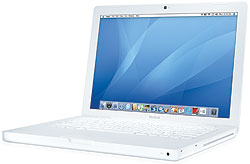 Quietly unveiled without a press release -- just like the model it replaced -- the Apple MacBook "Core 2 Duo" 2.13 13-Inch (White - Mid-2009) features a 45 nm "Penryn" 2.13 GHz Intel "Core 2 Duo" processor (P7450), with two independent processor "cores" on a single silicon chip, a 3 MB shared "on chip" level 2 cache, a 1066 MHz frontside bus, 2 GB of 800 MHz DDR2 SDRAM (PC2-6400) installed in pairs (two 1 GB modules), a 160 GB Serial ATA (5400 RPM) hard drive, an 8X DL "SuperDrive", a NVIDIA GeForce 9400M "graphics processor with 256 MB of SDRAM shared with main memory", and a 13.3" widescreen TFT active-matrix "glossy" display (1280x800 native resolution).
The MacBook "Core 2 Duo" 2.13 13" (White - Mid-2009) shares the same white polycarbonate case as the MacBook "Core 2 Duo" 2.0 13" (White - Early 2009) that it replaced and connectivity is the same as well with AirPort Extreme (802.11a/b/g/n), Gigabit Ethernet, a FireWire "400" port, two USB 2.0 ports, optical digital audio in/out, and video out capabilities (mini-DVI) that supports an external display. The hard drive is larger and the memory is faster. Interestingly, Apple also officially claims that this model provides 5 hours of battery life (up from 4.5 hours on the model replaced).
Internally, this system has quite a bit in common with the MacBook "Core 2 Duo" 2.0 13" (Unibody) and is equipped with the same NVIDIA GeForce 9400M graphics, but uses a faster processor and slower RAM (800 MHz DDR2 compared to 1066 MHz DDR3 in the "Unibody" models).
Also see:
- What are the differences between the White "Mid-2009" MacBook Core 2 Duo and the White "Early 2009" MacBook that it replaced?
- What are the differences between the White "Mid-2009" MacBook Core 2 Duo and the "Mid-2009" 13-Inch MacBook Pro models?
Buy Newer Macs at site sponsor OWC. Click for current options.
Sell Newer Macs at A+ BBB rated site sponsor Cash For Your Mac. Quick quote!
Upgrade This Mac at site sponsor OWC. Memory, storage & more.
- Tech Specs
- Ports
- Global Original Prices
- Popular Q&As
Click on a category for related details. The most commonly needed info is "open" by default, but all info is important. Asterisks (*) reference data in details fields.
| Introduction Date: |
May 27, 2009 |
Discontinued Date: |
October 20, 2009 |
| Details: |
The "Introduction Date" refers to the date a model was introduced via press release. The "Discontinued Date" refers to the date a model either was replaced by a subsequent system or production otherwise ended.
Also see: All Macs introduced in 2009. |
| Processors: |
1 (2 Cores) |
Architecture: |
64-Bit |
| Geekbench 2 (32): |
2940 |
Geekbench 2 (64): |
3227 |
| Details: |
Geekbench 2 benchmarks are in 32-bit and 64-bit modes, respectively. These numbers reflect an average of user provided 32-bit and 64-bit results as submitted to the Geekbench website. Higher numbers are better.
You also might be interested in reviewing all 32-bit and 64-bit Geekbench 2 user submissions for Macs with the MacBook5,2 Model Identifier, which may include multiple models.
To dynamically compare Geekbench 2 results from different Macs side-by-side, see EveryMac.com's Ultimate Mac Comparison. |
| Geekbench 3 (32): |
1151 |
Geekbench 3 (32): |
1991 |
| Details: |
These Geekbench 3 benchmarks are in 32-bit mode and are for a single processor core and all processor cores, respectively. Both numbers reflect an average of user provided results as submitted to the Geekbench website. Higher numbers are better.
You also might be interested in reviewing all 32-bit single core and multicore Geekbench 3 user submissions for Macs with the MacBook5,2 Model Identifier, which may include multiple models.
To dynamically compare 32-bit Geekbench 3 results from different Macs side-by-side, see EveryMac.com's Ultimate Mac Comparison. |
| Geekbench 3 (64): |
1259 |
Geekbench 3 (64): |
2192 |
| Details: |
These Geekbench 3 benchmarks are in 64-bit mode and are for a single processor core and all processor cores, respectively. Both numbers reflect an average of user provided results as submitted to the Geekbench website. Higher numbers are better.
You also might be interested in reviewing all 64-bit single core and multicore Geekbench 3 user submissions for Macs with the MacBook5,2 Model Identifier, which may include multiple models.
To dynamically compare 64-bit Geekbench 3 results from different Macs side-by-side, see EveryMac.com's Ultimate Mac Comparison. |
| Geekbench 4 (SC): |
1354 |
Geekbench 4 (MC): |
2226 |
| Details: |
These Geekbench 4 benchmarks are are for a single processor core and all processor cores, respectively. All Geekbench 4 benchmarks are 64-bit. Both numbers reflect an average of user provided results as submitted to the Geekbench website. Higher numbers are better.
You also might be interested in reviewing all single core and multicore Geekbench 4 user submissions for Macs with the MacBook5,2 Model Identifier, which may include multiple models.
To dynamically compare Geekbench 4 results from different Macs side-by-side, see EveryMac.com's Ultimate Mac Comparison. |
| Geekbench 5 (SC): |
282 |
Geekbench 5 (MC): |
485 |
| Details: |
These Geekbench 5 benchmarks are are for a single processor core and all processor cores, respectively. All Geekbench 5 benchmarks for the Mac are 64-bit. Both numbers reflect an average of user provided results as submitted to the Geekbench website. Higher numbers are better.
You also might be interested in reviewing all single core and multicore Geekbench 5 user submissions for Macs with the MacBook5,2 Model Identifier, which may include multiple models.
To dynamically compare Geekbench 5 results from different Macs side-by-side, see EveryMac.com's Ultimate Mac Comparison. |
| Processor Speed: |
2.13 GHz |
Processor Type: |
Core 2 Duo (P7450) |
| Details: |
The Intel "Core 2 Duo" (P7450) 45 nm "Penryn" processor includes two independent processor "cores" on a single silicon chip.
Also see: How fast is the White "Mid-2009" MacBook Core 2 Duo compared to the White "Early 2009" MacBook that it replaced? |
| Turbo Boost: |
N/A |
Custom Speeds: |
N/A |
| Processor Upgrade: |
Soldered |
FPU: |
Integrated |
| Details: |
Also see: Can you upgrade the processor in the MacBook? |
| System Bus Speed: |
1066 MHz |
Cache Bus Speed: |
2.13 GHz (Built-in) |
| Details: |
1066 MHz frontside bus. |
| ROM/Firmware Type: |
EFI |
EFI Architecture: |
64-Bit |
| Details: |
Also see: Does the MacBook have a ROM or BIOS? |
| L1 Cache: |
32k/32k |
L2/L3 Cache: |
3 MB (on chip) |
| Details: |
Includes a 3 MB shared "on chip" level 2 cache that runs at processor speed. |
| RAM Type: |
PC2-6400 DDR2 |
Min. RAM Speed: |
800 MHz |
| Details: |
Supports 800 MHz PC2-6400 DDR2 SDRAM. Also see: How do you upgrade the RAM in the MacBook? How much RAM of what type does it support? |
| Standard RAM: |
2 GB |
Maximum RAM: |
6 GB* |
| Details: |
2 GB of RAM is installed as two 1 GB modules, no slots free.
*Apple officially supports a maximum of 4 GB of RAM but third-parties have been able to upgrade the system to 6 GB of RAM using one 2 GB and one 4 GB memory module.
In the US (and many other countries), site sponsor Other World Computing sells memory -- as well as other upgrades -- for this MacBook.
In the UK, site sponsor Flexx sells memory and other upgrades for this MacBook.
In Germany, site sponsor CompuRAM sells memory and other upgrades for this MacBook.
Also see: Actual Max RAM of All G3 & Later Macs. |
| Motherboard RAM: |
None |
RAM Slots: |
2 |
| Details: |
Apple recommends that one install RAM in matched pairs for optimum performance. |
| Video Card: |
GeForce 9400M |
VRAM Type: |
Integrated |
| Details: |
This model has a NVIDIA GeForce 9400M that shares memory with the system. |
| Standard VRAM: |
256 MB |
Maximum VRAM: |
256 MB |
| Details: |
Apple reports that "memory available to Mac OS X may vary depending on graphics needs. Minimum graphics memory usage is 256 MB". |
| Built-in Display: |
13.3" Widescreen |
Native Resolution: |
1280x800 |
| Details: |
13.3" color widescreen TFT active-matrix "glossy" display with a 1280 by 800 native resolution. Apple reports that it also supports "1152 by 720, 1024 by 768, 1024 by 640, 800 by 600, 800 by 500, 720 by 480, and 640 by 480 at 16:10 aspect ratio; 1024 by 768, 800 by 600, and 640 by 480 pixels at 4:3 aspect ratio; [and] 720 by 480 at 3:2 aspect ratio".
Also see: What exactly is a glossy display? Is the glossy display used in the MacBook better or worse than the previous iBook display?
In Spain, site sponsor iRepairs provides affordable repair and data recovery services. In-person and by mail repair services include the display, battery, keyboard, motherboard, and more for this MacBook.
|
| 2nd Display Support: |
Dual/Mirroring |
2nd Max. Resolution: |
1920x1200 |
| Details: |
The maximum resolution supported on an external display is 1920x1200. |
| Standard Storage: |
160 GB HDD |
Std. Storage Speed: |
5400 RPM |
| Storage Dimensions: |
2.5" (9.5 mm) |
Storage Interface: |
Serial ATA (3 Gb/s) |
| Details: |
This model supports a single SATA II (3 Gb/s) 2.5" hard drive or SSD that is up to 9.5 mm thick. |
| Standard Optical: |
8X DL "SuperDrive" |
Standard Disk: |
None |
| Details: |
Apple reports that this slot-loading "SuperDrive" (DVD±R DL/DVD±RW/CD-RW) has a maxium write speed of "8x DVD-R, DVD+R; 4x DVD-R DL (double layer), DVD+R DL (double layer), DVD-RW, DVD+RW; 24x CD-R; 10x CD-RW" and a maximum read speed of "8x DVD-R, DVD+R, DVD-ROM; 6x DVD-ROM (double layer DVD-9), DVD-R DL (double layer), DVD+R DL (double layer), DVD-RW, and DVD+RW; 24x CD". |
| Standard Modem: |
None |
Standard Ethernet: |
10/100/1000Base-T |
| Details: |
External Apple USB Modem offered for US$49. |
| Standard AirPort: |
802.11a/b/g/n |
Standard Bluetooth: |
2.1+EDR |
| Details: |
AirPort Extreme (802.11a/b/g/n) and Bluetooth 2.1+EDR standard.
Also see: What is 802.11n? How is it different from 802.11b, 802.11g, and 802.11a? |
| USB Ports: |
2 (2.0) |
Firewire Ports: |
1 (400) |
| Details: |
Two 480-Mbps USB 2.0 ports. One Firewire "400" port. |
| Expansion Slots: |
None |
Expansion Bays: |
None |
| Details: |
No expansion slots or bays provided.
In the US (and many other countries), site sponsor Other World Computing sells a wide variety of external expansion options and accessories, including docks, cables, adapters, input devices, cases, and more for this MacBook. |
| Incl. Keyboard: |
Full-size |
Incl. Input: |
Trackpad |
| Details: |
Apple reports that the integrated keyboard has "78 (US) or 79 (ISO) keys, including 12 function keys, 4 arrow keys (inverted "T" arrangement)." It does not have an embedded numeric keypad.
The trackpad supports "two-finger scrolling, tap, double-tap, and drag".
Also see: How does the MacBook keyboard "feel"? |
| Case Type: |
Notebook |
Form Factor: |
MacBook |
| Details: |
This MacBook uses a white case design with a "catchless" magnetic latch. |
| Apple Order No: |
MC240LL/A |
Apple Subfamily: |
Mid-2009 |
| Details: |
The Apple order number should be unique to this system. |
| Apple Model No: |
A1181 (EMC 2330) |
Model ID: |
MacBook5,2 |
| Details: |
Please note that these identifiers refer to more than one model.
Also see: All Macs with the A1181 Model Number, the 2330 EMC Number, and the MacBook5,2 Model Identifier.
For more about these identifiers and how to locate them on each Mac, please refer to EveryMac.com's Mac Identification section. |
| Battery Type: |
55 W h Li-Poly |
Battery Life: |
5 Hours |
| Details: |
Apple reports that this model has a "55-watt-hour lithium-polymer battery" that provides "5 hours of wireless productivity".
Also see: What is the MacBook battery life in "real-world" tests? How does the battery life of different MacBook models compare to one another?
In the US (and many other countries), site sponsor Other World Computing sells quality batteries for this MacBook.
In the UK, site sponsor Flexx is a local distributor of OWC batteries for this MacBook. |
| Pre-Installed MacOS: |
X 10.5.7 |
Maximum MacOS: |
X 10.11.6* |
| Details: |
*This system can run the last version of OS X 10.10 "Yosemite" and OS X 10.11 "El Capitan," although advanced feature support is minimal (Mac-to-Mac AirDrop is supported). When running Mac OS X 10.6 "Snow Leopard" it is not supported booting in 64-bit mode. It is not supported running macOS Sierra (10.12) or subsequent versions of the macOS at all.
Please note that OS X "Lion" 10.7 and subsequent versions of OS X are not capable of running Mac OS X apps originally written for the PowerPC processor as these operating systems do not support the "Rosetta" environment. To run PowerPC applications on this Mac, it will be necessary to use Mac OS X 10.6 "Snow Leopard" or earlier.
Also see: Which Macs are compatible with OS X El Capitan (10.11)? What are the system requirements? Which Macs support which features? |
| Minimum Windows: |
XP SP2 (32-Bit)* |
Maximum Windows: |
7 (32-Bit)* |
| Details: |
*Apple's Boot Camp 4 formally supports the 32-bit versions of Windows XP SP2, Windows Vista, and Windows 7. However, the system does meet Microsoft's minimum requirements for Windows 8 and readers have reported successfully running the 32-bit version of this operating system with appropriate drivers. |
| MacOS 9 Support: |
None |
Windows Support: |
Boot/Virtualization |
| Details: |
Also see: Are there any third-party programs to run Mac OS 9/Classic applications on Intel Macs?
For more on running Windows on Intel Macs, please refer to the exhaustive Windows on Mac Q&A. |
| Dimensions: |
1.08 x 12.78 x 8.92 |
Avg. Weight: |
5.0 lbs (2.27 kg) |
| Details: |
In inches while closed - height by width by depth, (2.75 cm, 32.5 cm, 22.7 cm). |
| Original Price (US): |
US$999 |
Est. Current Retail: |
US$125-US$175 |
| Details: |
Photo Credit: Apple, Inc. |
Global original prices for the MacBook "Core 2 Duo" 2.13 13" (White-09) in 34 different countries and territories follow; organized alphabetically by region.
For global original prices for Intel Macs in one particular country on a single page, please refer to EveryMac.com's Global Original Prices section.
Original Prices - North & South America
| Canada: |
C$1149 |
Brazil: |
R$3.099 |
| Mexico: |
N/A |
United States: |
US$999 |
Original Prices - Europe
| Austria: |
€899 |
Belgium: |
N/A |
| Denmark: |
N/A |
Finland: |
N/A |
| France: |
€899 |
Germany: |
€899 |
| Luxembourg: |
N/A |
Netherlands: |
€899 |
| Norway: |
N/A |
Portugal: |
€899 |
| Switzerland: |
N/A |
United Kingdom: |
£719 |
Original Prices - Asia
| China: |
RMB 7,998 |
Hong Kong: |
HK$7,788 |
| India: |
N/A |
Indonesia: |
N/A |
| Japan: |
¥114,800 |
Korea: |
N/A |
| Malaysia: |
N/A |
The Philippines: |
N/A |
| Singapore: |
N/A |
Taiwan: |
NT$34,900 |
| Thailand: |
N/A |
Vietnam: |
N/A |
Original Prices - Australia & New Zealand
| Australia: |
A$1649 |
New Zealand: |
NZ$1999 |
If you have additional original prices for this model, please get in touch. Thank you.
Ten of the most popular Q&As about the MacBook models follow.
Permalink | Report an Error/Typo | Sign Up for Site Update Notices
<< MacBook (Home) | Also see: MacBook FAQ
Established in 1996, EveryMac.com has been created by experts with decades of experience with Apple hardware. EveryMac.com includes, and always has included, original research incorporating detailed, hands-on inspection of packaging, computers, and devices as well as extensive real-world use. All information is provided in good faith, but no website or person is perfect.
Accordingly, EveryMac.com is provided "as is" without warranty of any kind whatsoever.
EveryMac.com, and the authors thereof, shall not be held responsible or liable, under any circumstances, for any
damages resulting from the use or inability to use the information within. For complete disclaimer and copyright
information please read and understand the Terms
of Use and the Privacy Policy before
using EveryMac.com. Copying, scraping, or use of any content without expressed permission is not allowed, although links to any page are welcomed and appreciated.




 1 (mini-DVI)
  None
None  None
None  None
None  None
None None
None 2 (2.0)
 1 (400)
 1 (RJ-45)
 None
None None
None 1 (Internal)
 1
1 1
1 1
1 1
1 None
None N/A
N/A 1
1